
GOAD: an isolated domain and evidence
What does a group entry prove?
Find direct membership in an AD export and record the limit of the observation. 38s · with narration and captions.
Video transcript
Lesson 1. Define the assessment before building the lab
This course assesses your own training domain and explains which trust relationships support a defensible risk finding. The deliverable is an evidence package with limitations and a repeatable retest. Domain Administrator privileges are not a required outcome: the selected build, services, patches and configuration can prevent a proposed path. This first module prepares the environment. The following two modules teach the tools, and object-level assessment starts after their readiness exercises.
Before beginning, distinguish a domain from a forest and explain DNS, SIDs, groups, LDAP and the Kerberos authentication sequence. Test your understanding: why are identically named users in two domains different identities? Why does an open port not prove that authentication will succeed? Why is a ticket for one service not universal authorization? Complete the prerequisite Active Directory foundations and infrastructure course if these questions are unfamiliar. You need your own computer with virtualization support, or a dedicated training server, administrative access to its hypervisor and enough storage for snapshots.
GOAD is Orange Cyberdefense’s ready-made open-source lab project. Select an official configuration rather than an unverified image distributed through a chat. Full GOAD, GOAD-Light and MINILAB have different contents. A smaller lab can introduce the domain model but does not guarantee an installed CA or Windows Server 2025. Check the official README. We use 192.168.56.0/24 as an illustrative network; obtain the actual domain, DC and account names from your selected instance’s inventory. The example names in this course are not a second authoritative inventory.
Lesson 2. Install GOAD through its documented provider
For the reproducible example, select a supported Linux x86-64 host and the VirtualBox provider. An ARM Mac cannot be promised to run these x86 Windows images merely by copying a command; use a compatible dedicated training host. Install VirtualBox and Vagrant through their official channels, then the required plugins and Python virtual environment described in the GOAD Linux prerequisites. Compare memory, disk and architecture with the chosen variant before downloading images. Resources sufficient for one DC are not necessarily sufficient for the complete training forest.
Run the sequence below in a new directory. It installs a deliberately vulnerable lab on your own prepared host. The wrapper’s first invocation may create its dependency environment. A successful prerequisites check is not proof of successful domain provisioning. Pinning the commit makes the installation documentation reproducible; review the documentation again before adopting a later revision.
git clone https://github.com/Orange-Cyberdefense/GOAD.git
cd GOAD
git checkout 992307adf944b934a3b76a2f56a637104c54b805
./goad.sh -h
./goad.sh -t check -l GOAD-Light -p virtualbox
# Only on your prepared, isolated training host:
./goad.sh -t install -l GOAD-Light -p virtualbox
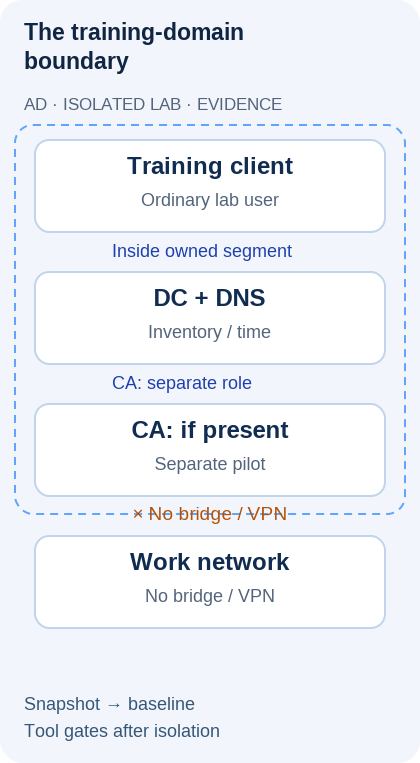
Verify supported arguments, provider selection and actions against the VirtualBox instructions. After installation, open the management prompt, read ?, locate your instance and inspect its status. Inspect every adapter in the hypervisor interface. Use a host-only or internal segment for exercises. A bridged adapter into a home or work network does not meet this course’s boundary. Restrict any NAT used during provisioning and disconnect it once required packages are available. Private addresses do not prove isolation: routes, VPNs and forwarding can connect otherwise separate networks.
If provisioning fails, record the role, node, message and time. Resolve dependencies or resource shortages and repeat the documented stage. Windows desktop windows alone do not establish a healthy domain. A scanner cannot repair incomplete provisioning. The capability gained here is the ability to describe and restore your environment before assessing it.
For the selected Ubuntu 22.04/VirtualBox route, install Git, VirtualBox, Python venv, sshpass, lftp, rsync and openssh-client through the host distribution. Install Vagrant through the official HashiCorp Linux installer, then run vagrant plugin install vagrant-reload vagrant-vbguest winrm winrm-fs winrm-elevated. Check VBoxManage --version, vagrant --version, python3 --version and vagrant plugin list. Expect available executables and the required plugins. Command-not-found returns to installation; a plugin error leads to checking Vagrant/plugin compatibility. In the GOAD prompt, use ?, locate the instance and inspect status, then compare it with VirtualBox’s VM list. The linked provider tutorial supports this step and its failure decisions.
For pinned GOAD-Light, provider inventory assigns dc01 suffix .10, dc02 .11 and srv02 .22. Lab configuration names them kingslanding.sevenkingdoms.local, winterfell.north.sevenkingdoms.local and castelblack.north.sevenkingdoms.local. With the default ip_range, the first DC is 192.168.56.10. Inventory includes AD CS on dc01, but confirm that the role actually provisioned. Record these expected values beside observed: pending in the passport, keeping recipe configuration separate from your working environment.
On the Windows client, run nslookup kingslanding.sevenkingdoms.local 192.168.56.10 only after verifying your instance. Match the reply’s Server/Address to designated lab DNS and the resolved name’s Address to dc01 inventory. A corporate DNS server in the response requires correcting client DNS before tool cases. On owned DC/client machines, w32tm /query /status shows time source/status. Compare clocks and sources without changing domain policy. Choose a known nonprivileged user from local inventory or precreate disposable lab-reader through AD Users and Computers on your own lab. Inventory passwords are never reused outside that segment.
Lesson 3. Two mini-exercises and a readiness gate
Mini-exercise A: build a VM → adapter → segment → purpose table in the hypervisor. Compare it with GOAD inventory. On the training Windows machine, inspect its network settings and run the built-in ipconfig /all and whoami commands. Name the source of each address and identity observation. On the Linux training client, read ip address and ip route. These show your own configuration; an address appearing in a neighbouring route is not automatically within the assessment scope.
Mini-exercise B: resolve your DC’s FQDN using the lab’s designated DNS server, compare the client and DC clocks, and sign in as a known ordinary training user. Record the distinct function checked by each observation. A DNS error leads to DNS repair; time differences lead to synchronization review; an authentication denial leads to checking that specific lab account. Stop further authentication after an unexplained denial rather than trying lists of passwords. Create baseline snapshots of all machines and practice restoring one instance before significant evidence has accumulated.
The readiness gate requires the domain inventory, evidence that the work network is disconnected, a known ordinary account, working DNS and time, an available snapshot and a demonstrated restoration. You can then learn the ready tools’ read-only modes. If AD CS or dMSA is absent, its later module produces an applicability decision and a plan for a separate pilot. That is a valid assessment outcome.
Lesson 4. Turn a question into an evidence chain
HackTricks AD methodology organizes possibilities by available starting capabilities. The OCD mindmap shows adjacent branches. Use both as question maps. Begin with a known user, accessible services and one precise object. Identify missing conditions. An attack path remains a hypothesis until its individual relationships have been confirmed.
Create a journal before collecting data. Every step records input, action, observation, decision, the next available capability, evidence and cleanup or retest. Include instance identity, UTC time, tool version, account role and the exact object. The planning record below is illustrative, not an observation of a successfully installed GOAD instance.
case: AD-LAB-01 / illustrative planning record
input: GOAD inventory + ordinary lab account
question: can this account modify the designated training group?
action: planned read-only ACL review after tool readiness gates
observation: not collected
next capability: object-level permission review
evidence: pending / cleanup: none yet / retest: same object and identity
Practice. Submit a lab passport and assessment plan
Submit lab-passport.md, a network diagram and evidence-index.csv. Identify the GOAD variant, commit, machines, DNS, permitted addresses, training identities, snapshots and excluded actions. Mark CA and Server 2025 availability as present, absent or unknown, with supporting evidence. Formulate one ACL question, one Kerberos question and one certificate question. Assign each the smallest useful future read-only collection. Stop unneeded machines afterward, preserve the installation journal and disconnect temporary NAT. Cleanup removes objects you created and restores documented configuration; it does not erase logs. A verified environment or an honest provisioning blocker is accepted. An invented successful exploit is not.
Sources
GOAD installation and the primary materials linked above. Additional active techniques in methodology references do not extend this lab’s scope.
Account identity and access rights
Change the conditions and observe this training model. It runs in your browser and does not change your computer.
Choose conditions above to see an explanation of the result.
Independent exercise · Russian
Учебный центр в Екатеринбурге готовит домен GOAD к декабрьской приёмке 2026 года. Администратор передал паспорт и три вложения. Нужно установить, какие материалы относятся к одной изолированной копии и какая запись подтвердит возможность вернуться к исходному состоянию.
Evidence
Паспорт Л-17 содержит узлы DC-U и WS-U, виртуальный коммутатор U17 без внешнего подключения и снимок S17. Вложение А — экспорт настроек обеих машин с U17 в 09:00 МСК. Б — журнал DC-U с меткой копии Л-16 в 09:05. В — запись создания S17 в 08:50. Поле результата восстановления пусто.
Assignment
Соберите опись вложений с решением по каждому. Напишите, что добавить в журнал приёмки после штатного восстановления копии.
Compare your reasoning
А подтверждает привязку двух машин к U17 на момент выгрузки. Б принадлежит другой копии, хотя имя контроллера совпало. В подтверждает создание снимка. Для приёмки восстановимости нужны идентификатор S17, время восстановления и результат запуска согласованной штатной службы на восстановленной копии.
Is your owned domain ready for assessment?
Three illustrative cases from the free GOAD module. Outputs are teaching examples. Choose the next action and read its explanation; this is open practice, not a graded assessment.
A bridge breaks the boundary
VM: kingslanding
Adapter 2: Bridged Adapter
IPv4: 192.168.56.10
A private IP does not establish isolation. Bridging connects the VM to the selected external network. Verify a host-only/internal segment and routes before requests.
Locate the owned instance in VirtualBox, inspect all adapters, replace bridging with the permitted isolated segment and compare routes with the passport before passing the gate.
A password does not change the network boundary. Domain permissions have not been measured; this task concerns adapters and routing.
Review every option
- Start: the address is private
A private IP does not establish isolation. Bridging connects the VM to the selected external network. Verify a host-only/internal segment and routes before requests.
- Correct the segment and review routes
Locate the owned instance in VirtualBox, inspect all adapters, replace bridging with the permitted isolated segment and compare routes with the passport before passing the gate.
- Change the Domain Admin password
A password does not change the network boundary. Domain permissions have not been measured; this task concerns adapters and routing.
DNS baseline is incomplete
nslookup kingslanding.sevenkingdoms.local 192.168.56.10
Request timed out.
DNS server in client settings: work-dns.example
Match DC IP to GOAD inventory, client connection to the lab segment and DNS settings. A timeout does not establish LDAP denial or user authorization.
A timeout does not expand scope. Your known DC and a precise DNS/transport question are sufficient; a wider network does not explain the setting.
This DNS lookup did not use a password. Authentication attempts do not repair DNS and create unnecessary failures; restore baseline first.
Review every option
- Inspect lab DNS and your DC connectivity
Match DC IP to GOAD inventory, client connection to the lab segment and DNS settings. A timeout does not establish LDAP denial or user authorization.
- Scan the neighbouring network broadly
A timeout does not expand scope. Your known DC and a precise DNS/transport question are sufficient; a wider network does not explain the setting.
- Try different domain passwords
This DNS lookup did not use a password. Authentication attempts do not repair DNS and create unnecessary failures; restore baseline first.
Installation completed; the gate did not
Prerequisites: passed
Provisioning: completed
Ordinary lab user: verified
Snapshot restore: not tested
Bridge/VPN routes: unknown
Provisioning describes installation. The gate separately needs isolation, DNS/time and demonstrated restoration; one status does not resolve those unknowns.
A complex assessment does not verify isolation or rollback. Baseline comes first, followed by tool gates and then object-level ACL assessment.
Resolve the explicit unknowns: bridge/VPN routes and snapshot restoration. Preserve passport evidence, then complete introductory tool exercises before the ACL case.
Review every option
- Treat completed as sufficient
Provisioning describes installation. The gate separately needs isolation, DNS/time and demonstrated restoration; one status does not resolve those unknowns.
- Start looking for Domain Administrator
A complex assessment does not verify isolation or rollback. Baseline comes first, followed by tool gates and then object-level ACL assessment.
- Verify routes and restoration, then tool gates
Resolve the explicit unknowns: bridge/VPN routes and snapshot restoration. Preserve passport evidence, then complete introductory tool exercises before the ACL case.
Personal practice environment
Check an excerpt, find matching lines and compute the SHA-256 of the original text. Temporary data expires after 30 minutes or when you close the environment.
Sign in