
Groups and permissions: Anna reads, Boris is denied
Lesson 1. From a list of people to permission on a resource
Anna and Boris are in People, but location alone grants no document access. We need an explicit chain: Anna belongs to an editorial role group, that group belongs to a resource-access group, and the resource group can read a particular file. Changing the editorial team then requires membership changes while the resource permission retains a clear purpose. Adding a person to an administrator group to read one note grants far more than needed.
AD distinguishes Security and Distribution groups. Security groups participate in access checks; Distribution groups are mailing lists and unsuitable for our ACL. Scope determines eligible members and where permissions can be assigned. In our single domain, use Global for people sharing a role and Domain Local for a resource in that domain. Universal groups also exist, but extra domains are unnecessary here. Accounts → Global → Domain Local → Permissions is commonly called AGDLP. It is an access-organization convention, rather than a separate tool.
An ACL, Access Control List, contains access entries for an object. For file permission checks we examine its DACL. Each ACE, Access Control Entry, relates a principal’s SID to permissions and other conditions. ADUC’s Members list describes the directory; a file’s Security list describes the resource; whoami /groups describes the current process token. These are different sources. Testing with an ordinary session confirms the intended behavior under the stated conditions.
The file in this lesson is local to WS01. We are not creating a shared SMB folder, where share permissions would require an additional check. Changes are limited to a newly created folder inside your training VM. C:\ itself, personal profiles, system folders and host files stay outside the exercise.
Lesson 2. Learn ADUC and the Security window
On DC01 open ADUC and Academy → Groups. Under New → Group, locate Group name, Group scope and Group type before creating anything. Mini-exercise 1: open built-in Domain Users properties and inspect Members and Member Of without changing them. Members lists the group’s members; Member Of lists groups containing this group. Return to our Groups OU.
On WS01 sign in as your learning domain administrator. In Explorer create C:\AcademyLab\Editorial, then use Notepad to save note.txt containing “Editorial training note, version 1.” File → Save As selects the path; confirm the txt extension in Explorer. Mini-exercise 2: open Editorial → Properties → Security → Advanced. Find Owner, Permission entries, and the Principal, Access, Inherited from and Applies to columns. Read them first. An inherited entry comes from a parent; it does not imply an intentional permission for the editorial group.
Readiness means you distinguish Members from Member Of, Security from Distribution, and identify inheritance on the new Editorial folder. You retain administrator access to WS01 for returning after ordinary-user checks. If the properties title identifies C:\ or a personal folder, close it and select the training folder.
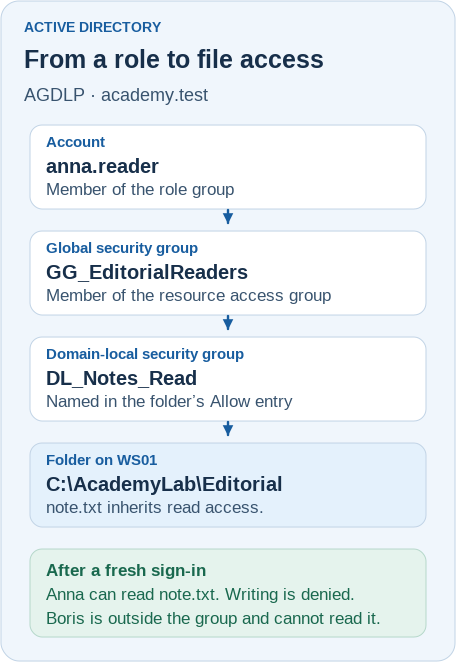
Arrows represent membership and permission assignment. People OU organizes the directory and is outside this access chain.
Practice: a limited permission and two different sessions
On DC01 create GG_EditorialReaders, Scope Global, Type Security. Then create DL_Notes_Read, Scope Domain Local, Type Security. Open DL_Notes_Read → Members → Add. Under Enter the object names to select, enter GG_EditorialReaders, select Check Names, then OK. GG_EditorialReaders’s Member Of should contain DL_Notes_Read. Leave Anna out for now so we can observe the baseline denial.
On WS01, in Editorial’s Advanced Security window, select Disable inheritance → Convert inherited permissions into explicit permissions on this object. Conversion preserves entries for deliberate editing. Keep Full control for SYSTEM, Administrators and your administrator if separately listed. Remove other permissions from this new folder, including broad Users, Authenticated Users and Everyone entries if present. Do not add Deny entries or edit AcademyLab’s parent permissions. We are constructing a limited Allow.
Select Add → Select a principal, choose Location academy.test, enter DL_Notes_Read and select Check Names. Choose Type: Allow, Applies to: This folder, subfolders and files, and basic Read & execute, List folder contents and Read. Apply saves configuration. Inspect note.txt → Security and confirm inheritance from Editorial. If the file has a separate broad entry, correct only this new file or recreate it inside the prepared folder.
Sign out of the administrator session on WS01 and sign in as Anna. Run whoami, then try opening C:\AcademyLab\Editorial\note.txt. Without GG membership she should be denied. Sign in as Boris, changing his initial password if needed, and expect the same denial. Keep Notepad unelevated and avoid testing as an administrator. Denial is our intended baseline, rather than a broken system.
On DC01 add anna.reader to GG_EditorialReaders using Members → Add → Check Names. Read two membership forms with the existing command:
Get-ADGroupMember -Identity DL_Notes_Read -Server DC01
Get-ADGroupMember -Identity DL_Notes_Read -Recursive -Server DC01
Get-ADGroupMember reads group membership. Without -Recursive, expect the directly nested GG_EditorialReaders; with it, expect the leaf user Anna Reader. -Identity selects a group and -Server selects our DC. This reads directory state. Anna’s already open session may retain its previous token groups: saving membership does not recreate every existing process.
On WS01 select Sign out, then sign in as Anna again; Lock/Unlock is insufficient for this check. Run whoami /groups, where /groups shows the current token’s groups. Locate the learning GG by name or SID and compare it with the directory. Open note.txt: its original text should now be readable. Change the line and try Save to the same file. Expect a write denial or a request to choose another location. Saving a copy under Documents does not change the protected original. Close without saving.
After a fresh sign-in, Boris must still be unable to read the file. This is the negative control after the change. If he can read it, stop and locate the cause: a broad Allow remains, Boris joined GG, the file has unexpected inheritance, or another account performed the test. Do not hide the model error by adding a Deny for Boris. Find the extra Allow and check whoami first.
Lesson 3. Produce a checkable access map
Save access-map.txt under AcademyEvidence from the administrator session. Record ordinary-user observations manually. Evidence storage is not the protected resource of this exercise. Record each learning group’s actual SID using properties or Get-ADGroup -Identity GG_EditorialReaders -Server DC01. Get-ADGroup retrieves a group object and standard fields. A visible group name alone does not supply its SID.
Resource: WS01 / C:\AcademyLab\Editorial\note.txt
Account -> role -> resource group -> permission
anna.reader -> GG_EditorialReaders -> DL_Notes_Read -> Read
boris.review -> no editorial membership -> no applicable Allow
Before membership: Anna denied; Boris denied
After fresh sign-in: Anna reads, cannot save; Boris denied
SYSTEM and Administrators: management access retained
Add a permission screenshot showing Principal, Access and Inherited from, plus a reading result from each session. The public artifact states that the test concerned a local NTFS file. It does not generalize to an SMB share, every process or another computer. Administrator Full control supports lab management; it does not demonstrate Anna’s permissions.
Lesson 4. Mistakes, cleanup and the next topic
If Anna still cannot read after a new sign-in, check the chain in order: whoami, GG Members, DL Members, then file Principal and Read. Include the resource name: identical note.txt files in Documents and Editorial have different permissions. If Check Names searches only WS01, change Location to academy.test because the group is a domain object. A child file may retain a different state even after its parent’s change: read that file’s own Security page.
Keep GG, DL, Anna’s membership and the file for the final exercise. Close the unsaved edit and sign out of user sessions. Retain SYSTEM and Administrators access. If preparation went wrong, deleting only the new Editorial folder from an administrator session and rebuilding it is simpler than changing the entire disk’s permissions.
Next we will examine how a domain session obtains Kerberos tickets for a service. File authorization remains a separate question: successful authentication does not override its ACL. Types and scopes are documented in Microsoft: security groups; access entries in DACLs and ACEs; token inspection in whoami.
Account identity and access rights
Change the conditions and observe this training model. It runs in your browser and does not change your computer.
Choose conditions above to see an explanation of the result.
Independent exercise · Russian
Учебный архив в Самаре даёт группе корректоров чтение каталога «Образцы». При передаче дежурства один корректор обнаружил, что может сохранить правку через сетевую папку. У него есть отдельная тестовая копия макета. Помогите владельцу убрать лишнее право.
Evidence
На общей папке для группы персонала разрешено изменение. В NTFS на каталоге группе GG-Proof дано чтение, а GG-Layout — изменение. Учебная запись proof-04 входит в обе группы. По согласованной роли ей нужно только чтение, членство в GG-Layout назначено по ошибке. Учебная запись layout-02 должна сохранить право изменения. Явных запретов нет.
Assignment
Покажите путь к лишнему праву и предложите минимальное изменение членства. Составьте две проверки после обновления пользовательских сессий. Для записи используйте только выделенную копию.
Compare your reasoning
У proof-04 разрешение изменения проходит и через общую папку, и через членство в GG-Layout для NTFS. Уберите ошибочное членство. В новой сессии proof-04 должна открыть копию на чтение и получить отказ при записи. Для layout-02 контрольная правка той же копии должна пройти. Общая настройка каталога остаётся пригодной для верстальщиков.
Personal practice environment
Check an excerpt, find matching lines and compute the SHA-256 of the original text. Temporary data expires after 30 minutes or when you close the environment.
Sign in