
Kerberos without mystery: sign-in, tickets and service access
Lesson 1. Why a successful sign-in is only part of the story
Anna reads our file while Boris is denied. Both can sign in to the domain. This separates authentication, checking identity, from authorization, deciding access to a resource. Kerberos helps a client establish its identity to a service; the file ACL still decides what it may do. A ticket does not supply a missing Read permission.
A domain controller provides a KDC, Key Distribution Center. Our simplified learning sequence is: the domain session gets a TGT, Ticket Granting Ticket; it uses that TGT to request a ticket for a particular service; the service accepts the ticket and checks access. A TGT relates to the domain’s krbtgt service. A service ticket targets a particular service such as CIFS, used for SMB file access. An SPN, Service Principal Name, identifies a service as service/host, for example cifs/dc01.academy.test. The learner sees Explorer while Windows carries out the necessary requests.
A ticket has a start and end time, a client and a target service. It is time-limited and belongs to a session. We inspect only current-session cache metadata with a built-in command. We do not extract credentials, export tickets or reuse them elsewhere. Cache deletion is unnecessary. The aim is to understand which observation supports which claim.
Kerberos depends on service naming and coordinated time, so the earlier DNS lesson remains relevant. A substantial clock difference is a hypothesis to investigate; the precise permitted interval is set by policy. Avoid changing clocks to manufacture a failure. That disturbs log timelines without teaching how to locate an actual cause.
Lesson 2. klist and two exercises in your own session
On WS01 sign in interactively as ACADEMY\anna.reader. Open Windows PowerShell without Run as administrator. klist is included with Windows. It displays cached tickets for a selected session, defaulting to the current session. No downloaded research utility is needed. Processes and accounts can belong to different sessions, so begin with whoami.
Mini-exercise 1: run whoami, hostname and klist /?. The last command opens built-in help. Find tickets and tgt descriptions; leave purge, sessions and other-session operations unused. Some additional modes require elevated authority and are unnecessary here. Record that this session is Anna on WS01.
Mini-exercise 2: run klist, followed by klist tgt. In the first output locate Current LogonId, Cached Tickets, Client, Server, Start Time and End Time. LogonId identifies a session, rather than an account SID. The second output concerns the TGT. A domain session commonly has a krbtgt/ACADEMY.TEST target; background activity may already have obtained service tickets. Copy relevant fields instead of predicting an exact ticket count.
This teaching fragment explains the fields; it was not captured from an author’s VM:
Session: WS01 / academy\anna.reader
Client: anna.reader @ ACADEMY.TEST
Server: krbtgt/ACADEMY.TEST @ ACADEMY.TEST
Start Time: observed locally
End Time: observed locally
Meaning: a TGT exists in this session's cache
Unproven: permission to modify note.txt
Readiness means you identify the current computer and account, distinguish krbtgt from cifs, and locate ticket validity times. If Cached Tickets is zero, check for a local WS01… sign-in, DC availability and whether a domain sign-in occurred. An empty cache alone does not establish an incorrect password. Record context before considering domain policy changes.
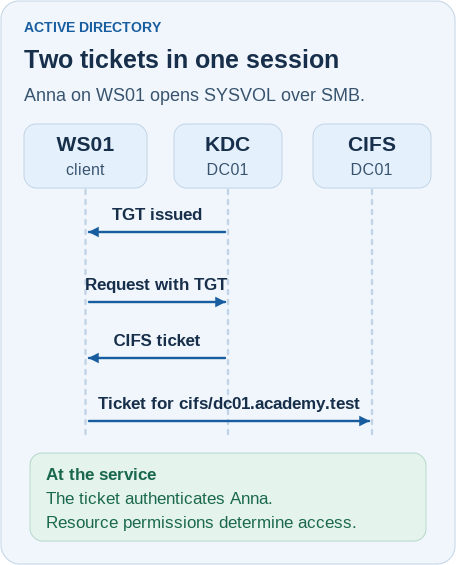
After establishing identity, a service separately checks resource permissions. A ticket and Read permission serve different purposes.
Practice: your DC’s file service and observable tickets
Before accessing the service, copy klist observations into kerberos-observation.txt in your session’s Documents. Later transfer them to AcademyEvidence from an administrator session. If Evidence accepts only administrator writes, retain that boundary. Add observation time and the planned service target. A custom comparison script is unnecessary: note the Server lines before and after.
Open Explorer and enter \dc01.academy.test\SYSVOL in its address bar. This is your domain’s standard shared folder containing domain policy data. View only the top-level academy.test directory. Keep SYSVOL files and sharing permissions unchanged; your training note belongs locally on WS01.
Return immediately to the same PowerShell and run klist. Locate a ticket whose Server corresponds to cifs/dc01.academy.test, or the controller’s actual canonical name. Compare its client and validity interval with your sign-in and folder-opening time. If it existed before, reusing the cached ticket is a normal outcome. A higher ticket count is not required for success. Separately record that Explorer actually listed your SYSVOL contents.
For a negative control, open local C:\AcademyLab\Editorial\note.txt and inspect klist again. Reading this local file does not require a new CIFS ticket to DC01. Background activity may obtain other tickets, so compare the particular target rather than only the total. Then sign in as Boris and check two behaviors: he can list the domain’s standard SYSVOL, while local note.txt remains inaccessible. This demonstrates that access to one authenticated service does not grant permission on another resource.
If SYSVOL fails to open, preserve the exact message. “Network path not found” and “access denied” guide different checks. Repeat A and SRV queries and confirm the FQDN. Replacing the name with an IP address can change authentication protocol selection and distort the exercise. klist displays cache state, not captured network packets.
Lesson 3. Event Viewer: where to look and why
On DC01 as administrator, open Event Viewer → Windows Logs → Security → Filter Current Log. Limit the time to the last ten minutes and enter 4768,4769 under Event IDs. 4768 concerns a TGT request; 4769 concerns a service-ticket request. The controller records them when the appropriate auditing is enabled. If audit policy does not record them, missing rows do not demonstrate missing Kerberos. This lesson does not change domain auditing just to obtain a visual result.
Open General and Details on a relevant entry. Compare Account Name, Service Name, Client Address, time and Computer with the lab. Security’s Computer identifies DC01 even though the user worked on WS01: it is the event-recording location. Event versions and fields depend on Windows updates, so read your actual entry. One status does not establish every action performed by the user. A successful ticket request does not prove document reading; matching names without time and address give weak correlation.
The 4768 and 4769 references describe fields and recording conditions. If no relevant row is available, write “log checked; relevant event not found; auditing state unconfirmed.” This is an honest limitation alongside valid cache and folder observations.
Lesson 4. Artifact, mistakes and cleanup
The final note has five observations: current session, TGT, CIFS target before and after SYSVOL, actual folder listing, and the local-file results for Anna and Boris. If a matching event is available, add that correlation and its limits. Separate observations from conclusions:
Observed: Anna session has a TGT and a CIFS ticket for our DC.
Observed: our SYSVOL listing opens; local note is readable only by Anna.
Conclusion: ticket metadata agrees with the service used.
Limit: no network capture; no inference about every application.
Security log: matched event / unavailable / not found, with reason.
Common mistakes include comparing an administrator cache with Anna’s Explorer, expecting a new ticket after each opening, confusing LogonId with SID, and treating a TGT as write permission. Start corrections with whoami and the resource name. Current-session inspection is supported by the documented klist command, while the overall sequence appears in Microsoft’s Kerberos overview.
Cleanup means closing the SYSVOL Explorer window, choosing Clear Filter in Security, and signing out. Keep logs, SYSVOL and ticket caches intact; purge is unnecessary. Preserve the domain for the next topic. We will configure one reversible user GPO, inspect its stored settings on DC01 and separately check its application on WS01.
Account identity and access rights
Change the conditions and observe this training model. It runs in your browser and does not change your computer.
Choose conditions above to see an explanation of the result.
Independent exercise · Russian
В учебном подразделении в Кирове пользователь успешно вошёл в домен и открыл одну папку на файловом сервере. Соседнюю папку открыть не удалось. Дежурный предлагает менять часы контроллера. Сверьте события с назначением каждого билета.
Evidence
В 09:02 в собственной сессии lab-reader виден билет krbtgt/LAB.EXAMPLE. После обращения к серверу в 09:05 появился cifs/fs1.lab.example. На FS1 журнал подтверждает сетевой вход этой записи через Kerberos. Папка «Каталог» читается, «План» даёт отказ. В карточке прав «Каталог» разрешён группе Readers, «План» только группе Planning; lab-reader входит только в Readers.
Assignment
Разделите в записке выдачу билета и решение о чтении папки. Укажите, к какому уровню относится отказ и у кого запросить подтверждение, если сотруднику действительно нужен «План».
Compare your reasoning
Билет cifs и запись на FS1 подтверждают аутентификацию для файловой службы. Две папки используют одну службу и разные правила доступа. Попросите владельца «Плана» подтвердить рабочую роль, затем проверьте эффективные права на этот ресурс. Успешное чтение «Каталога» служит контролем для той же сессии и сервера.
Personal practice environment
Check an excerpt, find matching lines and compute the SHA-256 of the original text. Temporary data expires after 30 minutes or when you close the environment.
Sign in