
The directory as an address book: objects, OUs and LDAP
Lesson 1. Where a person is stored and how Windows recognizes them
DNS now helps WS01 locate DC01. We need to understand what sits behind that service. The directory stores objects representing users, computers, groups and organizational units. Objects have attributes: named fields such as a logon name, description and department. A user object represents an account, rather than a folder containing that person’s documents. WS01 also has its own object and computer account. Domain membership involves more than a label in client settings.
An Organizational Unit, or OU, is a container for organizing objects, delegating administration and defining policy scope. A group collects members for assigning access. Putting Anna into the People OU does not automatically give her permission on a file. Conversely, membership in a readers group does not move her object. For our editorial lab, People, Groups and Workstations sit beneath Academy: exercises concern this training space while standard containers remain separate.
A Distinguished Name, DN, is an object’s address in the hierarchy. The teaching example CN=Anna Reader,OU=People,OU=Academy,DC=academy,DC=test reads from the object towards the root. CN means Common Name, OU means organizational unit, and DC here means Domain Component, rather than a controller machine. Moving an object changes its DN. A SID, Security Identifier, identifies a security principal during Windows permission checks. Renaming the same account does not create a new SID; a new account with the old display name does not become the previous identity.
LDAP, Lightweight Directory Access Protocol, provides directory queries and access. We will study search structure using an existing tool. The ActiveDirectory PowerShell module supplies Get-ADUser, which normally communicates with Active Directory Web Services, ADWS. Its LDAPFilter parameter accepts LDAP filter syntax. That parameter’s presence does not establish a separate connection from your process to TCP 389. This distinction prevents an attractive but unsupported networking claim.
Lesson 2. ADUC and two exercises before creating users
Work on your DC01 as the training domain administrator. Open Server Manager → Tools → Active Directory Users and Computers. ADUC is the ready-made object management console. Its left tree shows the domain and containers; the right list shows the selected location’s contents. Action → New creates an object in the selected container. Confirm the highlighted tree row before clicking. Properties opens object properties, and double-clicking an OU opens its contents.
Mini-exercise 1: expand academy.test, then inspect Users and Computers. Locate Administrator and WS01 and read Type. Users is a standard container that also contains groups. Domain Controllers is a separate OU for controllers; our ordinary users do not belong there. Enable View → Advanced Features, open Properties for WS01 directly in its container, and inspect Attribute Editor. Read distinguishedName without editing it. This tab may be absent when opening an object from search results: return to the tree.
Mini-exercise 2: open built-in Windows PowerShell on DC01 and read Get-Help Get-ADUser -Examples. Then retrieve one existing account:
Get-ADUser -Identity Administrator -Server DC01Get-ADUser retrieves a user; -Identity selects a specific object using a supported identifier; -Server targets our DC. Find DistinguishedName, Enabled, SamAccountName and SID in the result. SamAccountName is the familiar short logon name. These fields describe the object. They provide neither a password nor a complete effective-access calculation. If the cmdlet is missing, check AD DS management tools on DC01 instead of downloading a replacement script. An ordinary fresh client may lack these tools, so our directory commands run on the server.
Readiness means you can identify the creation container, distinguish an OU from a group, explain DN components and read Administrator’s properties. Before creating an object, you know where to find it and how to confirm its creation. The Get-ADUser documentation describes supported identifiers and search parameters.
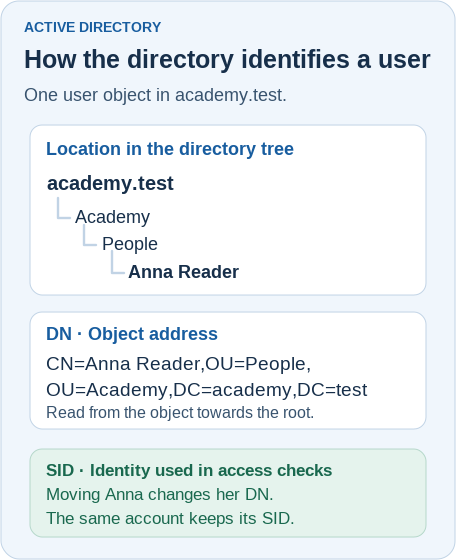
DN describes location; SID identifies a principal in access checks. They answer different questions.
Practice: two ordinary accounts for the editorial team
In ADUC select academy.test, then New → Organizational Unit. Set Name to Academy and keep Protect container from accidental deletion selected. Inside it create People, Groups and Workstations OUs. Check nesting in the tree. Move only your training WS01 from Computers using Move → Academy → Workstations. Leave DC01 where it belongs. Read WS01’s new DN: its location changed while it remains the same domain member.
In People select New → User. For the first entry, use First name Anna, Last name Reader, Full name Anna Reader, and User logon name anna.reader, with suffix academy.test. Check the short logon name is also anna.reader. On the next screen enter your independently chosen password satisfying domain policy. Keep User must change password at next logon selected. Leave Password never expires unselected. Finish creates the account. Similarly create Boris Review with logon name boris.review. Give accounts different passwords and exclude them from reports.
Open Anna Reader → Properties → Organization, set Department to Editorial, and select Apply. Repeat for Boris. In Account, read User logon name and account options. All people and organizational information here are fictional. Actual employee directories are unnecessary for the exercise.
On DC01 retrieve Anna and request the additional attribute:
Get-ADUser -Identity anna.reader -Properties Department -Server DC01
Get-ADUser -LDAPFilter '(sAMAccountName=anna.reader)' -SearchBase 'OU=People,OU=Academy,DC=academy,DC=test' -Properties Department -Server DC01
-Properties Department requests a field outside the usual result set. -LDAPFilter takes the parenthesized expression equating sAMAccountName to our known value. -SearchBase starts the search in our People OU. This expression is prepared for known learning data; inserting arbitrary names with special characters requires proper filter handling beyond this lesson. Both commands should return the same account with Department Editorial. There is no custom analyzer to write.
For a negative control, replace anna.reader inside the filter with missing.user. Expect no object because that account does not exist. An empty result is not an access-denied message and does not prove the whole domain is empty. Restore the original filter and retrieve Anna again. If that also returns nothing, compare SearchBase with actual nesting, inspect the short name under Account, and confirm you clicked Finish.
On WS01 sign out of the administrator session. Under Other user, sign in as ACADEMY\anna.reader. At first sign-in, change the password in the offered window. Run whoami: expect academy\anna.reader. A local WS01\... account belongs to a different account namespace. Ordinary Anna needs no administrative desktop on DC01; do not grant controller sign-in for this exercise.
Lesson 3. Reading an object does not grant resource access
Save directory-map.txt containing the Academy tree, Anna’s DN and SID, Boris’s short name, department and WS01’s new DN. Use the actual SID; S-1-5-21-… below illustrates its format rather than an observed identifier:
Academy
  People: Anna Reader / anna.reader; Boris Review / boris.review
  Groups: empty before the next lesson
  Workstations: WS01
Anna DN: CN=Anna Reader,OU=People,OU=Academy,DC=academy,DC=test
Anna SID: observed S-1-5-21-...
Department: Editorial
Negative control: missing.user -> no objects
WS01 current session: academy\anna.reader
If Department is absent, distinguish an unrequested property from an empty attribute. Check -Properties Department, then Organization and Apply. Attribute Editor lists many unfamiliar fields; read the small set relevant here and leave other values unchanged. Directory data affects sign-in and administration.
Your portfolio should explain three differences: display name versus logon name, DN address versus SID identity, and OU versus group. Label screenshots with VM and time. A screenshot of People alone does not prove Anna signed in to WS01. Object properties and whoami are separate observations that together connect the directory entry with the client session.
Lesson 4. Cleanup and the next question
Keep the new objects: the next module uses Anna, Boris and Academy. Close properties without saving experimental changes. If you accidentally created a third training account, verify its DN and delete only that entry through ADUC. Leave Academy’s accidental-deletion protection enabled. Keep built-in accounts and the Users container intact. Update the passport with “directory created” and “ordinary domain sign-in observed” only after the corresponding checks.
Next, two groups will separate editorial membership from resource permission. We will test actual reading of one file we own and see why stored group membership may differ from an already open session’s token. OU purposes are described in Microsoft’s OU delegation guidance; the overall directory model appears in the AD DS overview.
Account identity and access rights
Change the conditions and observe this training model. It runs in your browser and does not change your computer.
Choose conditions above to see an explanation of the result.
Independent exercise · Russian
В учебной базе кадрового центра Брянска после переноса профиля из отдела практики в отдел стажировок пропала строка в отчёте. Оператор боится создать дубликат. Вам даны обезличенные результаты двух выгрузок из одного домена.
Evidence
В понедельник объект с условной меткой GUID G17 имел DN CN=Lab-17,OU=Practice,DC=lab,DC=example. Во вторник запись с той же меткой имеет DN CN=Lab-17,OU=Interns,DC=lab,DC=example. В обеих выгрузках sAMAccountName=trainee17. Отчёт выбирает объекты класса user только в поддереве OU=Practice. В новом отчёте строк по trainee17 нет.
Assignment
Нарисуйте дерево из двух OU, отметьте положение объекта в разные дни и предложите узко ограниченную проверку, которая поможет восстановить отчёт. Укажите, что должно совпасть в результатах.
Compare your reasoning
GUID сохраняет связь между выгрузками при перемещении объекта. Изменился DN, а прежняя база поиска исключила его новый адрес. Пробная выборка в OU=Interns должна вернуть одну запись с меткой G17 и тем же именем входа. Владелец отчёта решает, входят ли стажёры в его охват. Создание второй записи исказило бы учёт.
Personal practice environment
Check an excerpt, find matching lines and compute the SHA-256 of the original text. Temporary data expires after 30 minutes or when you close the environment.
Sign in