
Public monitoring: Google Alerts, feeds, and Telegram without code
Contents
- Lesson 1. Search-monitoring method: explore Google Alerts
- Lesson 2. Feed method: explore an existing RSS reader
- Lesson 3. Public-notification method: Telegram and the official bot
- Lesson 4. Change method: record identity and state
- Practice. Build a functioning route without writing a bot
- Sources and currency
Monitoring means repeatedly checking selected sources for changes. A one-off search asks what was found now. Monitoring adds what changed since the previous check. Three things matter: the correct entity, functioning collection, and a person checking what an alert means. A red badge or bot message is not evidence of wrongdoing by itself.
We use existing services and applications: Google Alerts, Telegram, and optionally the Thunderbird feed reader. Writing a parser or bot is unnecessary. The project observes an agreed organisation’s public publications: website news, its official channel, and selected registry records. It excludes telephone lookups, documents, closed groups, private conversations, and leaked records. The core spreadsheet and manual checking remain available without paid service features.
Lesson 1. Search-monitoring method: explore Google Alerts
The T.Hunter Habr monitoring article connects search queries with notifications. Begin with Google Alerts and its official instructions. Configuration uses your own Google account, not somebody else’s. The query box accepts a topic and displays available sample results below. Show options controls frequency, sources, language, and delivery. Preview is not a guarantee of every future alert.
Playground: enter the name of a known public museum, then quote its name and compare apparent noise. Next add site: with its official domain. Create nothing until you can explain the three queries’ differences. If the preview is empty, check spelling and remove an excessive restriction rather than declaring the site nonexistent.
For the main task create two separate alerts: the exact organisation name, and that name restricted to the official domain. Record each complete query, creation date, and settings. Choose a convenient modest frequency and language; do not assume immediate complete coverage. Review the preview and create the alert. Find it in the list, edit it, and remove an unnecessary test rule. You are ready when you can locate, change, and stop your own alert.
Teaching query plan; substitute an agreed real organisation:
"Mayak Lab"
site:mayak-lab.example "Mayak Lab"
Replace .example with the real permitted domain for external use. Even a correctly configured rule can miss a new page: the provider may not have discovered, indexed, or considered it relevant. No email does not establish no event. Compare a manual query with Alerts and check account settings and spam folders. Distinguish “rule created”, “email received”, and “event verified against its original page”.
Lesson 2. Feed method: explore an existing RSS reader
RSS and Atom are feed formats used by sites to publish material lists for reader applications. A feed contains a title, link, and other fields; it is not a complete site archive. The Habr spreadsheet-monitoring article combines feeds with human checking. We do not need spreadsheet scripts or commercial APIs: an existing reader already retrieves and displays publications.
For a browser route, use a feed reader you already know and review its official terms. For a local route, download Thunderbird from the project website, select your operating system, and record the installed version from About. Thunderbird is free software; a donation is not compulsory payment. A separate feed account does not require an email account. Skip email-account setup if you only intend to read feeds.
Following Thunderbird’s guide, choose File → New → Feed Account and name it “Learning monitor”. If the menu is hidden, open the application menu; labels vary by localisation. Select Manage subscriptions, paste a feed URL, and add it. A safe introductory feed is https://github.com/soxoj/maigret/releases.atom, the project’s public release feed. It concerns software releases rather than people. Expect a folder and available release entries or an explicit retrieval failure, not a predetermined entry count.
Three trials: open an entry and identify its source link; update the same feed; enter an ordinary webpage instead of a feed address. The last should require another address or show validation failure. Readiness means distinguishing a page from a feed and opening an entry’s origin. Do not use an unknown RSS generator that requests your account password.
Choose summary display so the reader does not automatically load every original webpage. Create “Source” and “Checked” folders and mark reviewed entries. A reader may reduce technical duplicates, but an analyst still distinguishes copied stories. An OPML export preserves subscription lists; it is not a backup of all evidence. Save used original documents and links separately.
Lesson 3. Public-notification method: Telegram and the official bot
Before adding analytics, explore ordinary Telegram. Open an agreed public channel, read its description, find Notifications, and enable them. Disable and re-enable them so you understand the state. Test with your own channel or an organisation that agreed to the exercise. A publication is created by its authorised owner, not by course software acting as another company.
Playground: find a post, copy its link, and save it to Saved Messages. Then locate the post by searching its text within the channel. Finally turn notifications off: the post can still exist even when your device displays no alert. This distinguishes publication, delivery, and display. If global search does not show the channel, use its verified direct link from the organisation website.
TGStat monitoring supports mention searches. The official page lists @TGAlertsBot; follow that link rather than a similar advertisement name. Press Start, review current conditions, and locate its query-configuration instructions. If your plan permits it, configure an exact public organisation name and compare the preview against a generic word. Do not purchase a plan for course submission. Own-channel notifications and manual public TGStat/Telemetr checks remain alternatives.
A bot’s operator receives your input. An analytics bot does not see all of Telegram. Unavailable channels, indexing delays, limited periods, and edited posts create coverage gaps. An alert should lead to an inspectable post that you match against the entity. A result without a source link or time is an unverified signal. Neither a famous bot name nor a paid subscription makes opaque records dependable evidence.
Lesson 4. Change method: record identity and state
The Fedresurs Habr tutorial works with individual publications. Monitoring benefits from a stable record identifier paired with the entity and state. We do not repeat its old backend requests. Open permitted public cards manually or use documented service features.
In an existing spreadsheet create an Observations sheet: source, entity, record identifier, document date, check time, state, link, and next step. Enter the two supplied passes below. This is a teaching log, not real company data.
run,entity,record_id,state
1,DEMO-INN-A,M-17,published
1,DEMO-INN-A,M-18,published
2,DEMO-INN-A,M-17,annulled
2,DEMO-INN-A,M-18,published
2,DEMO-INN-A,M-19,published
2,DEMO-INN-B,M-20,published
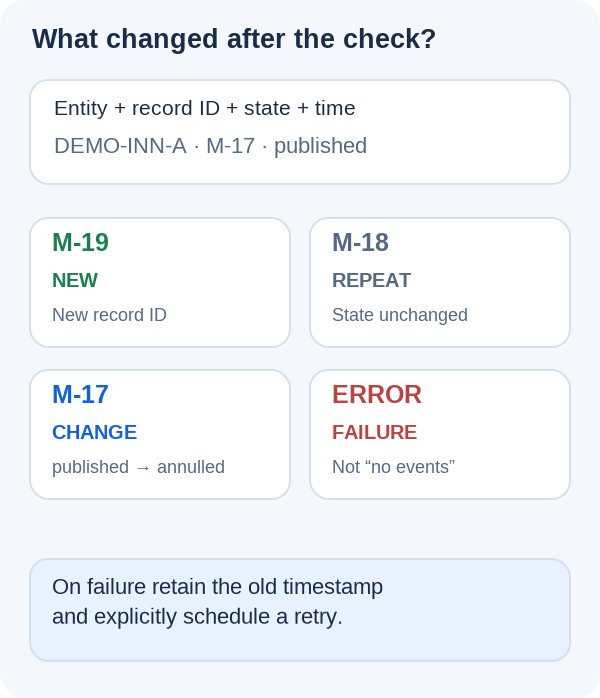
On the second pass M-17 changes state, M-18 stays unchanged, M-19 is new, and M-20 belongs to another organisation and is excluded from A’s dossier. A new state does not erase an earlier observation. Preserve both rows and their relationship. Repeated retrieval does not make a publication a new event. However, revised content under the same identifier needs checking even if a reader does not flag a new item.
Negative controls: an empty identifier cannot serve as a key; an access error does not change a previous state to disappeared; an incomplete list does not mean every omitted entry was deleted. If the current request fails, retain the prior state with its old date and add “check not completed” at the new time. Schedule a manual retry instead of masking failure with a normal green indicator.
Practice. Build a functioning route without writing a bot
Choose one agreed entity and no more than three sources. For each specify the existing tool, input, expected result type, frequency, known limits, and stop procedure. Configure one actual search alert or public feed, then separately inspect a public channel. An immediate new publication is not required. A settings screenshot and an inspected original record demonstrate interface use.
Complete three trials: a broad phrase creates noise; an incorrect URL is not a feed; disabled notifications do not delete a publication. Interpret the CSV manually: M-17 → changed, M-18 → unchanged, M-19 → new, and M-20 → other entity. Add a retrieval-error row and explain why older facts remain. Do not automatically mark a record with no identifier as new.
Submit query/subscription settings, a genuine observation log with URLs, the interpreted control set, and a short signal-response procedure. For example: open original → check ID/date → establish provenance → update table → communicate only supported findings. State which branches were checked manually, which were merely configured, and where access was unavailable. Stop unnecessary test rules afterwards and remove incidental unnecessary data. The outcome is a reproducible public-monitoring workflow, not a promise of complete round-the-clock visibility into an organisation.
Sources and currency
The three Habr approaches are notification queries, feeds, and publication identifiers. Settings were reviewed against Google, Thunderbird, and TGStat resources on 6 October 2026. Plans, coverage, and button labels change; review them when starting. The CSV is original teaching data, and external services do not guarantee coverage or delivery speed. Programming, paid databases, and other people’s personal records are unnecessary for completion.
Do two websites mean two sources?
Change the conditions and observe this training model. It runs in your browser and does not change your computer.
Three publications report a company relocation. Which ones provide independent support?
Choose conditions above to see an explanation of the result.
Independent exercise · Russian
В феврале 2027 года отдел закупок следит за открытыми уведомлениями производителя об изменениях каталога. Дежурный увидел три сообщения и сообщил о трёх новых решениях. В журнале доставки есть идентификаторы публикаций, ссылки на первоисточник и сверка с официальной лентой в конце дня.
Evidence
08:10, RSS: запись R-14, новая фасовка 12 шт. 08:30, публичный канал: ссылка на R-14, те же 12 шт. 10:05, RSS: R-14 исправлена на 10 шт. С 10:30 до 12:30 читалка не обновлялась. На основном сайте в 11:40 появилась R-15 о смене цвета упаковки. К 16:00 поисковых уведомлений не поступало.
Assignment
Восстановите журнал по идентификаторам: для каждой записи укажите итог, историю изменения и канал обнаружения. Опишите проверку охвата после перерыва и число различных решений к 16:00.
Compare your reasoning
Итоговых записей две. У R-14 действующее значение 10, первоначальные 12 сохраняются в истории. Канал повторил первую публикацию. R-15 выявлена сверкой с сайтом. После перерыва сопоставляют перечень официальных публикаций за пропущенный интервал с журналом читалки. По тишине поисковых уведомлений пропуск установить нельзя.
Personal practice environment
Check an excerpt, find matching lines and compute the SHA-256 of the original text. Temporary data expires after 30 minutes or when you close the environment.
Sign in