
Bash for beginners: ready text tools and repeatable analysis
Lesson 1. Repeatability starts with a precise input
Bash connects ready programs, preserves output, and repeats commands. Programming is not a prerequisite: we use grep, cut, sort, uniq, and wc from standard packages rather than writing an analyzer. A text procedure describing the input and commands already makes a small task repeatable. Arbitrary JSON, quoted CSV, and multiline logs need a ready tool that understands their format instead of an expanding collection of accidental filters.
Programs receive standard input, stdin, print results to stdout, and diagnostics to stderr. > redirects stdout to a destination, replacing existing contents; 2> saves stderr separately; | passes stdout to the next program. A pipeline does not preserve an intermediate copy automatically. Keep input and output names different: grep ... source > source truncates the original before it is read.
This lesson uses fictional records with an explicit simple format: three fields, a | separator, failed/success in the final field, and no separator inside values. Times are consistent UTC. The fixture is not an OS export, so its results do not establish an incident. A username containing failed will demonstrate a false match from ordinary text search.
Lesson 2. Learn ready commands
On Ubuntu check grep --version and cut --version. Grep belongs to the grep package; the other tools belong to coreutils and are normally installed. If absent in your VM, inspect the familiar transaction and run sudo apt install grep coreutils. On another distribution use its own manager separately instead of writing executable substitutes.
grep -F 'text' file searches literal text; -F does not interpret regular expressions. grep -E selects extended regular expressions. -n adds line numbers; -c counts selected lines, not every occurrence. cut -d '|' -f 2 selects field two: -d defines a separator character, -f the field numbers. Cut does not validate each event.
sort orders lines, with ordering affected by locale. LC_ALL=C sort sets an environment value for that command only, giving a repeatable simple byte order rather than changing the OS permanently. uniq -c groups adjacent equal lines; -c adds counts. Equal names separated by another name remain separate groups without sorting first. wc -l counts newline characters; for our newline-terminated fixture this equals lines. A header means it is not the event count.
Grep returns 0 for matches, 1 for no matches, and 2 for an error. Empty output without a status and stderr cannot support “nothing happened.” That distinction matters when processing any export.
Lesson 3. Two mini-practices and gate
Save work/filter-trial.txt in the editor:
alex
mira
alex
First, grep -n -F 'alex' work/filter-trial.txt should show lines 1 and 3. grep -F 'nobody' work/filter-trial.txt prints nothing; immediate echo $? returns 1. grep -F 'alex' work/missing-trial.txt produces an error and status 2. Keep no matches distinct from no file.
Second, uniq -c work/filter-trial.txt gives three separate groups. Run LC_ALL=C sort work/filter-trial.txt > work/filter-sorted.txt, followed by uniq -c work/filter-sorted.txt. Expect 2 alex and 1 mira, with the count before the name. Alignment whitespace is acceptable. Counts total three input lines; sorting must not lose data.
Gate: explain every option, state the input format, and distinguish grep’s three outcomes. Read an intermediate file before the next operation. If the format still requires guessing, analysis is not ready. Copying a long pipeline without checking input does not meet the gate.
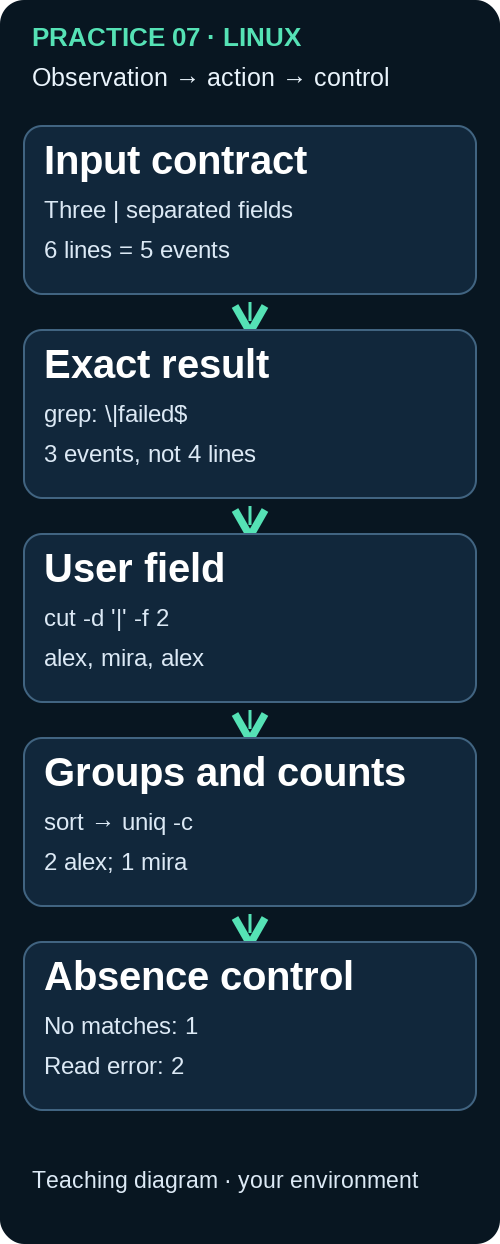
Caption: each intermediate stage can be read and compared with the original.
Practice. Count fictional failed events by user
- Save
data/login-events.txtusing your editor. Do not add displayed line numbers or a formatted table:
time|user|result
2026-10-01T12:00:00Z|alex|failed
2026-10-01T12:01:00Z|mira|failed
2026-10-01T12:02:00Z|alex|failed
2026-10-01T12:03:00Z|failed-user|success
2026-10-01T12:04:00Z|alex|success
Close it and read with cat. wc -l data/login-events.txt should print 6: a header and five events. Inspect the fields: each row has exactly three. For different counts or delimiters, fix the saved input. Our commands are not a validator for arbitrary production logs.
- Save its hash with
sha256sum data/login-events.txt > evidence/login-before.sha256. Comparegrep -n -F 'failed' data/login-events.txtwith the exact filter below. Literal search selects four lines, including failed-user’s successful record.
grep -E '\|failed$' data/login-events.txt > work/failed-rows.txt 2> evidence/filter-errors.txt
echo $?
cat work/failed-rows.txt
cat evidence/filter-errors.txt
Here \| is the literal delimiter, failed the value, and $ the line end. The expression selects the final result in our simple format. Expect three records, status 0, and empty diagnostics. Windows CRLF can add a CR before the newline, affecting this ending check. Identify the format and save a correct training copy using the editor before treating an empty selection as success.
- Run stages separately:
cut -d '|' -f 2 work/failed-rows.txt > work/failed-users.txt
cat work/failed-users.txt
LC_ALL=C sort work/failed-users.txt > work/failed-users-sorted.txt
uniq -c work/failed-users-sorted.txt > evidence/failed-counts.txt
cat evidence/failed-counts.txt
After cut expect alex, mira, alex. Final output is 2 alex and 1 mira. Counts total the three selected events; failed-user is absent. Failed-event volume supports a training triage candidate, not proof of password guessing.
- After inspecting stages, try the same ready pipeline:
set -o pipefail
grep -E '\|failed$' data/login-events.txt | cut -d '|' -f 2 | LC_ALL=C sort | uniq -c
echo $?
Bash’s set -o pipefail makes pipeline status nonzero when a stage returns nonzero instead of using only the last command. It affects this shell and does not replace reading stderr. Status 1 for zero grep matches still differs from error 2. That is why the required result is established stage by stage; the shorter pipeline follows understanding.
- Negative control: use Save As to make
work/login-success-only.txtwith the same header and one2026-10-01T12:04:00Z|alex|successrecord. Run exact grep on this copy and preserve status 1. An absent path should produce error 2. Recompute the original data/login-events.txt hash and compare with the saved value.
Save evidence/text-method.txt with the format, commands, counts 6/3/2+1, false match, both negative controls, and scope limits. If counts differ, inspect intermediate files before writing the report. The next step after readiness is an authorized real export and a format-appropriate tool, while preserving its original.
Clean up only filter-trial.txt, filter-sorted.txt, and temporary control copies using Files. Keep original fixtures and final evidence. Closing the terminal discards local shell settings but does not remove saved files.
Sources
- GNU Grep: invocation, options, and statuses.
- GNU Coreutils: cut.
- GNU Coreutils: uniq.
- GNU Bash: pipelines.
What your computer stores
Change the conditions and observe this training model. It runs in your browser and does not change your computer.
A filename is not the whole story. Try revealing its extension.
Choose conditions above to see an explanation of the result.
Independent exercise · Russian
Ночная смена распределительного центра считает неуспешные учебные проверки двух терминалов. При первом подсчёте получились три строки для двух терминалов. Стажёр должен понять, где теряется группировка, и оставить воспроизводимый порядок разбора.
Evidence
Выгрузка содержит пять строк без заголовка. Поля разделены вертикальной чертой.
01|gate-a|failed
02|gate-b|failed
03|gate-a|failed
04|gate-a|ok
05|gate-b|failed_retry
Assignment
Составьте последовательность отбора, извлечения и группировки. Приложите список имён до и после сортировки, итог по каждому терминалу и сверку суммы с количеством строк после отбора. Состояния failed и failed_retry учитываются раздельно.
Compare your reasoning
Условие точного равенства третьего поля значению failed оставляет строки 01, 02 и 03. До сортировки имена идут gate-a, gate-b, gate-a. После сортировки — gate-a, gate-a, gate-b. Теперь uniq -c даст два события у gate-a и одно у gate-b. Сумма равна трём. Если вышло четыре, в выборку попал повторный статус failed_retry.
Personal practice environment
Check an excerpt, find matching lines and compute the SHA-256 of the original text. Temporary data expires after 30 minutes or when you close the environment.
Sign in