
Burp Suite Community: browser, Proxy, Repeater and Decoder
What changed in the server response?
Compare three saved HTTP exchanges and identify the field that follows the marker. 40s · with narration and captions.
Video transcript
Lesson 1. What Burp does and what permission covers
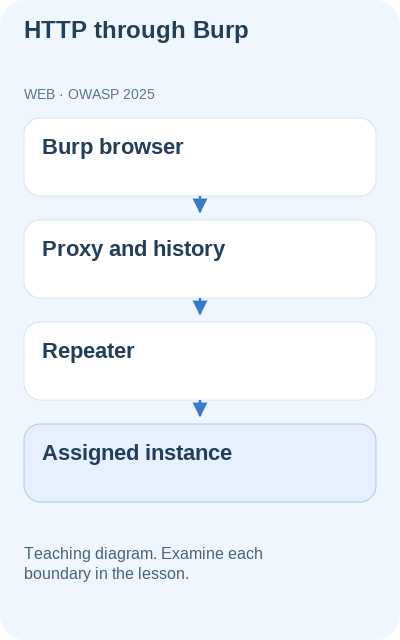
Burp Suite Community is an HTTP proxy with tools for manual testing. A browser sends a message through Proxy; Burp shows it and forwards it to the server. HTTP history records the exchange. Repeater resends a selected request independently of page clicks. Decoder changes a byte representation, such as URL encoding, into something readable. The software cannot decide which actions you are authorized to perform: the assigned lab defines that scope.
Install Community from PortSwigger’s official download page. Choose Temporary project and Use Burp defaults when starting. Scanner, professional report generation and Collaborator are unnecessary for these exercises. Create your own free PortSwigger account, open Reflected XSS into HTML context with nothing encoded, and select Access the lab. The unique instance hostname is your authorized target. It is an external training service, rather than a local server or permission to test every PortSwigger hostname.
Record the instance URL and time. Provided users, credentials and objects belong to that instance. This Academy website, work accounts and unrelated websites are outside the exercise. If the instance expires, launch a new one and update your notes. Old cookies and links may no longer describe the current environment. Make that transition explicit rather than mixing evidence from two hosts.
Lesson 2. An interface sandbox before exploitation
Go to Proxy → Intercept → Open browser. Burp’s separate browser has its proxy configured; this route does not require installing Burp’s CA into the operating system certificate store. Keep Intercept off so that page loading continues. Browse to your assigned HTTPS instance and search for academy-one. In Proxy → HTTP history, select the GET request containing search and your marker. Static images and requests to the main PortSwigger site are separate entries.
Inspect Request and Response. Find the method, path, Host, search parameter, status, Content-Type and the response location containing the marker. Add only the instance host to scope from Target → Site map using Add to scope, then show in-scope entries in history. Filtering makes the view manageable; it does not prohibit tools from contacting other hosts. Verify the destination before each Send.
Right-click the request and choose Send to Repeater. Name the tab baseline. Send it unchanged and compare the response meaning with the browser result. Duplicate the tab, name it marker-two, change only search to academy-two, then Send again. Expect the new marker to be reflected. Do not change the hostname, account or request method. You are learning the interface; reflection by itself does not establish XSS.
Lesson 3. Encoding and message handling
A space should not be inserted literally into the request target. Select the parameter value and use URL-encode from the context menu, or edit through Inspector. Send academy one and locate its readable form in the response. Paste academy%20one into Decoder and select Decode as → URL. The result is academy one. Encode as → URL reverses that representation. Encoding neither encrypts the data nor grants additional permission.
GET /?search=academy%20one HTTP/1.1
Host: YOUR-LAB-HOST.web-security-academy.net
This is a comparison fragment, not a complete request for a real hostname. Use the captured message from your own instance; its path can differ. Never send the placeholder Host or publish a real session cookie. Distinguish the HTTP status, returned HTML and browser rendering. Repeater does not execute JavaScript as the browser does. A script tag in its Response is not evidence that execution occurred.
After understanding history, enable Intercept briefly. Repeat a harmless search, observe the paused request, change the marker and press Forward. Drop cancels that message. Return Intercept to off afterwards. If a page appears stuck, check the interception queue before reporting an unavailable server. External-browser listener settings are a separate setup path; this exercise uses the built-in browser without changing global operating system networking.
Lesson 4. Control pairs and evidence
Keep the baseline, the modified request and a repetition of the baseline. Record the single changed variable and your observation. Public search needs no account; later exercises require an explicit identity. The browser’s current cookie can differ from a cookie left in a Repeater tab. Treat identity as an experimental condition, rather than assuming all tabs share it automatically.
Save selected messages with Copy to file or as request/response text in your report. A Community temporary project does not promise persistent history after closing the application. Export relevant evidence first. Keep your original evidence separately from a sharing copy. Mask cookies, tokens and unique addresses in that copy while retaining parameter names and the response differences needed to understand the result. Screenshots support the trace but cannot replace a replayable request.
Practice. Your first repeatable Burp exercise
Complete setup and the three harmless requests before attempting exploitation. Deliver the scoped URL, Burp version, a screenshot of the selected history entry, three Repeater messages, a Decoder operation and an explanation of filtering versus authorization. Label which observations came from the browser and which came from Repeater. Acceptance requires the baseline repetition to preserve its meaning, the changed marker to appear in the response, and every request to remain on your instance.
If HTTPS fails, check that you opened Burp’s browser, used the unique URL and still have a live instance. Do not disable TLS checks for the entire computer or trust an unfamiliar CA. Sign out of training accounts and close the temporary browser afterwards. The browser-boundary module continues with XSS; this first exercise builds tool fluency and the ability to explain your own evidence.
Sources
PortSwigger: Community setup and first actions Burp Proxy Burp Repeater Sandbox lab
Account identity and access rights
Change the conditions and observe this training model. It runs in your browser and does not change your computer.
Choose conditions above to see an explanation of the result.
Independent exercise · Russian

Редактор волгоградского справочника выгрузил из истории Burp три обезличенных обмена со своей учебной витриной. Он хочет приложить к заявке пару, показывающую влияние языка на заголовок страницы. Время фиксировалось на одном рабочем месте в ноябре 2026 года.
Evidence
Запись 31: GET /hours, язык ru, гость, сборка 81, ответ 200 «Часы работы». Запись 32: тот же метод, путь, роль и сборка, язык en, ответ 200 «Opening hours». Запись 47: GET /hours, язык en, редактор, сборка 82, ответ 200 «Edit hours».
Assignment
Выберите две записи из готовой истории. Выпишите сохраняемые условия, меняющееся поле и наблюдаемую часть ответа. Объясните одним предложением, почему оставшаяся запись ослабляет сравнение.
Compare your reasoning
Подходят 31 и 32. В выбранной паре меняется заявленный язык, а в теле меняется заголовок при одинаковом статусе. У записи 47 одновременно изменились роль и версия. В зачётной карточке есть оба номера обмена, версия 81 и название сравниваемого поля ответа.
Burp: read the exchange before acting
Illustrative training output, not a recording of another session. These three decisions reinforce the introduction and do not affect your grade.
The page is waiting
Intercept is on
GET /?search=academy-one
Host: YOUR-OWN-LAB-HOST
Forward sends the intercepted request. Intercept off lets later messages pass without a manual pause. Find the completed exchange in HTTP history.
Drop cancels that message. No response to it will arrive; repeat the search after turning interception off.
An HTTP request is already visible in interception. The Proxy queue explains this pause; system certificate replacement is unnecessary.
Review every option
- Click Forward, then turn Intercept off
Forward sends the intercepted request. Intercept off lets later messages pass without a manual pause. Find the completed exchange in HTTP history.
- Click Drop and wait for the same response
Drop cancels that message. No response to it will arrive; repeat the search after turning interception off.
- Reinstall certificates across the operating system
An HTTP request is already visible in interception. The Proxy queue explains this pause; system certificate replacement is unnecessary.
History contains unrelated entries
GET /favicon.ico     200 image/x-icon
GET /?search=academy-one 200 text/html
This request matches your action. Check Host against scope, inspect Request/Response, then use Send to Repeater.
Status alone does not identify a useful request. An icon request lacks your search value and will not explain parameter handling.
Documentation and the unique lab instance are different targets. Select the exchange from your own assigned instance.
Review every option
- The search request on the assigned instance hostname
This request matches your action. Check Host against scope, inspect Request/Response, then use Send to Repeater.
- favicon.ico, because its status is also200
Status alone does not identify a useful request. An icon request lacks your search value and will not explain parameter handling.
- The first request to the main PortSwigger website
Documentation and the unique lab instance are different targets. Select the exchange from your own assigned instance.
The new marker appears in the response
baseline: search=academy-one →200, marker visible
changed:  search=academy-two →200, marker visible
This controlled pair demonstrates changing one parameter and observing reflection. Code execution, another account access and remediation are not established.
Reflected text does not demonstrate JavaScript execution. Context and browser behavior need separate verification; Repeater does not render a page.
200 describes an HTTP outcome, not a security verdict. Preserve the requests, responses, changed variable and limits of the conclusion.
Review every option
- Repeater repeated a request with a changed value
This controlled pair demonstrates changing one parameter and observing reflection. Code execution, another account access and remediation are not established.
- Every reflected marker proves XSS
Reflected text does not demonstrate JavaScript execution. Context and browser behavior need separate verification; Repeater does not render a page.
- The application is secure because both statuses are200
200 describes an HTTP outcome, not a security verdict. Preserve the requests, responses, changed variable and limits of the conclusion.
Personal practice environment
Check an excerpt, find matching lines and compute the SHA-256 of the original text. Temporary data expires after 30 minutes or when you close the environment.
Sign in