
IDS/IPS: turn a network event into a supported conclusion
A matching rule starts an investigation
A log contains the word “attack”. Is that enough to declare a computer compromised and block all its users? You need to know the matching rule, observed exchange, sensor location and applied action. You will build an event card, correlate a session and distinguish evidence of detection from evidence of interruption. Required practice is free and uses local tools plus explicitly fictional logs.
1. IDS, IPS and observation points
An IDS identifies suspicious communication and reports it. An IPS can prevent communication, for example by interrupting a session or blocking an address under policy. Roles depend on deployment and rule actions. A sensor receiving a SPAN-port copy sees mirrored traffic; that copy does not itself sit in every original packet’s path. An inline device lies in the forwarding path and can act on it directly. Check the architecture before saying “the attack was prevented”.
A signature describes recognizable communication features. A profile groups selected rules and actions. Effective use requires an appropriate library, service relevance and tuning. An event can be a false positive; no event can reflect inadequate visibility or an unsuitable rule. Investigate time, route, profile and context before disabling an entire IPS.
A session groups related communication. Search keys normally include time, addresses, transport and ports. A five-tuple is source address and port, destination address and port, and transport protocol. NAT changes visible addresses between observation points. Similar timestamps and IPs do not guarantee the same session. Time synchronization and sensor placement belong in your evidence.
TLS protects content along a particular segment. Without decryption a sensor may see metadata but not the URL or document. Do not report HTTP text when the source supplied only a TLS session. Wireshark helps examine packets; installing it on a laptop does not deploy a Russian security product or a continuously operating IPS.
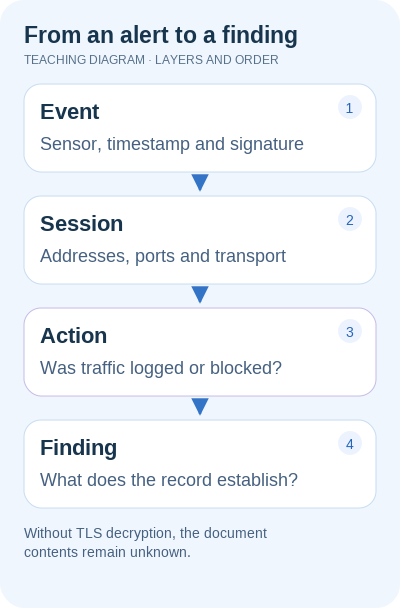
2. Russian products and access conditions
We examine UserGate NGFW’s IDPS and Positive Technologies PT NAD. UserGate attaches an IDPS profile to an allowing firewall rule; signature actions determine reporting or intervention. PT NAD analyses network communication, sessions and detected indicators. Do not automatically describe a passive analyzer as a blocking gateway.
Both products are commercial. Before using their interfaces you need a licence or officially granted training/trial access, the version and an appropriate role. The course does not supply these or promise a freely available full-featured image. Public manuals are free to read, and the required case uses the data below. Do not use an exposed third-party console or keys found in articles. Certification belongs to a documented delivery; a Russian vendor name does not certify every version.
In the UserGate manual locate Security Policies → IDPS and Libraries → IDPS Profiles. Read profile conditions, actions and attachment to an allowing firewall rule. In PT NAD’s Working with sessions chapter locate the session list, time filter, selected-session card and parsed application-protocol tabs. A protocol-message tab may be absent when the protocol was not parsed. Match the manual to the version instead of relying on an old article’s buttons.
Mini-exercise A: locate UserGate’s signature selection and action descriptions. Record the extra fact needed to claim blocking. Mini-exercise B: follow PT NAD’s documented path from a session list to parsed messages. Explain a session card versus a detection list. You are ready when you can name the event source, observation point, operating mode and related-exchange search. Without access label this “manual review”.
3. Existing tools: a listener is not an attack
First read this invented result:
State    Local address        Peer address
LISTEN   127.0.0.1:18000       *:*
LISTEN means a program awaits incoming TCP connections. 127.0.0.1 restricts this line to loopback; 0.0.0.0 would cover all IPv4 interfaces. Port18000 is not evidence of maliciousness. ESTABLISHED describes an active connection. A port alone cannot establish malicious behaviour.
Use built-in tools without installation: Windows netstat -ano -p tcp, macOS netstat -an -p tcp, Linux ss -lnt. netstat lists communication; -a includes listeners and -n keeps numeric values. Windows -o adds process IDs. Linux -l selects listeners, -n numbers and -t TCP. macOS formatting differs, so identify addresses and states rather than copying a sample’s column positions. Full output may contain private addresses; do not publish it wholesale.
Local mini-exercise A: read the output without changing networking, identify a state and local address, or record that the wanted listener is absent. Mini-exercise B: repeat module5’s standard server in your NetworkLab: python3 -m http.server 18000 --bind 127.0.0.1, or on Windows py -3 -m http.server 18000 --bind 127.0.0.1. This is Python’s existing server, not a programming exercise. Find its port in the other terminal, stop just your server with Ctrl+C and compare again. Readiness means explaining why the listener appears and disappears. This experiment generates no promised IDS alert and does not test a real IPS.
Practice 4. three observations of an exchange
Create NetworkLab/monitoring-case.txt. These are original fictional inputs, not a product export or a packet capture. Documentation addresses stand for lab roles.
Topology: client -> UserGate inline -> lesson server
PT NAD: receives an approved mirrored copy
A 10:10:00 tcp 192.0.2.10:53000 -> 198.51.100.20:18000
  app=HTTP request="GET /training-marker" response=200
B 10:10:01 detection=session-A rule=LAB-MARKER action=log
C 10:12:00 tcp 192.0.2.10:53001 -> 198.51.100.20:18000
  request="GET /training-marker" client=connection-reset
D 10:12:00 detection=session-C rule=LAB-MARKER action=reset
E 10:12:00 server-session-C response=none
F 10:14:00 tcp 192.0.2.11:54000 -> 198.51.100.20:18000
  app=HTTP request="GET /lesson" response=200
Step 1. Identify A and C’s participants and write their five-tuples. Source ports differ: these are separate exchanges. The card defines no NAT; do not introduce an undocumented translation.
Step 2. Correlate B with A by identifier and time. The signature matched but the action was log. HTTP200 shows the request received a response. The supported statement is that a marker was detected without stopping this exchange. The marker is teaching text, not proof of successful exploitation.
Step 3. Correlate D with C and E. Reset action, the client observation and missing server response agree with interruption of this teaching session. Real investigations still examine other causes and log completeness; this card supplies the intended correlation. Do not extend the statement to every request from the address.
Step 4. Use F as a negative signature control and a positive availability control. Its ordinary /lesson path received HTTP200, retaining useful communication in this model. No F detection does not prove complete attack coverage. Blocking the whole server accidentally could break this control and reveal side effects.
Step 5. Write an operator decision: observed teaching marker, action in the first mode, action in the second, supporting messages and limits, and additional data needed in a real incident. Do not write “infected host”. A sensible next step can be checking the application owner and scheduled testing rather than blocking the organization.
5. Packets and optional Wireshark
Wireshark is a free existing analyzer from the official Download page. Windows capture can need another component and privileges; macOS uses BPF permissions. This lesson requires no changes to capture-device permissions. Without approved capture access use the diagram and ledger; a mockup must not be called “my PCAP”.
If the owner separately provides a safe practice PCAP with its source and usage permission, select File → Open. The top panel lists packets, the next shows the selected packet’s protocol tree, and another shows bytes. A display filter limits already opened data; a capture filter limits collection and uses a different syntax. Mini-exercises: select a packet and expand IP/TCP, then apply tcp.port == 18000 and clear the filter. Readiness means distinguishing addresses and ports from HTTP fields and knowing hidden packets were not deleted. Do not expect HTTP messages inside encrypted TLS.
This additional packet analysis is not work in UserGate or PT NAD. Testing those interfaces requires a separately licensed lab, an approved test, a normal baseline session and profile restoration. Moving from observation to blocking follows a reviewed procedure, not a single alert.
6. Output, errors and cleanup
Save the event card and A–F table with time, session, fact, action, conclusion and limitation. Add a private observation of the local listener before and after your server. A portfolio can use fictional data with an honest description of the method.
For missing events check period, filters and observation point first. For absent HTTP fields check the protocol and visibility. If live capture is denied, continue documentary analysis without weakening the OS. Your server is stopped, temporary display filters cleared and other people’s processes untouched. On a product lab restore the original profile and verify the normal session through the owner’s procedure.
Readiness for SOC means explaining what was visible, what matched, which action occurred and what remains unproven. That is more useful than a count of unexplained alerts.
Primary sources and additional reading
- UserGate 7.x: intrusion detection and prevention
- UserGate: IDPS profiles
- PT NAD 12.3: working with sessions
- UserGate: licence terms
- Wireshark: working with packets
- Wireshark: official Download
- Linux: ss
- Microsoft: netstat
- Habr author’s analysis of example.com traffic — additional reading, not evidence of a capture you performed.
An event is not yet an incident
Change the conditions and observe this training model. It runs in your browser and does not change your computer.
Select the events you want to include in your explanation.
Choose conditions above to see an explanation of the result.
Independent exercise · Russian
В региональном архиве в 02:10 сработало сетевое оповещение о крупной передаче на узел хранения. Утренняя смена хочет выяснить, завершилось ли ночное резервное копирование и вмешалась ли система обнаружения в передачу.
Evidence
Датчик получает копию трафика с зеркального порта. В 02:10 он записал сообщение «объём выше обычного» для потока архив → хранилище. Межсетевой экран записал по тому же потоку «разрешено». План копирования предусматривает запуск в 02:00. Отчёт хранилища в 02:18 перечисляет 36 из 36 файлов. Результат пробного восстановления ещё не получен.
Assignment
Заполните карточку дежурного. Укажите причину внимания, действие каждого средства и границу вывода из строки «36 из 36». Предложите одну следующую проверку для владельца архива.
Compare your reasoning
Датчик на зеркальном порту наблюдал передачу и выпустил сообщение. Экран её разрешил. Время и получатель согласуются с плановым заданием, а хранилище подтвердило приём всех перечисленных файлов. Для проверки пригодности копии владелец может восстановить выбранный файл в отдельную папку и сверить содержимое с известной контрольной версией.
Personal practice environment
Check an excerpt, find matching lines and compute the SHA-256 of the original text. Temporary data expires after 30 minutes or when you close the environment.
Sign in