
Your first network: isolated GOAD and readable Nmap output
Contents
- Lesson 1. Which network will become your first assessment
- Lesson 2. Deploy GOAD and understand its controls
- Lesson 3. Touch Nmap before using it in the main case
- Lesson 4. Build an inventory without guessing
- Lesson 5. Decide what a result allows you to do next
- Practice. Your first reconnaissance package
- References
Which machine had address .12?
Match two saved exports by MAC address and record the confirmed pair in an inventory. 38s · with narration and captions.
Video transcript
Lesson 1. Which network will become your first assessment
Imagine a small organisation: employees sign into a domain, open shared folders, and use a database. Your assignment is to discover a path through which an ordinary user receives excessive permissions. Starting with “scan everything” would skip essential preparation. You first need an environment where mistakes can be reversed, snapshots can be restored, and every change can be explained. This course uses your own GOAD-Light, a deliberately vulnerable Windows lab maintained by Orange Cyberdefense. It is neither an academy server nor a public address available to every reader.
The main sequence is service discovery → protocol metadata inspection → supplied-account policy review → file-permission analysis → vendor-patch applicability → permitted connectivity measurements → evidence and retest. Additional branches examine Linux and macOS. Your deliverable is an assessment journal, not a list of tool names. You neither extract secrets nor gain new privileges in this course. Before starting, make sure you can open a terminal, work with files, and explain an IP address; the networking and operating-system foundations courses provide that preparation.
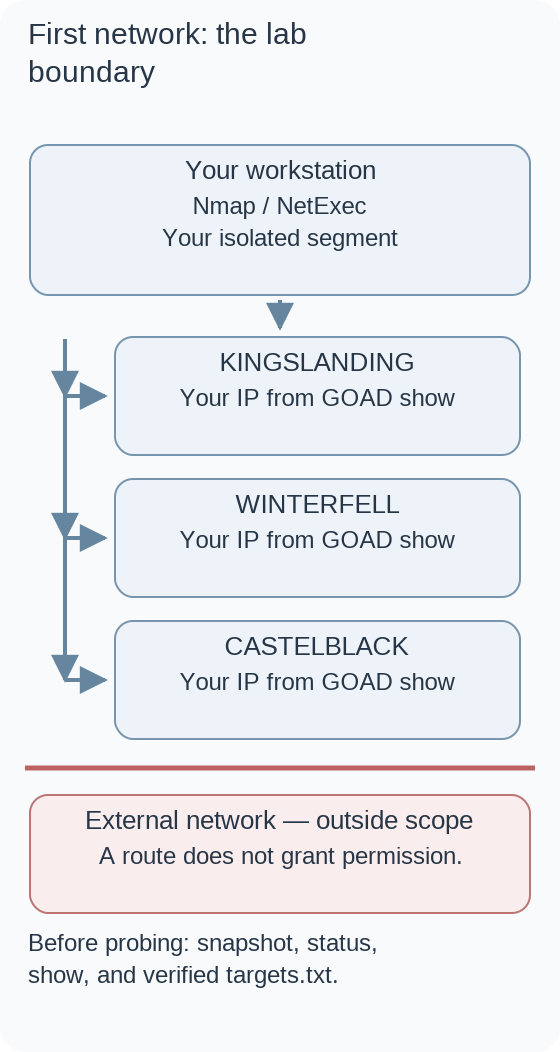
Only the dedicated lab network is a scan target. A route does not, by itself, enlarge the assignment scope.
Lesson 2. Deploy GOAD and understand its controls
Choose GOAD-Light for the main route: KINGSLANDING, WINTERFELL, and CASTELBLACK are included. The smaller MINILAB contains different scenarios and does not automatically substitute for this path. Use a compatible x86-64 host with resources for three Windows VMs and an assessment workstation. On an Apple-silicon Mac, do not assume x86-64 Windows images are compatible with ARM; use a separate compatible lab host you control. Verify resource requirements and dependencies in the selected provider’s official guide. The Windows evaluation images also have licence conditions and an evaluation period.
In your hypervisor GUI, find Network settings for every VM. The lab interface must use a host-only or internal network, without a bridge into a home or corporate network. If provisioning uses a separate NAT interface, document its purpose and restrict lab egress before exercises. Do not remove adapters blindly: VM management and provisioning may depend on them. Save a snapshot of the completed lab and an export of its network settings.
Install VirtualBox, Vagrant, and the listed plugins using the official provider guide. Git retrieves the ready-made project: clone downloads its directory and rev-parse identifies the exact revision. The GOAD wrapper prepares dependencies and launches an existing management console; you do not write Python code.
git clone https://github.com/Orange-Cyberdefense/GOAD.git
cd GOAD
git rev-parse HEAD
./goad.sh -h
./goad.sh -p virtualbox -l GOAD-Light
In the interactive console, enter help, then check. Find the selected lab, provider, and range in the prompt. Resolve mandatory dependency errors before entering install. After provisioning succeeds, run status and show. These are your first two preparation tasks: read VM status and match machine names to addresses. You are ready when you can identify your three VMs, their lab IPs, and their recovery snapshot. An unsuccessful dependency check is not fixed by randomly switching providers.
Lesson 3. Touch Nmap before using it in the main case
Nmap sends network requests and describes their responses. An open service is not automatically a vulnerability. On your Kali workstation, run sudo apt update, then sudo apt install nmap from the distribution’s package repository. Before contacting GOAD, run nmap --version and nmap --help. Record the installed version. Flags in these examples were checked against Nmap 7.99 available to the editors on 6 October 2026; your package may differ.
nmap -sL -n 127.0.0.1
nmap -sT -Pn -n -p 22,80,443 127.0.0.1
The first action lists one target: -sL does not scan ports and -n prevents DNS lookups. The second action contacts only your workstation. -sT attempts TCP connections, -Pn skips preliminary host discovery, and -p limits the ports. Locate PORT, STATE, and SERVICE in the output. On the editors’ machine all three ports were closed; that is an observation from that machine, not a mandatory result on yours. open means a connection was accepted; closed means a response indicated no listener; filtered means filtering or the lack of a suitable response prevented this distinction.
Two mini-exercises: explain why the first run does not measure availability; in the second, identify the exact destination and distinguish a SERVICE label from a proven product version. Your readiness gate is understanding every part of the command and knowing how to stop it with Ctrl+C. Proceed to the main lab only after that.
With -Pn, Host is up is not a separate discovery result: that stage was skipped. Inspect PORT/STATE and the response reason. Without -sV, the https label comes from the port database and does not establish the application protocol or health.
Lesson 4. Build an inventory without guessing
Copy the three VM addresses reported by show into targets.txt, one per line, using a text editor. Do not select a private range simply because it appeared in an article. List targets without scanning and compare them with the hypervisor:
nmap -sL -n -iL targets.txt
nmap -sT -Pn -n -sV --version-light -p 53,88,135,139,389,445,1433,3389 -iL targets.txt -oA infra-baseline
Here -sV really sends service-identification probes. --version-light reduces their number but does not make the activity passive. -oA saves multiple output formats sharing one basename. For each endpoint, record IP, hostname from a confirmed source, port, state, observed service, version or unknown, command, timestamp, and source VM. 1433 open ms-sql-s justifies a SQL inspection; it does not prove a weak password. Port 445 is conventionally associated with SMB, but a known-port table entry and an observed service-probe result have different evidential strength.
Lesson 5. Decide what a result allows you to do next
GOAD-Light’s expected structure is documented, but actual deployment depends on revision and provisioning. If WINTERFELL does not respond, inspect status, the selected lab interface, and its address before increasing scan intensity. For a closed port, check that the intended service is running in your VM. For filtered, compare the filter configuration and measurement origin. For an unknown version, preserve unknown and choose a protocol-specific check rather than a guessed CVE.
No privileges have changed at this stage: you know reachable endpoints. Keep that boundary explicit in your report. The next module uses this map to inspect DNS, SMB, and LDAP. HackTricks methodology helps select branches from observations; the OCD mindmap shows possible AD transitions. A diagram does not authorise every technique it depicts.
Practice. Your first reconnaissance package
Submit network settings, the GOAD revision, tool versions, targets.txt, original Nmap files, and the endpoint inventory. Include one actual negative result and explain its next diagnostic step. Exclude the NAT gateway, host computer, and other home devices from targets. Acceptance requires every address to belong to a listed lab VM, honest service/version fields, preserved commands and timestamps, and a next stage chosen from an observed protocol. Cleanup does not require deleting the VMs: stop unnecessary processes and retain a clean snapshot for the rest of the course.
References
GOAD installation · GOAD arguments · Nmap host discovery · Nmap service detection
Why a service cannot be reached
Change the conditions and observe this training model. It runs in your browser and does not change your computer.
Choose conditions above to see an explanation of the result.
Independent exercise · Russian
В ноябре 2026 года преподаватель в техникуме Тулы готовит учебную сеть из двух виртуальных машин и передаёт следующей смене инвентарную ведомость. Перед занятием смена должна решить, годится ли сохранённый вчера перечень служб для сегодняшней схемы.
Evidence
По проекту обе ВМ подключены только к внутреннему коммутатору «Практикум». Вчера в 16:00 в ведомости значились DNS на У1 и файловая служба на У2. Сегодня снимок настроек на 09:10 показывает у У1 один внутренний адаптер, у У2 — внутренний и второй активный адаптер в режиме моста к сети здания. Изменение в журнале согласований отсутствует.
Assignment
Нарисуйте две схемы подключения У2, проектную и фактическую. В ведомости подпишите дату наблюдения служб и условие допуска стенда к занятию.
Compare your reasoning
Второй адаптер выходит за согласованную границу. Приостановите работу на стенде до исправления владельцем и получения свежих настроек обеих ВМ. Сведения о двух службах сохраните как исторические. Снимок адаптеров подтверждает несоответствие схеме; сам по себе он не показывает, что кто-либо из сети здания обращался к службе.
Read the output before choosing the next action
Three teaching examples from the first module. They illustrate output interpretation, not a recording of a successful assessment of your lab. Choose an action and read every explanation; this is ungraded practice.
The HTTPS name does not establish working HTTPS
nmap -sT -Pn -n -p 443 127.0.0.1
Host is up.
443/tcp closed https
Closed indicates no listener on the tested port. The https label comes from the known-port table: -sV was not run. With -Pn, Host is up does not itself establish a host response because discovery was skipped. Record TCP/443 closed; HTTPS operation is unconfirmed.
Closed contradicts that conclusion: a TCP connection was not accepted. The command obtained no HTTP response, checked no certificate, and did not sign into an application.
With -Pn, Nmap treats the target as active without prior discovery, so Host is up alone is not evidence. Closed differs from silence: this port did not accept a connection. One port does not establish that the whole machine is off or reveal its other services.
Review every option
- Own TCP/443 responded closed; HTTPS is unconfirmed
Closed indicates no listener on the tested port. The https label comes from the known-port table: -sV was not run. With -Pn, Host is up does not itself establish a host response because discovery was skipped. Record TCP/443 closed; HTTPS operation is unconfirmed.
- HTTPS was successfully checked on this computer
Closed contradicts that conclusion: a TCP connection was not accepted. The command obtained no HTTP response, checked no certificate, and did not sign into an application.
- A closed port means the whole computer is switched off
With -Pn, Nmap treats the target as active without prior discovery, so Host is up alone is not evidence. Closed differs from silence: this port did not accept a connection. One port does not establish that the whole machine is off or reveal its other services.
Why a target list reports zero hosts up
nmap -sL -n 127.0.0.1
Nmap scan report for 127.0.0.1
Nmap done: 1 IP address (0 hosts up) scanned
-sL lists targets without measuring host availability or ports. Its 0 hosts up counter is not a negative health check.
There are no PORT and STATE columns, and -sL does not perform a port scan. This run established no open services.
The scan-report line lets you review the address before probes. -n suppresses name resolution. This is suitable target-list practice; TCP inspection is a separate action.
Review every option
- Proof that loopback is unavailable
-sL lists targets without measuring host availability or ports. Its 0 hosts up counter is not a negative health check.
- An open-port list for the next lesson
There are no PORT and STATE columns, and -sL does not perform a port scan. This run established no open services.
- Confirmation of the one supplied address
The scan-report line lets you review the address before probes. -n suppresses name resolution. This is suitable target-list practice; TCP inspection is a separate action.
Lab readiness before the main scan
GOAD check: required dependency missing
GOAD status: WINTERFELL not provisioned
targets.txt: addresses copied from an earlier draft
More probes do not install the missing dependency or create a VM. An old address list does not confirm scope, so expanding the range makes the exercise less reproducible.
First establish your own lab’s readiness: required check errors, provisioning, status, and show. Transfer only actual assigned VM addresses to targets.txt, then use -sL to review the list before bounded probes.
Status describes a preparation problem, while filtered is an observation from a particular network check. No such probe is shown here. Substituting one for the other invents an observation and hides an incomplete readiness gate.
Review every option
- Increase Nmap intensity and inspect the whole range
More probes do not install the missing dependency or create a VM. An old address list does not confirm scope, so expanding the range makes the exercise less reproducible.
- Fix the dependency using the provider guide and recheck show
First establish your own lab’s readiness: required check errors, provisioning, status, and show. Transfer only actual assigned VM addresses to targets.txt, then use -sL to review the list before bounded probes.
- Record the absent VM as filtered and finish the stage
Status describes a preparation problem, while filtered is an observation from a particular network check. No such probe is shown here. Substituting one for the other invents an observation and hides an incomplete readiness gate.
Personal practice environment
Check an excerpt, find matching lines and compute the SHA-256 of the original text. Temporary data expires after 30 minutes or when you close the environment.
Sign in