
Backup, restoration, and VM snapshot limits
Lesson 1. Recover data, not merely create an archive
A backup should return a required object to an acceptable state within a known time. A successful archive-creation command proves only one stage. Verify its contents, extraction, restored data, and the consumer’s operation. Our consumer is you reading a training configuration. We do not promise to restore a database or whole operating system from a few text files.
Work only with ~/linux-academy/data. It contains your fictional first note.txt, app.conf, and login-events.txt. Re-create any missing fixture from its module before backup: archiving cannot recover data already missing. Previous services, nc listeners, and additional accounts should be cleaned up. Keeping an archive in the same VM helps learning but does not protect against loss of its virtual disk or host. Later move it to separate storage you own and verify availability without the original disk.
A VM snapshot preserves machine state while depending on its disks. It helps package rollback, but losing the base disk can lose the snapshot too. Restoring also returns all subsequent machine state: files, installed applications, and logs. Extracting files into a separate folder has a smaller, more verifiable change scope.
Lesson 2. Learn tar and the restore destination
GNU tar is a ready archiving tool. Ubuntu normally includes it; tar --version identifies the implementation. If missing, inspect the package plan and run sudo apt install tar. On other Linux environments check implementation and help first. BusyBox tar is not GNU tar even when basic options resemble it. The main route uses GNU tar and ordinary user privileges.
In tar -cf archive.tar ..., -c creates an archive and -f makes the next argument its filename. -t lists entries; -x extracts; -C changes directory for subsequent file names. We avoid compression to keep packaging separate from additional options. Keep the archive outside data to avoid accidentally including the output archive in its own input.
diff -r recursively compares subdirectories. This reads data rather than recursively modifying permissions or deleting files. Diff verifies content, not equality of ACLs, owners, and special attributes. A real protected-system restoration, including Astra mandatory attributes, requires an appropriate standard mechanism and vendor documentation. Our ordinary user-text archive is not presented as that backup.
Lesson 3. Two mini-practices and gate
First, create work/backup-trial and a note.txt file containing RESTORE ME in your editor. Run tar -cf work/trial.tar -C work/backup-trial note.txt and tar -tf work/trial.tar. Expect only note.txt. -C applies to the input name; the archive path is relative to your original working directory. Do not extract an unexpectedly empty or unfamiliar inventory.
Second, create an empty work/trial-restored using Files. Run tar -xf work/trial.tar -C work/trial-restored, cat work/trial-restored/note.txt, diff -u work/backup-trial/note.txt work/trial-restored/note.txt, and echo $?. Expect RESTORE ME, empty diff, and 0. The existence of trial.tar alone did not establish recovery.
Gate: identify source, separate archive, and empty destination; explain c/t/x/f/C; recover the previous line; distinguish content from metadata. Stop for absolute paths, unexpected .. entries, or unfamiliar names. Extract only the archive you created, not an unknown archive. Do not elevate user-data extraction with sudo.
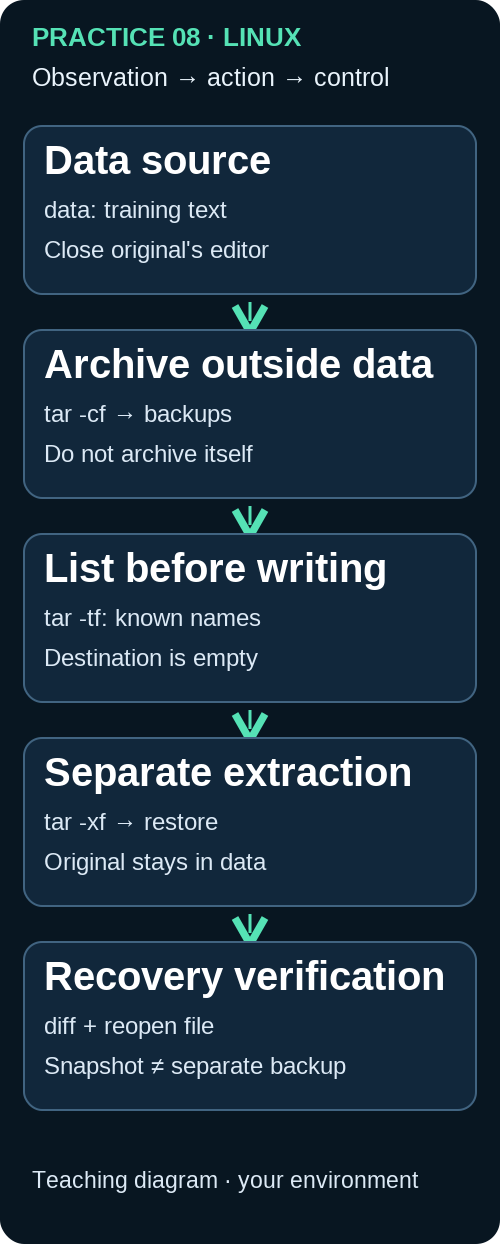
Caption: backup becomes verified after restored data is read and checked.
Practice. Recover a configuration from your archive
- Inspect data in Files and close editors containing the original files. Run:
cd ~/linux-academy
mkdir backups
mkdir -p restore/data-01
ls -la restore/data-01
tar -cf backups/data-01.tar -C data .
echo $?
tar -tf backups/data-01.tar
The dot selects all contents of data. Backups and restore sit beside data, not inside it. Restore/data-01 must be empty before extraction. For a repeat, use data-02 and a corresponding new archive name. Expect status 0 and relative entries for known fixtures. If tar reports “file changed as we read it,” the backup may be inconsistent. Stop editing and repeat under a new name. A live database would need more than this command.
-
Create
work/recover-app.confusingcp -i data/app.conf work/recover-app.conf. Open only that copy and change LOG_LEVEL toLOG_LEVEL=broken-training. Leave data/app.conf untouched. Save and confirm the difference withdiff -u data/app.conf work/recover-app.conf. Delete only damaged recover-app.conf through Files. Fictional data is enough; real loss is unnecessary. -
Extract into the prepared empty destination:
tar -xf backups/data-01.tar -C restore/data-01
echo $?
diff -r data restore/data-01
echo $?
cat restore/data-01/app.conf
Both statuses should be 0 and diff empty. The restored app.conf contains MODE=training, LOG_LEVEL=info, and ENDPOINT=local-only. If you deliberately preserved another earlier value, compare against the documented pre-archive state rather than someone else’s expectation. A missing object is not successful partial recovery.
-
Return the working copy with
cp -i restore/data-01/app.conf work/recover-app.conf. Close and reopen it in the editor.diff -u data/app.conf work/recover-app.confshould be empty. This positively checks use of the recovered object. -
Negative control: copy restored app.conf to
work/restore-negative.conf, change MODE toMODE=changedthere, and compare against data/app.conf. Diff must display the change and status 1. If every comparison returned 0, you may have compared a file with itself. Preserve the original and archive.
Save evidence/restore.txt with beginning/end timestamps read from date -Is, tar version, file inventory, commands, both statuses, reopening result, and negative control. State the limits: content checked; protected attributes and the entire OS not restored. This is restoration evidence instead of merely a portfolio archive.
Lesson 4. Check a snapshot and choose the next action
An additional route uses your own VirtualBox 7.1 VM. Close applications, shut down the guest, select VM → Snapshots → Take, and create a new before-marker snapshot. Start, create after-snapshot.txt in your workspace with fictional text, record snapshot name/time outside the guest, and shut down again. Select exactly before-marker → Restore in Manager. If the dialog offers to snapshot the current state first, preserve it so you can return to the marker state. After boot, after-snapshot.txt should be absent. This observes whole-VM rollback. Do not choose the earlier before-packages snapshot for this trial: it would undo subsequent coursework too.
Preserve snapshot evidence outside the VM before restoration, because evidence written afterward also disappears. This route does not apply to a physical Linux computer; file restoration remains mandatory. UTM snapshot controls and support depend on backend/version, so VirtualBox button names are not guessed for UTM.
After content verification, copy the archive to separate storage you own and repeat extraction from there into a new folder. For differences, first inspect inventory, capture time, and destination. Clean up trial folders, trial.tar, and restore-negative.conf in Files. Keep data, a checked archive, final evidence, and one restored copy. Delete snapshots through the hypervisor manager only after preserving required data, never by manually removing disk files.
Sources
- GNU tar: create, list, and extract.
- GNU diffutils.
- VirtualBox 7.1: snapshot contents and restoration.
- Larrabee’s firsthand restoration section. Its old repository and custom Python tool are not installed; it informed the requirement to prove restoration.
What your computer stores
Change the conditions and observe this training model. It runs in your browser and does not change your computer.
A filename is not the whole story. Try revealing its extension.
Choose conditions above to see an explanation of the result.
Independent exercise · Russian
В учебной копии сервиса доставки возвращают тариф, действовавший до 09:00. Файл за утро менялся дважды. В рабочей папке нужно сохранить и самую свежую версию, чтобы бухгалтерия могла позднее сверить изменения.
Evidence
В 08:45 создан архив tariff-0845.tar с файлом rates/local.conf и строкой base=240. В 09:10 архив tariff-0910.tar содержит base=260. Сейчас рабочий rates/local.conf содержит base=280. В 09:30 сделан снимок виртуальной машины. Контрольная сумма SHA-256 версии 08:45 хранится в учебном реестре.
Assignment
Выберите источник восстановления и целевой каталог. Запишите, чем убедитесь, что нужный файл есть в архиве до извлечения. Сдайте карточку с двумя прочитанными значениями и результатом сравнения с контрольной суммой.
Compare your reasoning
Проверьте состав tariff-0845.tar командой tar -tf и извлеките rates/local.conf в отдельную пустую папку. Из восстановленного файла читается base=240, из рабочего по-прежнему base=280. Полная сумма восстановленного файла должна совпасть с записью для 08:45. Снимок в 09:30 сам по себе не подтверждает наличие версии, действовавшей до девяти.
Personal practice environment
Check an excerpt, find matching lines and compute the SHA-256 of the original text. Temporary data expires after 30 minutes or when you close the environment.
Sign in