
Editors, copies, and evidence of a change
Lesson 1. Establish the path and preserve a copy
Security work often involves configuration text, but editing an original can invalidate a review. You will change only your own training copy, identify the exact difference, and restore its previous value. Work inside ~/linux-academy from module one. Real /etc files, other users’ home directories, and service keys are unnecessary.
Plain text contains characters and lines. An editor may display a buffer that has not been saved; a program reads the disk contents. “I can see the new value” and “the change was saved” are separate checks. Case, equals signs, whitespace, and line endings can be part of a file format. We use a fictional key=value format without surrounding spaces. No service automatically consumes this training configuration.
Open data in Files. Create app.conf in Text Editor with the following three lines. Ctrl+S saves; the first save asks for a path and name. Save in data, close the document, and reopen it. A plain text editor differs from a word processor: do not select ODT or DOCX.
MODE=training
LOG_LEVEL=info
ENDPOINT=local-only
Astra Linux SE 1.8 documentation describes Kate and the Fly file manager. Use your distribution’s installed plain text editor instead of assuming that GNOME’s controls have the same names. Any plain text editor with a separate-file save action can complete the basic case.
Lesson 2. Learn nano and comparison tools
Nano is a ready terminal editor for environments without graphical windows. Check nano --version. The option prints the installed version and exits. If the command is missing, use Text Editor for now. The next module installs a repository package, after which you should return to nano practice. Do not download a random executable. Check GNU diff and sha256sum using diff --version and sha256sum --version on the main Ubuntu route.
Create work/editor-trial.txt in Text Editor and enter FIRST. Then run nano work/editor-trial.txt. Nano shows the name at the top, text in the center, and shortcuts at the bottom. ^ means Ctrl; M- usually means Alt. Arrow keys move the cursor, and typing changes the buffer. Add a second line, SECOND. Ctrl+O opens Write Out. Check the File Name to Write field, then press Enter. Ctrl+X exits. cat work/editor-trial.txt should print both lines. If nano asks whether to save on exit, n discards unsaved changes; y continues to the filename confirmation. Do not type the shortcut letters into the document.
diff compares two files. -u requests a unified diff: - lines belong to the old file, + lines to the new file, and space-prefixed lines provide context. The --- and +++ headers identify files rather than deleted content. sha256sum calculates a SHA-256 content checksum. Matching hashes help establish byte-level preservation; they do not authenticate a file’s author or prove safety. Its output also contains a filename. Compare the hexadecimal sequences themselves.
Lesson 3. Two mini-practices and gate
The first mini-practice uses Save As. Open work/editor-trial.txt, choose Save As from the editor menu, and use work/editor-second.txt. Change SECOND to THIRD in the new document only. Save, close both windows, and reopen both files. The first should still contain SECOND; the second should contain THIRD. If both changed, you saved to the old path. Restore the two-line trial and repeat under a fresh name.
For the second mini-practice, run diff -u work/editor-trial.txt work/editor-second.txt and immediately echo $?. Expect one removed line, one added line, and status 1. Diff returns 0 for identical contents, 1 for differences, and 2 for trouble comparing. Its contract differs from “every nonzero status means failure.” Compare the first file with itself using diff -u work/editor-trial.txt work/editor-trial.txt. Empty output and status 0 form a positive equality control.
Gate: you can identify the path you are editing, save and exit, explain buffers versus disk files, read diff context, and distinguish its three outcomes. If nano is unavailable, record “GUI completed; nano postponed until installation.” You can complete the other actions in a graphical editor. Finish nano practice after the next module and before service work.
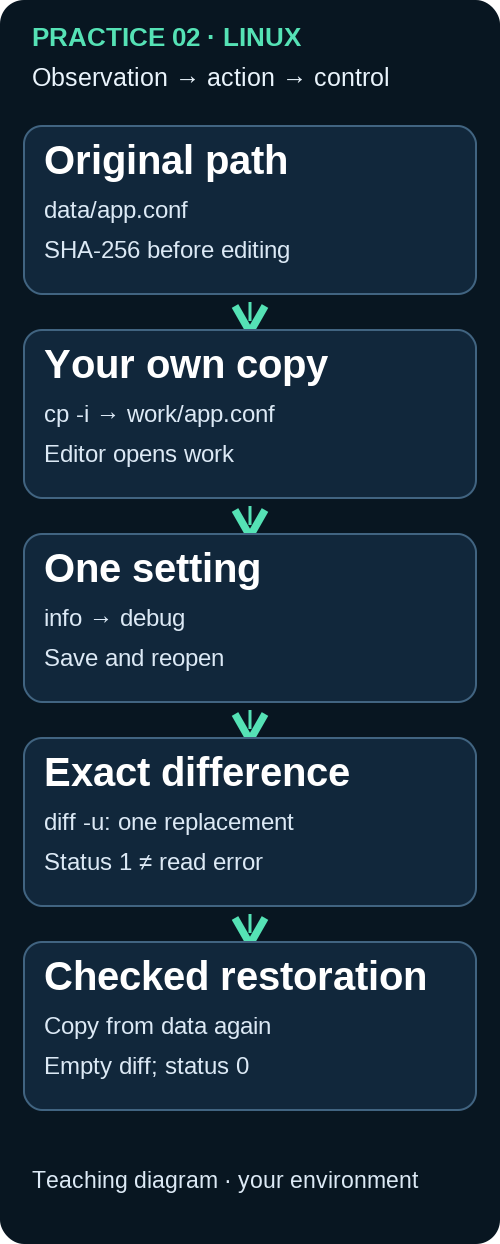
Caption: change the copy only after checking its path; check the original again afterward.
Practice. Change one setting and verify restoration
- Enter the workspace and record the original checksum. The
>redirection creates a destination or truncates an existing one; use a new suffix such as before-02 for a repeat attempt. It does not pass data “inside the program.”
cd ~/linux-academy
sha256sum data/app.conf > evidence/app-before.sha256
cp -i data/app.conf work/app.conf
cat work/app.conf- Open only
work/app.confin nano or Text Editor. ChangeLOG_LEVEL=infotoLOG_LEVEL=debug, preserving MODE and ENDPOINT. Save, close, and run:
cat work/app.conf
diff -u data/app.conf work/app.conf > evidence/app-change.diff
echo $?
cat evidence/app-change.diff
sha256sum data/app.conf
cat evidence/app-before.sha256
The diff should show -LOG_LEVEL=info and +LOG_LEVEL=debug; its status is 1. The data/app.conf hash matches the saved pre-change hash. Your notes may use different names, but the original’s bytes must remain unchanged.
-
The negative control is
diff -u data/app.conf work/missing.conf. Expect a diagnostic and status 2. Treating it as “difference found” would produce a false report. Keep the error distinct from an actual change. -
Restore your copy with
cp -i data/app.conf work/app.conf. Answer y to the overwrite question only after checking both exact paths; overwriting is intentional here. Repeatdiff -u data/app.conf work/app.confandecho $?. Expect no output and status 0. This restores a file copy; it is not a service rollback.
Save evidence/editing-note.txt with the editor name, nano version if available, original checksum, diff, control statuses, and restoration result. Record the next decision: “The copy is restored; a real service change requires its owner and configuration validation.” If more than one line changed, inspect automatic formatting and which document you opened. For Permission denied, do not elevate the editor with sudo: establish the proper directory and ownership of your training file.
Clean up editor-trial.txt and editor-second.txt in Files after saving the note. Keep data/app.conf, restored work/app.conf, and evidence. Recursive removal is unnecessary for two known files. This skill supports configuration reviews and evidence handling: a change should be small, explained, and verified by a reverse operation.
Sources
- GNU nano: editor controls.
- GNU diffutils: invocation and exit statuses.
- GNU Coreutils: copying.
- GNU Coreutils: SHA-2.
- Molechka’s firsthand experience with editing and copies; outdated installation examples are not used.
What your computer stores
Change the conditions and observe this training model. It runs in your browser and does not change your computer.
A filename is not the whole story. Try revealing its extension.
Choose conditions above to see an explanation of the result.
Independent exercise · Russian
На площадке техподдержки готовят новый интервал записи температуры холодильной камеры. Службу пока оставляют работать со старым интервалом. От стажёра ждут проверяемый черновик и способ отменить правку в учебной папке.
Evidence
В исходном sensor.conf две строки — interval_sec=60 и unit=C. В заявке согласовано 30 секунд. После редактирования копии sensor.next в ней оказались interval_sec=30 и unit=F. Исходный sensor.conf сохранён отдельно и доступен для чтения.
Assignment
Составьте ожидаемый результат сравнения исходника с принятой копией. Укажите, какую строку в черновике нужно вернуть до согласования. Предложите проверку того, что откат черновика воспроизводит исходник байт в байт.
Compare your reasoning
В принятой копии меняется только 60 на 30. Буква C остаётся прежней, иначе получатель может неверно истолковать измерение. Сначала исправьте unit в sensor.next и проверьте diff -u sensor.conf sensor.next. Для учебного отката восстановите черновик из исходника. Теперь cmp sensor.conf sensor.next должен вернуть код 0.
Personal practice environment
Check an excerpt, find matching lines and compute the SHA-256 of the original text. Temporary data expires after 30 minutes or when you close the environment.
Sign in