
Your Linux network and a verifiable event log
Lesson 1. Establish what the network check measures
An interface connects the OS to a network. IP addresses identify hosts/interfaces in context; routing selects a path; DNS maps names to addresses. A port belongs to an application endpoint. Failure at one layer does not establish failure everywhere. Numeric 127.0.0.1 is the current machine’s IPv4 loopback. A VM and its host have separate loopbacks. IPv6 ::1 serves a similar role.
A 127.0.0.1:8099 listener accepts connections on local IPv4. 0.0.0.0 means all IPv4 interfaces, and [::] is an IPv6 wildcard. Broad binding alone does not prove internet reachability: routes, firewalls, NAT, and namespaces affect the path. A reverse proxy can publish a local service separately. We check one loopback port we own, without range scans or firewall changes.
Logs add time and source. An event describes what a particular component recorded; a missing line may reflect the wrong filter, access restrictions, or storage limitations. Timestamps without a timezone are difficult to correlate. Do not upload system journals or collect personal data for a training note.
Lesson 2. Learn ip, ss, and journalctl
The main environment is Ubuntu 24.04. ip and ss come from the ready iproute2 package, logger from util-linux, and journalctl from systemd. Install the local listener’s netcat-openbsd package using the familiar sudo apt install netcat-openbsd after inspecting its plan. If ip/ss are missing, separately run sudo apt install iproute2. Do not combine these with DNF commands. On Astra/RED OS identify installed tools and versions through the distribution’s manager. The nc case uses Ubuntu’s OpenBSD implementation; other netcat variants have different options.
Start with read-only observations:
ip -brief address
ip -4 route
ip -6 route
ss -lnt
date -Is
journalctl --since "10 minutes ago" --no-pager -n 5
Ip’s -brief makes output compact; address selects address information. -4 and -6 select the family, while route displays routes. A default entry is a default route, not proof of access to every server. Ss uses -l for listening sockets, -n for numeric addresses/ports, and -t for TCP. These reads do not contact another host. Adding -p requests process details when permitted; an empty process field does not prove that a socket has no owner.
date -Is prints ISO time with seconds and a timezone offset. Journalctl’s --since restricts the beginning of the period; --no-pager avoids a separate viewer; -n 5 limits output to five entries. Access depends on groups and journal configuration. Do not elevate simply to export everything. A main local Ubuntu session can normally read its own events; record restrictions and use an authorized export if necessary. A system without systemd requires another environment for this case, not an invented equivalent command.
Lesson 3. Two mini-practices and gate
First, locate lo and its loopback addresses in ip -brief address. Identify your VM network adapter’s address and any default IPv4 route. Record names and roles only; do not publish your household’s external address. A missing default route does not prevent a loopback exercise. Do not change router DNS because of one observation.
Second, create a deliberately fictional event:
logger -t academy-linux "TRAINING mini-practice"
journalctl -t academy-linux --since "10 minutes ago" --no-pager -o short-iso
Logger sends a message to system logging; -t sets its tag. Journalctl’s -t filters SYSLOG_IDENTIFIER, while -o short-iso selects the time format. Find your exact message. A successful logger call and a visible journal entry are separate checks: the event may be inaccessible in the current journal. For empty output, inspect tag, time window, privileges, and logging availability before claiming “no event.”
Gate: explain loopback, interface, and default route; read ss’s local address; find your journal marker or identify the specific limitation. Open two terminal windows inside the Linux VM. Both pwd values must belong to the guest. Continue using only 127.0.0.1 and your training port.
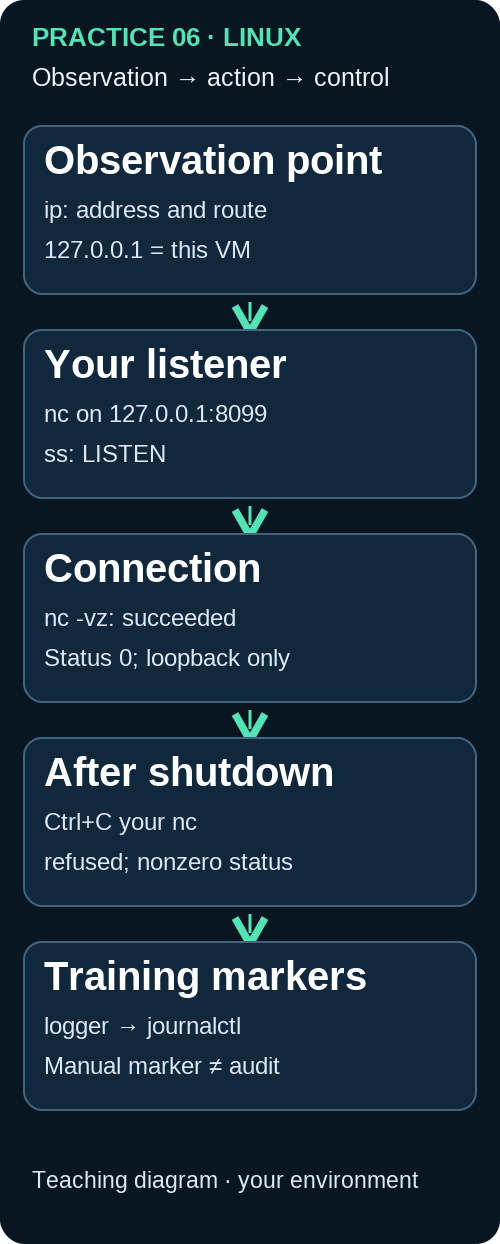
Caption: binding, measured connectivity, and a log event are different evidence.
Practice. Listener, success, shutdown, and denial
-
Run
nc -h.-hshows help for the expected OpenBSD netcat variant. Runss -lnt 'sport = :8099'in one window; the expression selects source/local port 8099. Before starting our process, expect only a header or no rows. If occupied, do not terminate someone else’s process. Choose another unused high port and replace it consistently. -
In window A run
nc -lk 127.0.0.1 8099.-lwaits for incoming connections;-kkeeps listening afterward. Address and port are explicit. The prompt disappears while the foreground process waits. Do not replace loopback with 0.0.0.0 for convenience. -
In window B observe
ss -lntp 'sport = :8099'. Expect LISTEN on 127.0.0.1:8099; your account may see the nc process. Then runnc -vz 127.0.0.1 8099andecho $?.-vgives verbose diagnostics;-zchecks connection opening without application payload. Expect succeeded and status 0. This measures one port you own, not external VM reachability. It tests neither HTTP nor the presence of a web application. -
Write the training marker
logger -t academy-linux "TRAINING loopback-connect success". You create this record manually: it is an exercise marker rather than automatic network auditing or proof of packet origin. In window A press Ctrl+C to stop only your nc process. -
Negative control in B: repeat
ss -lnt 'sport = :8099',nc -vz 127.0.0.1 8099, andecho $?. Expect no listener, Connection refused, and a nonzero status. If connection succeeds again, identify the current owner instead of terminating a guessed process. Addlogger -t academy-linux "TRAINING loopback-connect refused". -
Export only training markers:
cd ~/linux-academy
journalctl -t academy-linux --since "30 minutes ago" --no-pager -o short-iso > evidence/network-events.txt
cat evidence/network-events.txt
Choose the period from the actual exercise time. Expect mini-practice, success, and refused with your host and timestamps. These are expected characteristics, not an author-captured output from your VM. If events fall outside the window, expand it deliberately and document that choice. Separate repeated attempts by time.
Lesson 4. Errors, decisions, and artifact
Save evidence/network-note.txt with nc/ip versions, interface roles, exact local address, before/during/after results, connection statuses, and marker times. Build the sequence: “my nc listened → my connection succeeded → nc stopped → connection refused.” Adjacent markers do not establish causation in a real investigation; here causation is known because you controlled the action.
For command not found, return to package installation. For different nc help, identify the implementation before copying options. Successful TCP with an application error would lead next to application protocol and logs. A refused connection leads first to process and address checks. Refusal from your own loopback port does not establish that the internet is unavailable.
Clean up by checking that window A has its prompt again and your nc no longer listens on the port. Keep only the training export. Do not clear the system journal: OS history is not disposable exercise data. This prepares for networking and SOC courses: identify the observation point, select a meaningful filter, then make a supported conclusion.
Sources
- iproute2: ip.
- iproute2: ss.
- Ubuntu 24.04: OpenBSD nc.
- util-linux: logger.
- systemd: primary journalctl source.
Why a service cannot be reached
Change the conditions and observe this training model. It runs in your browser and does not change your computer.
Choose conditions above to see an explanation of the result.
Independent exercise · Russian
Дежурная смена в Казани проверяет на собственной виртуальной машине локальную страницу статуса перед передачей сборки. В журнале приложения время по UTC, на часах диспетчера московское. Смену интересует, в какой момент перестал отвечать локальный обработчик.
Evidence
В 11:02 МСК вывод ss показывает LISTEN на 127.0.0.1:8081. Локальный запрос тогда же получил HTTP 200. В журнале учебного юнита в 08:03:10 UTC отмечена штатная остановка. В 11:04 МСК нужной строки в ss уже нет, запрос к тому же адресу получил Connection refused.
Assignment
Сведите четыре наблюдения в короткую хронологию по московскому времени. Укажите интервал, в котором перестал отвечать обработчик, и какую доступность проверка действительно подтверждает.
Compare your reasoning
В 11:02 слушатель отвечал на том же узле. Событие остановки приходится на 11:03:10 МСК и попадает между успешным запросом и отказом в 11:04. Совпадение журнала с исчезновением сокета поддерживает вывод об остановке службы. Все запросы шли на loopback, поэтому по этим данным нельзя судить о маршруте с другой машины.
Personal practice environment
Check an excerpt, find matching lines and compute the SHA-256 of the original text. Temporary data expires after 30 minutes or when you close the environment.
Sign in