
Ready packages, repositories, and verified updates
Lesson 1. Do not download an executable blindly
A package is a distribution-ready set of files with a version, dependencies, and metadata. A package manager obtains it from a configured repository and records installation state. You can install the ready nano editor without compiling software, writing Python, or creating installation scripts. Signatures and standard sources reduce substitution risks; they do not guarantee that every application is flawless.
Use your separate VM or a Linux computer you own and administer. Check free space and preserve your training files. In VirtualBox 7.1, shut down the guest normally, select the VM in Manager, open Snapshots, and choose Take. Name the snapshot before-packages and include a date. Start the guest again. A snapshot can restore this machine’s state, but its dependence on the virtual disk makes it different from a separate backup. The backup module later verifies file restoration into another folder.
Identify the environment before selecting commands:
cat /etc/os-release
command -v apt
command -v dnf
/etc/os-release contains fields such as ID and VERSION_ID. command -v shows where the shell finds a program, or returns a nonzero status when unavailable. Finding apt alone does not identify the OS edition. Read both checks and choose one branch. Do not run dnf on Ubuntu or add a foreign repository to make a command appear.
The main Ubuntu 24.04 route uses APT. Debian has similar APT commands but a different package inventory and versions. Astra Linux SE 1.8 documentation separately describes dpkg, apt, and repositories. RED OS 8 uses DNF and RPM. The course does not replace Astra or RED OS repository addresses: use sources supplied for your edition and a legally available installation. Their access conditions do not prevent completing the free required practice on Ubuntu.
Lesson 2. Learn the manager through safe reads
On Ubuntu run apt show nano. Show prints package metadata such as Package, Version, Depends, Description, and available source information. apt list --installed nano shows installed nano packages; --installed limits the list to installed entries. APT’s warning about an unstable CLI for scripts does not mean an interactive read failed. We do not write an output parser.
On Astra SE 1.8 with the edition’s standard repositories configured, start with those same two read commands and compare with your supplied manual. Do not copy Ubuntu source addresses or mix different Astra updates. If the package is unavailable in your edition, record that fact and use its standard text editor; complete the mandatory nano case in the main Ubuntu VM.
RED OS 8 has a separate route: dnf info nano displays package description and version; dnf list --installed nano lists installed nano; dnf repolist lists enabled repositories. The supplier documents installation as sudo dnf install nano and updates as sudo dnf upgrade. These belong to that branch, not to a universal APT alias. Do not substitute them automatically into the main case below.
sudo runs one specified command with administrative privileges according to system policy. Password characters normally do not appear while typing. Use your training account’s password. If your account is not authorized, use another Linux VM you own with administrative access instead of changing policy for the course. The read-only commands above do not require sudo.
Lesson 3. Two mini-practices and gate
First, make a package card for your branch: installed version or “not installed,” description, and repository from available metadata. Run nano --version if installed. Application and package versions may have different formats because packages add build information. A missing command is expected when the package card says “not installed.”
Second, preview the Ubuntu transaction with apt --simulate install nano. --simulate displays intended actions without installing; non-administrative simulations can have limited information, noted in the output. If nano is already current, expect “already the newest version” and no changes. That is a useful result. On RED OS 8 use dnf --assumeno install nano instead of an invented simulate option. --assumeno answers no to transaction confirmation, but metadata queries may still use network access and cache. It is not complete isolation. Astra APT previews depend on accessible edition repositories.
Gate: you can name ID/VERSION_ID, identify your manager, distinguish package and application, understand confirmation, and stop when unexpected removals appear. Record DNS, signature, privilege, and manager-lock errors first. Do not remove lock files or disable signature checks. Another installer or update service may legitimately own the transaction; wait for it to finish.
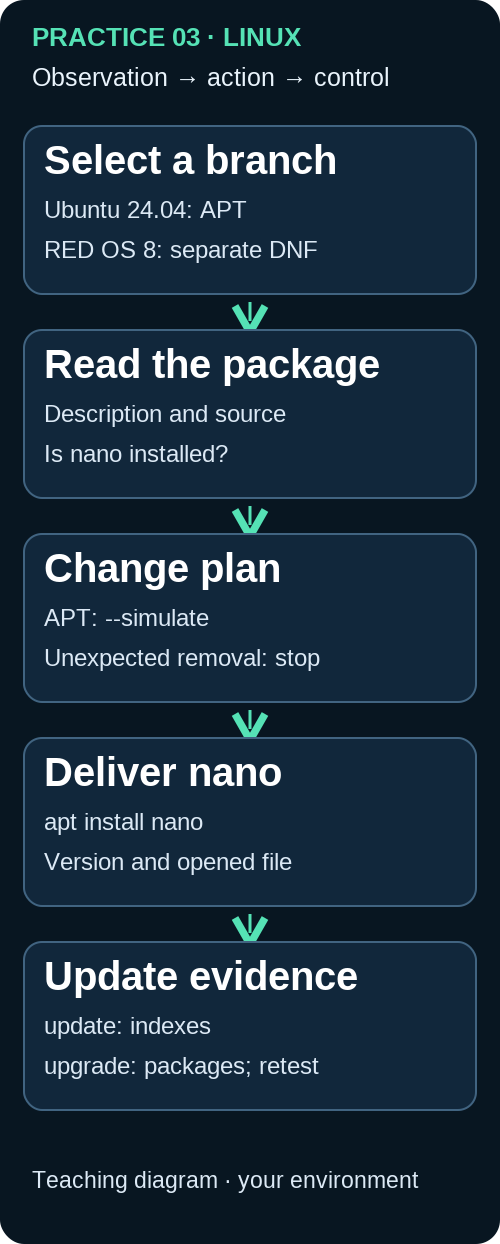
Caption: update refreshes source metadata; installation and upgrade change packages separately.
Practice. Deliver nano and verify updates in your Ubuntu VM
This complete main case uses Ubuntu 24.04, configured official repositories, and internet access. It does not promise a new version today. Run commands separately and read every result.
-
Run
sudo apt update. Update downloads package indexes; it does not install application updates. Check completion and repository errors, then immediately inspectecho $?. A zero status plus index-reading messages establishes execution, but warnings about an unavailable source still require attention. For DNS errors, record the message and use the networking module. Installation using stale indexes does not establish freshness. -
Run
apt --simulate install nanoand inspect the plan. Then runsudo apt install nano. Install adds the named package and required dependencies. Read download size and proposed changes; confirm only the expected installation or no-change result. Do not add-y: automatic confirmation would hide a useful beginner check. -
Verify
apt list --installed nano,command -v nano, andnano --version. Return to editor mini-practice: open your copy, save a line, and exit. A package database entry without a working application requires checking paths and diagnostics before declaring readiness. -
Read
apt list --upgradable.--upgradablerestricts the list to packages with a newer available version. Runapt --simulate upgrade, which previews installed-package upgrades. With an understood plan and prepared snapshot, runsudo apt upgradein your VM and read the confirmation. This introductory case does not use dist-upgrade/full-upgrade. Packages can remain held because of dependencies or phased updates; that is a distinct state, not proof that no fixes exist. -
If installation reports a required reboot, save documents and restart only the training guest through its menu. Recheck the OS version, nano launch, and
apt list --upgradable. A successful restart and working editor provide a positive availability control. -
Perform a negative control without installation:
apt show academy-training-package-does-not-exist. Expect no such package in your indexes and a diagnostic/nonzero result. Do not resolve a misspelled package by adding an arbitrary repository.
Save evidence/packages.txt with the OS, date, metadata sources, preview, actual changes or “0 changes,” nano version, post-restart result, and limitations. Do not record your password. This is evidence of delivering a ready tool. Proceed to access controls after success. For an unavailable repository, the next decision is connectivity or supplier-access verification, without claiming “updated.”
Keep nano for later work. Do not run autoremove or purge as cleanup: dependency removal and configuration deletion need separate review. Preserve the snapshot until verification and exported notes are complete. Restoring it requires understanding which subsequent changes will be lost.
Sources
- Ubuntu: package management.
- Astra Linux SE 1.8: administrator manual, section 5.
- RED OS 8: DNF commands.
- Oracle VirtualBox 7.1: snapshots.
What your computer stores
Change the conditions and observe this training model. It runs in your browser and does not change your computer.
A filename is not the whole story. Try revealing its extension.
Choose conditions above to see an explanation of the result.
Independent exercise · Russian
В учебной лаборатории учебного центра в Перми редактор nano уже установлен. На вечер согласовали обновление одного пакета из внутреннего зеркала. Дежурный сохранил два плана действий пакетного менеджера, прежде чем выбрать подходящее изменение.
Evidence
Учебные номера сборок в реестре зеркала — 7.2-1 и 7.2-2. Установлена 7.2-1. После успешного обновления индекса кандидат nano — 7.2-2 из согласованного зеркала. План A меняет только nano. План Б обновляет 18 пакетов и удаляет один сетевой инструмент.
Assignment
Заполните заявку на изменение. Укажите исходную и целевую сборки, источник, выбранный план и два наблюдения, которыми смена подтвердит результат после выполнения. Объясните судьбу второго плана.
Compare your reasoning
В согласованное окно укладывается план A. После обработки пакета опрос базы установленных пакетов должен показать для nano сборку 7.2-2. Запуск редактора с новой учебной заметкой проверяет его работоспособность. План Б требует отдельной оценки удаления сетевого инструмента. Само обновление индекса подтверждает только получение сведений о доступных сборках.
Personal practice environment
Check an excerpt, find matching lines and compute the SHA-256 of the original text. Temporary data expires after 30 minutes or when you close the environment.
Sign in