
Linux permissions: users, groups and your own file
Lesson 1. Who attempts which operation
Access permissions apply to an operation by a specific process. An account has a UID, a primary group, and supplementary groups. A process receives that identity when started. Names help people; numerical IDs matter to the system. Your identity can differ from a service’s identity. id shows your effective identity and groups; id academy-reader reads account information when that account exists. It does not establish that an already-running process refreshed its groups.
Traditional DAC assigns an owner and group to each file, with owner, group, and others permission classes. ls -l displays type and three rwx sets. For a regular file, r permits reading, w changing contents, and x execution. For directories, r permits listing names, x traversal, and w with the required x allows directory-entry changes. A non-writable file can therefore still be removed through a writable parent directory. ACLs, filesystem behavior, and other policies also affect real operations.
Mode 640 gives the owner 4+2 (read/write), group 4 (read), and others 0. Directory mode 750 gives owner rwx, group r-x, and others nothing. chmod changes the named object’s mode; chgrp changes its group. Do not apply either recursively to a whole home or /etc. Astra SE 1.8 mandatory mechanisms add restrictions; enabled contextual controls on RED OS also matter. Do not disable them for practice. This case measures ordinary DAC on your Ubuntu VM, not the configuration of a protected OS edition.
Lesson 2. Learn identity and mode inspection
In the main Ubuntu environment run id, ls -ld ~/linux-academy, and umask. The ls -d option displays the directory itself instead of its contents; -l is the familiar long format. Bare umask displays the creation mask. It removes bits from an object’s requested initial mode; it does not change existing files. Ordinary files are normally created without x even when the mask is zero.
Perform a safe first trial:
cd ~/linux-academy
mkdir permissions
umask 077
printf '%s\n' 'FICTIONAL TRAINING VALUE' > permissions/note.txt
ls -ld permissions
ls -l permissions/note.txt
mkdir creates a directory and deliberately reports an existing name. Inspect an existing permissions directory or repeat under a fresh name. printf prints arguments using a format: %s is a string and \n a newline. The redirection writes only our new training file. Mask 077 removes group and others permissions from newly created objects; expect a regular-file mode of 600. The directory was created before changing the mask, so read its mode instead of guessing.
Record your previous mask before the trial. Close this training terminal when finished: the changed mask belongs to this shell session; closing it does not change global settings. Do not edit .bashrc for this exercise.
Lesson 3. Two mini-practices and gate
First, write down your UID, primary GID, and one supplementary group if present. No supplementary group is an acceptable result. Read the owner/group of note.txt. This connects the process identity with object ownership without creating an administrator.
Second, check owner writing. Run chmod 400 permissions/note.txt, test -w permissions/note.txt, then immediately echo $?. test -w checks writing by the current user: zero means yes, nonzero means no. An ordinary owner with mode 400 should get a negative result. Do not run test through sudo; root changes the meaning of the check. Restore chmod 600 permissions/note.txt and repeat for status 0. Test prints no message, so use its status.
Gate: you can explain all three classes, distinguish file and directory semantics, read ownership, and identify who executed test. If logged in as root, switch to an ordinary account. The next case needs your own Ubuntu Linux and administrative access only to create isolated training identities. On another distribution, complete read-only inspection and a permissions plan; Ubuntu adduser commands below are not presented as universal RED OS commands.
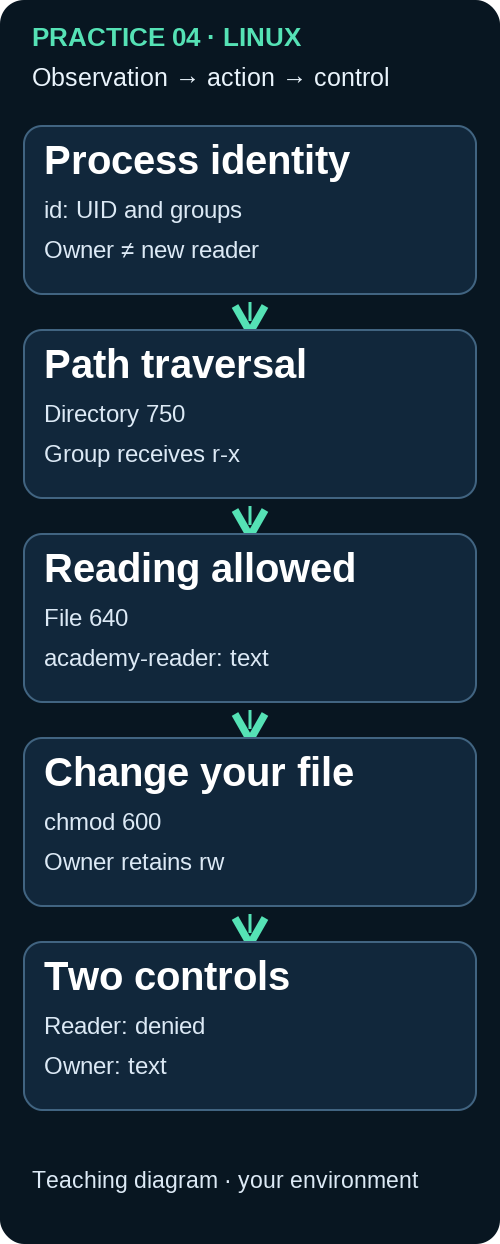
Caption: reading requires access along the entire path; denial is checked from another identity.
Practice. Permit group reading, then remove it
Create a new account without password login in the main Ubuntu VM. It serves only as a negative-control identity, not a system service.
-
Check for conflicts using
getent passwd academy-reader,getent group academy-study, andls -ld /tmp/academy-access-student. Getent queries user or group databases. Expect no account/group entry and a missing-directory error. If anything already exists, stop until you have a clean VM. Do not delete an unknown account or folder. -
Only after those checks run:
sudo adduser --disabled-password --comment '' academy-reader
sudo groupadd academy-study
sudo usermod -aG academy-study academy-reader
sudo -u academy-reader id
Ubuntu’s adduser creates an account and home directory; --disabled-password disables password login, while --comment '' supplies an empty descriptive field without questions. groupadd creates a group. Usermod’s -G specifies supplementary groups, and -a appends instead of replacing them. sudo -u executes the next command as the named user. Id must include academy-study. If it does not, inspect usermod’s result before claiming a different-user check.
- Create a shared training path without relying on traversal through your home:
mkdir /tmp/academy-access-student
printf '%s\n' 'FICTIONAL GROUP NOTE' > /tmp/academy-access-student/note.txt
sudo chgrp academy-study /tmp/academy-access-student
sudo chgrp academy-study /tmp/academy-access-student/note.txt
chmod 750 /tmp/academy-access-student
chmod 640 /tmp/academy-access-student/note.txt
ls -ld /tmp/academy-access-student
ls -l /tmp/academy-access-student/note.txt
sudo -u academy-reader cat /tmp/academy-access-student/note.txt
Chgrp changes only the group of our objects; you remain their owner. Sudo is needed here because your current process need not belong to academy-study. Mode 750 permits group traversal and 640 permits group reading. Expect the fictional line and status 0. Never put real secrets in this /tmp exercise.
- For the negative control run
chmod 600 /tmp/academy-access-student/note.txt, repeat the samesudo -u academy-reader cat /tmp/academy-access-student/note.txt, and checkecho $?. Expect Permission denied and a nonzero status. Read it again as the ordinary owner: the line remains accessible. These are two different identities, not repeated owner reads mislabeled as an others test.
Save evidence/access.txt with identities, directory/file modes, successful reading, denial, and working owner access. If 640 unexpectedly fails, inspect groups and traversal first. If 600 unexpectedly succeeds, inspect actual identity and additional policies. The next decision is minimum necessary access; a real service requires identifying its account and functional need.
Clean up only created objects. Remove note.txt in Files at the exact /tmp/academy-access-student path, then its empty folder. In your VM run sudo deluser --remove-home academy-reader followed by sudo groupdel academy-study. Ubuntu deluser removes the account; --remove-home removes its newly created home. Groupdel removes the training group. Repeat getent to establish that the entries are gone. Never run these cleanup commands for identities that existed before practice.
Sources
- Linux inode: modes and ownership.
- Linux path_resolution: traversal.
- Ubuntu 24.04: adduser.
- MaxRAF’s translated Habr permissions discussion is a secondary guide to common difficulties, not a primary Linux behavior source. Checking order is verified against inode/path_resolution and the local experiment.
Account identity and access rights
Change the conditions and observe this training model. It runs in your browser and does not change your computer.
The example has one ownership rule. Real operating-system access also depends on groups, permissions and ACLs: lists of access rules. This illustrates a principle rather than reproducing Linux or NTFS.
Choose conditions above to see an explanation of the result.
Independent exercise · Russian
В учебной копии ведомости для складской смены разрешено чтение второй ролью. После пересмотра прав оператор всё ещё получает отказ. Нужно различить доступ к самой ведомости и проход к ней через каталог.
Evidence
Каталог /srv/training принадлежит lab:shift, режим 0700. Файл /srv/training/stock.txt также принадлежит lab:shift, режим 0640. Сеанс reader входит в shift. Остальные компоненты пути проходимы. Дополнительных ACL нет. Оператору разрешено читать файл по известному имени без просмотра списка каталога.
Assignment
Назовите объект, на котором прекращается доступ. Запишите минимальный новый режим каталога. Составьте три проверки от имени reader для чтения файла, изменения файла и просмотра списка имён.
Compare your reasoning
В строке прав файла группе уже дано чтение. Для прохода по известному имени группе нужен x на /srv/training. Режим 0710 сохраняет права владельца и даёт группе только проход. В учебной копии reader сможет прочитать stock.txt. Попытки изменить файл и перечислить содержимое каталога должны завершиться отказом.
Personal practice environment
Check an excerpt, find matching lines and compute the SHA-256 of the original text. Temporary data expires after 30 minutes or when you close the environment.
Sign in