
Gatekeeper and quarantine: application source and signing
Application source, quarantine, and signing
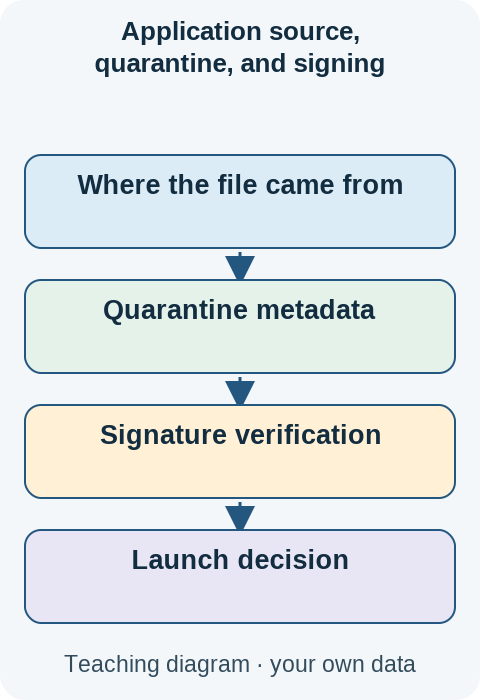
Original teaching diagram. Read from top to bottom; it explains the check sequence and does not depict a recorded interface.
Lesson 1. Decide before launching
A file named after a familiar application can be a different build or an imitation. Origin describes where an object came from. A digital signature concerns signing identity and whether code meets verification conditions. Permissions concern capabilities after launch. These observations are not interchangeable. Downloaded applications, .dmg images, and .pkg installers can lead to executable code, so review origin and warnings before deciding.
Do not download unfamiliar programs for this lesson. Use installed TextEdit and your own text. An optional additional object is Apple’s security-guide PDF obtained from its official page. Safari and Finder are included with macOS. Safari’s address field identifies the site; Downloads tracks downloads. A third-party advertisement does not become an official source because its button says Download. First mini exercise: open Apple Platform Security, read the domain, and locate the guide title. Second: locate the guide’s PDF-download link near the bottom and check that it belongs to Apple. If unavailable, record this step as untested rather than obtaining a substitute from a forum.
Download the official PDF, locate that specific object in Finder → Downloads, and move it into AcademyLab. Rename it to apple-guide.pdf while keeping its format. Do not inspect personal browser history or publish other download names. The readiness gate is that you know the paths, source page, and different object types, and understand that metadata inspection does not execute an installer.
Lesson 2. Quarantine is provenance metadata
Extended attributes hold information associated with an object in addition to its ordinary content and permissions. The built-in xattr reads them. Before the case, run xattr -h and inspect the modes. We use only -l for detailed listing and -p for reading a named attribute. Writing and deleting options are unnecessary. First mini exercise: run xattr -l ~/AcademyLab/note.txt; empty output is acceptable. Second: run xattr -p com.apple.quarantine ~/AcademyLab/note.txt. If absent, expect an attribute-not-found message, which differs from a missing file.
A browser can attach com.apple.quarantine to a download. Its value contains operational fields; do not interpret every digit as a threat. Presence does not establish malware, and absence does not establish trustworthy origin. Acquisition method, filesystem, transfers, and version can affect the observation. Avoid manually adding metadata to manufacture an expected result or removing it to open blocked software.
SantrY’s author analysis on Habr helps explain common trust mistakes. It dates from 2023 and includes historical limitations. Current launch behavior should follow Apple’s Gatekeeper documentation, rather than treating an old click sequence as universal advice. Gatekeeper evaluates software trust, including signing, integrity, and notarization in the applicable context. Notarization is Apple’s assessment for known malicious content; it does not demonstrate the absence of every defect.
Lesson 3. Separate displaying a signature from verification
codesign is included with macOS. Open man codesign, find display and verify modes, and leave with q. The first mini exercise displays the installed TextEdit metadata. The second verifies its signature separately. The commands inspect an application and contain no --sign argument.
codesign --display --verbose=2 /System/Applications/TextEdit.app
codesign --verify --strict --verbose=2 /System/Applications/TextEdit.app
--display shows metadata; --verbose=2 requests more detail. --verify checks the signature; --strict adds structural checking conditions. The path identifies one bundle. If it is absent in your version, locate installed TextEdit in Finder and determine its actual path rather than substituting an unrelated application. Read Identifier, Authority, and TeamIdentifier from actual output. Some built-in applications have absent or special fields; that alone does not establish an imitation.
codesign often sends information to stderr even on success. Output in that stream or colored text does not replace interpreting the message and exit status. Immediately after verification, run echo $?; zero represents success of that check. It does not establish Gatekeeper permission for another download, the safety of every feature, or a need for microphone access. A built-in system example and external software have different trust contexts.
Practice. Produce a card that supports a decision
- Read attributes of your local
note.txtand availableapple-guide.pdfwithxattr -l. Record presence or absence of quarantine. If the PDF was not downloaded, document the limitation and continue with your text. - Display TextEdit signature metadata, then verify separately. Retain only relevant lines and the actual result.
- Open System Settings → Privacy & Security and find the available description of permitted application sources. Read it without changing policy or overriding a warning. Device management may limit these controls.
- Analyse this training case:
ExampleConverterarrived through a message link, its signature was not verified, and it asks for screen recording to convert one text file. The next step is to establish the official source and explain the capability. The supplied evidence is insufficient for launching it.
application-card.txt
Object and exact path: ...
Source and date: ...
Quarantine observation: ... / not checked
Display metadata: ...
Signature verification: ...
Requested capability and purpose: ...
Decision / remaining uncertainty: ...
As a negative control, an unsigned own note.txt does not become a bad application: it is a text document, and application-signature verification is the wrong context. Avoid using codesign --verify on documents as a universal malware detector. When an unfamiliar download is blocked, preserve the message and investigate origin. Disabling Gatekeeper, removing quarantine, or installing a certificate to repair access are outside this practice. Cleanup means removing only the training PDF if desired, closing windows, and retaining the card. Next, apply the same reasoning to background configuration: a familiar label also does not prove origin.
What your computer stores
Change the conditions and observe this training model. It runs in your browser and does not change your computer.
A filename is not the whole story. Try revealing its extension.
Choose conditions above to see an explanation of the result.
Independent exercise · Russian
В архангельскую учебную студию пришли два архива программы для верстального цеха. Оба называют себя версией 4.2. Приёмщик должен выбрать экземпляр для дальнейшего функционального испытания по утверждённому манифесту поставки.
Evidence
В манифесте версия 4.2 привязана к идентификатору команды TEAMLAB042 и контрольной сумме архива. Архив А совпал с манифестом по полной SHA-256. Проверка подписи извлечённого приложения успешна, Team ID совпал. У архива Б полная сумма отличается, подпись приложения валидна для команды OTHER00042. Атрибут quarantine присутствует в обоих случаях.
Assignment
Оформите две строки в журнале приёмки. Для каждого кандидата укажите подходящие доказательства происхождения, решение о допуске и причину. Учтите, что сумма проверялась до извлечения.
Compare your reasoning
К испытанию проходит А по двум привязкам к ожидаемому выпуску. Б остаётся у ответственного за поставку до сверки канала и манифеста. Валидная чужая подпись не подтверждает ожидаемого издателя, а quarantine сам по себе не определяет подлинность. Даже успешная сверка А ещё оставляет функциональное испытание впереди.
Personal practice environment
Check an excerpt, find matching lines and compute the SHA-256 of the original text. Temporary data expires after 30 minutes or when you close the environment.
Sign in