
Your own network: localhost and HTTP controls
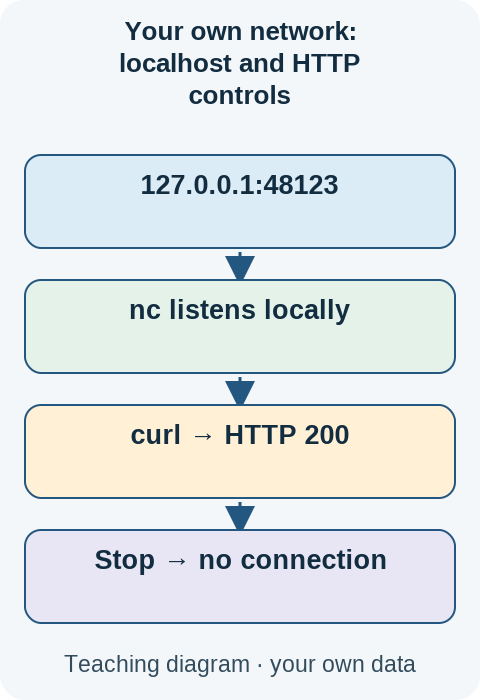
Original teaching diagram. Read from top to bottom; it explains the check sequence and does not depict a recorded interface.
Lesson 1. Address, port, and application response
An IP address identifies a network delivery point; a port distinguishes services at that point. 127.0.0.1 is IPv4 loopback and refers to the current machine. localhost normally resolves to loopback, but explicit IPv4 avoids mixing IPv4 and IPv6 in this first exercise. http://127.0.0.1:48123/ contains the HTTP scheme, address, port, and / path. This lab does not contact nearby devices and needs no internet after preparation.
Wi-Fi connection, interface address, route, DNS, TCP connection, and HTTP response are separate stages. HTTP 200 is an application response carrying that status. A TCP connection failure occurs before any HTTP response. HTTPS additionally uses TLS; our own loopback exercise intentionally shows ordinary HTTP without certificates. Success does not test internet access, DNS, a VPN, or an external site.
Open System Settings → Network, select the active connection, and choose Details. Read TCP/IP and DNS without changing addresses, router, or DHCP lease. First mini exercise: locate the address-assignment method, such as DHCP. Second: compare the router field with the DNS section. Omit home-network names and workplace addresses from reports. The readiness gate is that you distinguish interface configuration from a local HTTP service. Apple’s network-settings guide explains the interface.
Lesson 2. Prepare ready-made system tools
Use /usr/bin/nc, the network utility supplied with macOS, and /usr/bin/curl, a transfer client. Full paths matter because a separately installed nc may accept different arguments. First nc exercise: run /usr/bin/nc -h and find -l for listening and -n for numeric addressing without name resolution. Help may return a nonzero status; that is not the result of a later connection. Read the built-in manual with man /usr/share/man/man1/nc.1 to avoid another installed version’s page.
Second nc exercise: check only one own port with /usr/bin/nc -z -w 1 127.0.0.1 48123, then immediately run echo $?. The -z option performs a check without application data; -w 1 limits waiting. A nonzero result is expected without a listener. If connection succeeds, the port is occupied. Select a different free high port and replace it consistently throughout the exercise.
For curl, first run /usr/bin/curl --version and read the installed version. Next run /usr/bin/curl --help and compare relevant options with the official curl documentation. In the main request, -i includes response headers, --max-time 5 limits the entire operation to five seconds, and --noproxy '*' excludes proxy use for this one request. Quotes prevent shell expansion of * into filenames. System proxy settings remain unchanged.
The built-in lsof displays open process objects. Restrict it to one port with /usr/sbin/lsof -nP -iTCP:48123 -sTCP:LISTEN. Here -n avoids name resolution, P preserves numeric ports, -iTCP:48123 selects the TCP port, and -sTCP:LISTEN selects listeners. First read lsof -h, then perform this limited query. Do not stop someone else’s process when a port is occupied. You are ready when tools and arguments are understood, the port is free, and response.http and request.txt are unused names in AcademyLab.
Lesson 3. One response from your training file
We are not implementing a server program or analyzer. nc reads prepared HTTP-response bytes and sends them to one local client. It does not find files according to URL paths or implement an application. Different paths can receive the same body. It therefore demonstrates connections and response reading rather than website routing.
Open two Terminal windows with Window → New Window. In the first, create the new training response with the command below. printf is already familiar. \r\n represents the network CRLF line ending. > writes a file and can overwrite an existing one, which is why you checked the name first. AcademyLab\n contains 11 bytes, reflected by Content-Length.
printf 'HTTP/1.1 200 OK\r\nContent-Type: text/plain\r\nContent-Length: 11\r\nConnection: close\r\n\r\nAcademyLab\n' > ~/AcademyLab/response.http
/usr/bin/nc -l -n 127.0.0.1 48123 < ~/AcademyLab/response.http > ~/AcademyLab/request.txt
The < operator supplies file contents to nc; > saves the incoming request in your new request.txt. The address binds to loopback rather than every interface. The first Terminal waits. Leave it open and do not type a new command into its occupied input. If macOS requests network authorization, record the prompt and follow the owner’s policy. Disabling the firewall is unnecessary.
Practice. Receive a response and explain refusal
In the second window, first read the limited lsof view for your port, then issue:
/usr/bin/curl --noproxy '*' --max-time 5 -i http://127.0.0.1:48123/Expect HTTP/1.1 200 OK, headers, and AcademyLab. Record status and body separately. Read cat ~/AcademyLab/request.txt and locate GET / HTTP/1.1 and Host. One request may finish the listener. If the first Terminal remains waiting, stop only that operation with Control-C and check that its prompt returns. Repeat the request after stopping: expect a connection error, commonly curl status 7. This is a negative control for the running process rather than DNS.
If the request waits until timeout, compare nc state, port numbers, and Content-Length. If the port is occupied, leave the other service alone. If your listener uses 0.0.0.0, stop your exercise and correct the address to 127.0.0.1. Restart the one-request listener before another positive trial. Save network-card.txt with address, port, commands, positive response, refusal after stopping, and the limit “loopback only; external networking untested.” Cleanup requires a stopped nc and no own listener in lsof. Remove only the two HTTP training files after recording results. Logs are introduced separately next.
Why a service cannot be reached
Change the conditions and observe this training model. It runs in your browser and does not change your computer.
Choose conditions above to see an explanation of the result.
Independent exercise · Russian
Перед показом макета в новосибирской мастерской проверяют локальный предпросмотр. Изображение значка на странице пропало. Специалист получил только результаты трёх обращений со своего Mac и строку конфигурации сервера.
Evidence
Сервер слушал 127.0.0.1:8091. В 15:20 запрос /index.html к этому адресу получил HTTP 200 и ожидаемый заголовок страницы. На том же порту /mark.svg дал HTTP 404. Контрольный запрос к 127.0.0.1:8092 завершился сообщением Connection refused. В описи каталога значок называется mark-blue.svg.
Assignment
Составьте заметку для верстальщика. Укажите, какой ответ относится к файлу, какой к соединению, предложите одно исправление ссылки и запишите результаты двух повторных проверок, ожидаемые после исправления.
Compare your reasoning
На 8091 приложение уже принимает HTTP-запросы. В макете следует заменить ссылку на /mark-blue.svg и проверить получение ожидаемого SVG с кодом 200. Несуществующее контрольное имя на 8091 должно по-прежнему возвращать 404. Отказ на другом порту происходил до получения HTTP-ответа. Проверка loopback охватывает только этот Mac.
Personal practice environment
Check an excerpt, find matching lines and compute the SHA-256 of the original text. Temporary data expires after 30 minutes or when you close the environment.
Sign in