
How DNS works: addresses and the path from a browser to a server
Find the stage where the request stopped
A browser says a page is unavailable. That is an observation, not a diagnosis: it might have failed to resolve a name, find a route, connect to a service or obtain permission from the application. We will distinguish these stages using existing windows and commands. You do not need to change your home router. The deliverable is a map and an observation table that lets another person understand your next safe check.
1. What a network carries
A client initiates a request; a server provides a service. One computer can have both roles. Your browser is a web client, while a DNS server answers a different question: which records exist for a name. Server describes a program’s role, not necessarily an expensive physical machine.
An IP address identifies a network destination. It does not establish a person’s identity: addresses change, one device has several interfaces, and multiple people can use one computer. An interface is a system connection such as Ethernet, Wi-Fi, a VPN or internal loopback. IPv4 uses four numbers such as 10.50.10.25. IPv6 uses another form, such as ::1; an IPv4 route does not describe all IPv6 behaviour.
A subnet describes a range of destinations. In this simple example, 10.50.10.0/24 has a 24-bit network prefix, and 10.50.10.25 belongs to it. A gateway receives traffic for onward delivery when the selected route requires a next hop. DNS and a gateway have separate purposes, even when the same home device supplies both.
A port helps an operating system direct communication to a service. tcp/443 commonly serves HTTPS and tcp/445 serves SMB file sharing. A number alone proves neither the protocol nor security nor user permission. TCP provides stream communication between programs. UDP carries datagrams without promising the same delivery mechanism. DNS can use UDP and TCP; a modern browser may use HTTP/3 over QUIC. Our simple path is a starting model, not a promise that every website exchanges identical packets.
The TCP/IP model separates local delivery, the IP path, transport and application meaning. The seven-layer OSI model describes these tasks in more detail. Models help us ask questions; remembering a layer number cannot replace reading evidence. A MAC address belongs to a link and is not the final address of a website across another network. TLS protects communication and receives its own treatment in module four.
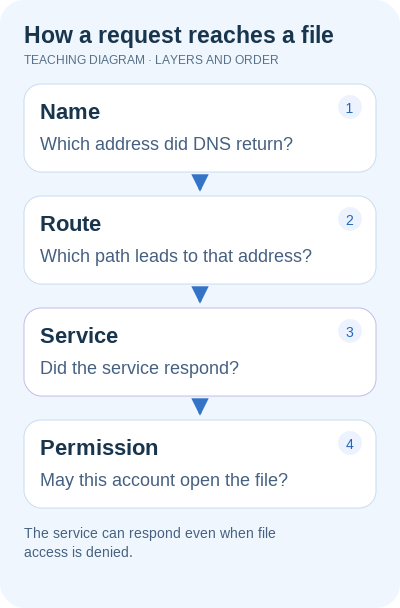
The diagram orders diagnostic questions. A working network still should not open another user’s document without application permission.
2. Meet the connection window
All required work is free and uses your operating system’s existing tools. Create NetworkLab in File Explorer, Finder or Files, and save a plain-text network-observations.txt. A terminal is a window for typing a command and reading its text result. Do not copy prompts such as PS> or $. Open PowerShell from Start on Windows, Terminal through search on macOS, or your installed terminal on Linux. These reading commands do not require administrator privileges.
First inspect the current connection without editing it. On Windows use Settings → Network & Internet → active connection properties. On macOS use System Settings → Network → the active connection → details. In GNOME use network settings and the details button beside the connection. ALT’s System Control Center has network-interface settings; Astra and ALT desktops differ, so consult the manual for your installed release. Locate an address, mask or prefix, gateway and DNS. When a field is absent, record “not displayed” instead of inventing its value.
Mini-exercise A: select the active interface and explain three fields. Mini-exercise B: compare fictional 10.50.10.25/24 and 10.50.20.8; explain why the server lies outside this local subnet. You are ready when you distinguish your device’s address from its gateway and DNS and can close the window without saving changes.
3. Read a result before issuing a command
This is an invented example, not a capture from your machine:
Adapter: Wi-Fi
IPv4 address: 10.50.10.25
Subnet mask: 255.255.255.0
Default gateway: 10.50.10.1
DNS server: 10.50.10.53
The address is the client interface, the gateway is the next hop, and DNS is the name-resolution server. This mask corresponds to /24. Real output also lists disconnected and virtual interfaces; identify the active one first. An address beginning 169.254 calls for checking address acquisition and does not prove internet connectivity.
Run just the command for your operating system:
Windows: ipconfig /all
Linux:   ip address
macOS:   ifconfig
ipconfig displays Windows configuration; /all adds adapter and DNS details. ip address displays Linux addresses; ip route separately displays paths. macOS ifconfig displays interfaces; read DNS from connection details rather than expecting every ifconfig output to contain it. You do not need set, flush, release, renew or interface-disabling commands.
Find loopback, normally lo0 on macOS and lo on Linux, with 127.0.0.1. It communicates inside your computer. Run ping -n 2 127.0.0.1 on Windows or ping -c 2 127.0.0.1 on macOS/Linux. The option limits the check to two requests. Replies and summary counters demonstrate a local ICMP exchange. They do not test DNS, the internet or HTTPS. Do not run endless checks against somebody else’s device.
Practice 4. the academy map
Read the inputs below. The .invalid domains are deliberately fictional; do not send network requests to this map’s addresses.
Student: 10.50.10.25/24
Gateway: 10.50.10.1
Resolver: 10.50.10.53
lesson.example.invalid -> 10.50.20.8
Lesson: HTTPS tcp/443; student account allowed
Files: 10.50.20.9 tcp/445; staff only
No route to 10.50.30.0/24
Step 1. Draw student, DNS, gateway, lesson and files. Label roles as well as numbers. DNS supplies records; the client then selects a route to the address. In this model the lesson is outside the local /24, so reaching it requires a gateway.
Step 2. Add tcp/443. A route still requires communication with a running service. HTTPS and the application then address protected communication, request handling and document permission. A DNS answer does not switch on a stopped server.
Step 3. Make four checks: name known, path provided, service responding and own document allowed. Identify separate evidence for each. The card describes intentions rather than captured packets. Say “expected”, not “tested”, when reasoning from it.
Step 4. Apply negative controls on paper. Missing DNS records call for a name-resolution check. A missing route to 10.50.30.8 is not repaired by knowing a name. A stopped service can still have the right IP address. A student requesting staff files can properly receive application denial over a working network.
To meet a real DNS utility, optionally run nslookup example.com. Identify both the resolver that received the question and the answer records; their addresses have different roles. If Linux lacks nslookup, use an already installed dig example.com or keep this stage documentary; package installation is optional. The public domain’s addresses vary. Record a DNS failure and continue with the card without changing system DNS. lesson.example.invalid normally yields NXDOMAIN as a negative name check, but a managed network may handle it differently.
5. Deliverable, errors and cleanup
Save the map and a table: action → expectation → observation → next step. Keep personal network addresses private; replace them with labelled fictional values in a portfolio. Distinguish an actual loopback ping, an actual DNS result and a prediction from the card. None is a scan of the entire network.
If a command is missing, check the operating system and spelling: ip and ipconfig are different tools. No ping reply does not prove that a web service has stopped; ICMP may have a separate policy. If a window shows only an SSID, open connection properties. A full work-device configuration is unnecessary for a public report.
Close settings without saving edits. The two pings finish automatically; no background service was started. You are ready for the next module when you can explain address, route, port and permission, name a distinct failure for each and propose the appropriate check. SOC uses this skill to interpret events, WEB to read requests and INFRA to diagnose an owned service.
Primary sources and additional reading
- Microsoft: ipconfig
- Microsoft: ping
- Microsoft: nslookup
- Linux: ip-address
- IETF: DNS, RFC 1034
- IETF: private addressing, RFC 1918
- ALT: System Control Center network settings
- Author’s Habr overview: How the internet works — supplementary reading; this lesson’s map and exercises are original.
Why a service cannot be reached
Change the conditions and observe this training model. It runs in your browser and does not change your computer.
Choose conditions above to see an explanation of the result.
Independent exercise · Russian
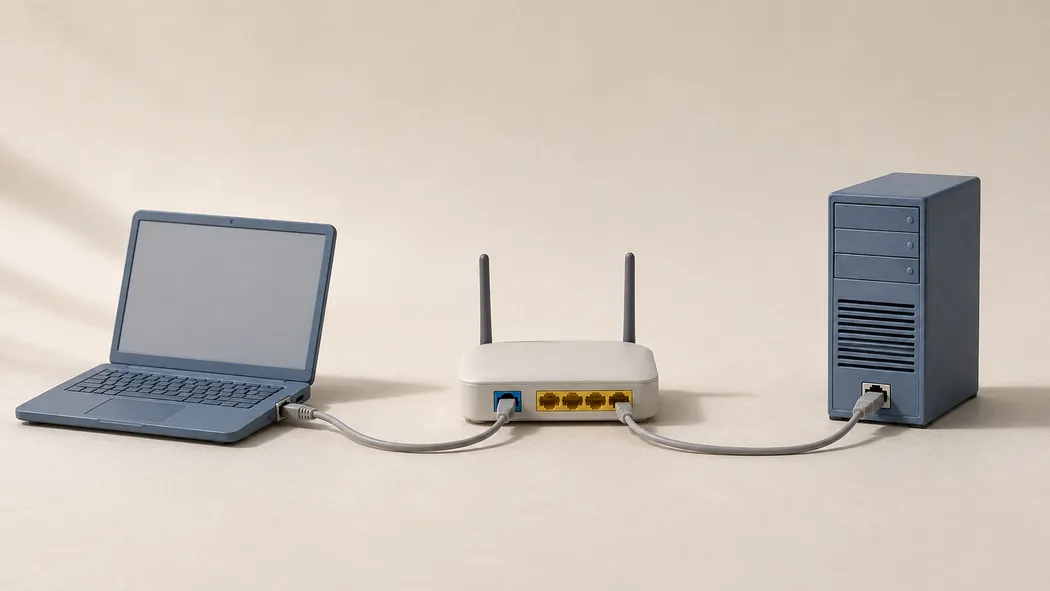
В филиале учебного центра в Казани справочник кабинетов переехал на другую машину. Через пять минут после переезда один ноутбук всё ещё показывает прежнюю страницу. Дежурный сохранил учебную выписку до того, как закрыли браузер.
Evidence
В 10:00 ноутбук получил для spravka.example адрес 192.0.2.15 со сроком хранения 600 секунд. В 10:04 администратор изменил запись на 192.0.2.42. В 10:09 ноутбук показал в кэше прежний адрес с остатком 60 секунд. В тот же момент другой компьютер впервые запросил имя и получил 192.0.2.42.
Assignment
Нарисуйте две стрелки от ноутбука: запрос имени к службе DNS и запрос страницы к полученному адресу. Подпишите старый адрес, новый адрес и самое раннее время повторной проверки после истечения указанного срока.
Compare your reasoning
Две машины в 10:09 могли использовать разные адреса. Ноутбук ещё хранил действующий ответ до 10:10. При повторной проверке запишите отдельно новый ответ DNS и адрес соединения при новой загрузке. Даже получение адреса .42 само по себе не подтверждает, что нужная страница открылась.
Personal practice environment
Check an excerpt, find matching lines and compute the SHA-256 of the original text. Temporary data expires after 30 minutes or when you close the environment.
Sign in