
Proxies, SOCKS5, V2Ray/Xray and REALITY: follow the request
One request, two possible paths
A browser using a proxy works, while another application connects directly. Why? An application’s proxy setting does not necessarily change the computer’s routing table. Here you will run the existing Xray tool and send requests with curl. First understand the local chain before introducing a remote server.
Lesson 1. What the application asks a proxy to do
A proxy accepts a client’s request and carries out the next part of the connection. SOCKS5 is a protocol for that conversation: the application supplies a destination and receives success or a refusal. A VPN interface operates at another boundary: the operating system routes IP packets through it. Some applications support SOCKS; others do not. Some proxy clients additionally create a TUN interface. Identify the actual operating mode instead of relying on an icon.
SOCKS5 by itself does not promise encryption. Sending HTTP through SOCKS does not turn it into HTTPS. TLS, SSH or another mechanism can protect a particular connection segment, while the destination application separately checks object permissions. Our listener binds to 127.0.0.1 so other computers cannot use it as a publicly exposed proxy.
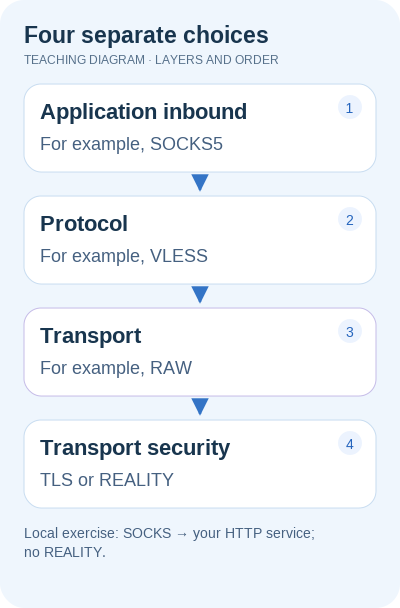
A remote configuration contains two distinct servers: the local listener and the remote relay. Reaching the first does not prove the second works. Our first exercise deliberately uses no remote relay: Xray forwards an allowed request to a standard HTTP server on your own computer. That gives you observable successes and failures without involving somebody else’s network.
Lesson 2. Separate the software, protocol and transport
V2Ray/V2Fly and Xray are software projects. Their configuration specifies an inbound, an outbound and routing rules. SOCKS can be an inbound; VLESS can be an outbound to another node. VMess and VLESS are protocol names rather than lists of accessible websites or anonymity guarantees. Xray and V2Fly have different versions and capabilities; check the documentation belonging to your installed project.
There are separate decisions inside a connection. The application protocol defines its exchange and participants. The transport carries that exchange, for example using RAW, WebSocket or gRPC. Transport security is another choice, such as TLS or REALITY in supported Xray combinations. A network value does not mean the same thing as a security value. Read VLESS + RAW + REALITY as three choices, not one magical product name.
REALITY modifies a TLS exchange and its trust checks. Configuration includes a target TLS endpoint, accepted server names, key material and a short identifier. This does not grant permission on the eventual application. The Xray documentation also warns that unauthenticated traffic can be forwarded to target; the server operator must understand forwarding limits. Do not claim that a scheme is undetectable merely because it changes the handshake.
Lesson 3. Prepare tools on your own computer
You need curl, Python 3 for its existing standard HTTP server, and Xray from the official Releases page. You will not write your own proxy or server. On Windows use PowerShell and curl.exe to avoid an older shell alias; Python commonly starts with py -3. On macOS and Linux use a terminal and python3. Run xray version; if the command is unavailable, use the path to the downloaded executable.
Create a NetworkLab directory and save a plain-text index.html containing LOCAL NETWORK LAB. Check that the editor did not append .txt. Open a terminal in that directory and run:
python3 -m http.server 8000 --bind 127.0.0.1On Windows replace python3 with py -3. Leave this terminal open. In another terminal run curl --noproxy '*' http://127.0.0.1:8000/. Windows uses curl.exe. Expect your text and a corresponding HTTP request in the server terminal. If the port is occupied, stop your own previous server or choose a free port and update it consistently in the URL, listener and routing rule.
Lesson 4. Start SOCKS5 and compare name resolution
Save this JSON as socks-local.json. There are no remote credentials, and only the local exercise endpoint is allowed:
{
  "log": {"loglevel": "info"},
  "inbounds": [{"listen": "127.0.0.1", "port": 10808, "protocol": "socks", "settings": {"auth": "noauth", "udp": false}}],
  "outbounds": [{"tag": "local", "protocol": "freedom"}, {"tag": "blocked", "protocol": "blackhole"}],
  "routing": {"rules": [
    {"type": "field", "domain": ["full:localhost"], "port": "8000", "outboundTag": "local"},
    {"type": "field", "ip": ["127.0.0.1/32"], "port": "8000", "outboundTag": "local"},
    {"type": "field", "network": "tcp,udp", "outboundTag": "blocked"}
  ]}
}
Check it using xray run -test -c socks-local.json, then start it with xray run -c socks-local.json. The first command validates a file; the second starts a process and occupies a port. From your client terminal run:
curl --noproxy '' --socks5 127.0.0.1:10808 http://localhost:8000/
curl --noproxy '' --socks5-hostname 127.0.0.1:10808 http://localhost:8000/
Both should return the same file. With --socks5, curl resolves the name locally; with --socks5-hostname, the proxy resolves it. --noproxy '' clears proxy exclusions for this call, preventing localhost from silently bypassing the proxy. If local name resolution chooses IPv6 ::1, the IPv4-only server may be unreachable. Add --ipv4 to the first test; for the second, a numeric 127.0.0.1 destination separates connectivity from name resolution, but no longer demonstrates proxy-side DNS.
Practice. Prove the proxy participated
Stop Xray with Ctrl+C and repeat a SOCKS request. It should fail to reach the proxy while a direct request still succeeds. Restart Xray, then stop the HTTP server. The listener now exists but the destination is unavailable. Distinguish these two failures using curl’s message and the Xray log. A successful configuration validation is not proof of a working destination service.
With both processes running, request 127.0.0.1:8001 through SOCKS using --max-time 3. That destination is outside our allowed rule and must fail. Do not fix it by exposing the listener on 0.0.0.0. Record the allowed test, blocked test, versions and cleanup in proxy-observations.txt. Stop both processes when finished and confirm a new connection fails.
The next module explains TLS and SNI. For a remote REALITY lab, follow the installed Xray version’s instructions and use endpoints you control; parameter names change. This local SOCKS exercise does not test REALITY and must not be described as doing so. Your useful outcome is a reproducible diagnosis of client, listener, route and destination as separate conditions.
Primary sources
Why a service cannot be reached
Change the conditions and observe this training model. It runs in your browser and does not change your computer.
Choose conditions above to see an explanation of the result.
Independent exercise · Russian
В издательстве контрольный экземпляр электронного каталога получает редакторская программа. После замены рабочего компьютера требуется подтвердить, что именно эта программа ходит к каталогу через согласованный посредник SOCKS5. Открытие той же страницы в браузере даёт только часть картины.
Evidence
Схема стенда: локальный посредник принимает соединения на 127.0.0.1:1080. Редактор записал в 16:04:21 «запрос R17, соединение с 127.0.0.1:1080». Журнал посредника в ту же секунду указал назначение catalog.example:443. Условный сервер каталога пометил ответ идентификатором R17. Браузер записал в 16:06 прямое соединение с сервером, ответ R18.
Assignment
Составьте две цепочки соединения и подпишите, какие записи относятся к редактору. Отдельно укажите, можно ли по этим данным назвать протокол между посредником и сервером сверх зафиксированного назначения и порта.
Compare your reasoning
Редактор подключился к локальному порту посредника. Время, назначение и связанный с операцией ответ R17 согласуются с передачей через него. Браузер установил отдельное прямое соединение. Порт 443 сообщает номер назначения. Для утверждения об использовании конкретного транспорта, например REALITY, потребовалась бы конфигурация или соответствующая запись о соединении.
Personal practice environment
Check an excerpt, find matching lines and compute the SHA-256 of the original text. Temporary data expires after 30 minutes or when you close the environment.
Sign in