
Routes, virtual networks and SDN: who directs a packet?
One cable can participate in several networks
A guest laptop and an accounting server may share equipment without sharing permissions. Cloud interfaces may be software objects rather than physical boxes. Begin by reading your own computer’s routes, then separate the component that sets rules from the component forwarding packets. The basic exercise needs no configuration changes; a virtual-machine extension lets you investigate SDN.
Lesson 1. A route chooses a path for a destination
A routing table associates a destination network with an interface and, where needed, a next hop. The gateway is a next participant, not necessarily the final server. A default route applies when there is no more specific matching route. A metric helps choose between applicable alternatives but does not replace the preference for a more specific destination.
127.0.0.1 reaches the computer itself. Testing it does not prove internet connectivity. A home Wi-Fi network has another address range. Connecting a VPN can add a virtual interface and more routes. A working Wi-Fi connection and an unavailable internal resource can coexist because their paths differ.
Read records before changing them. Do not disconnect a managed VPN or publish an organizational routing table. An unexplained route change can cut off your own access to a machine. The goal is to connect a real record to a simple diagram.
Lesson 2. Meet the operating system’s existing tool
Windows PowerShell provides Get-NetRoute, macOS Terminal provides netstat and route, and Linux provides ip route. These commands read state; they do not require disabling a firewall or rewriting the default gateway.
Windows PowerShell:
Get-NetRoute -AddressFamily IPv4
Get-NetIPConfiguration

macOS Terminal:
netstat -rn -f inet
route -n get 127.0.0.1

Linux terminal:
ip route
ip route get 127.0.0.1
Locate the destination field first: DestinationPrefix in PowerShell, Destination in netstat, or the network before via/dev in Linux. Next locate the interface and next hop. Interface names vary: macOS may show en0/lo0 and Linux may show eth0/wlan0/lo. A directly attached network can have no separate gateway; that is not automatically an error.
Before continuing, try a small sandbox. Find the loopback record and the default route. Copy two records to private notes, replacing personal addresses with placeholders. Explain which interface handles 127.0.0.1 and why your home router is unnecessary for it. You are ready when you can identify destination, interface and next hop in an actual record, rather than merely saying the command succeeded.
Lesson 3. VLAN, VPN and a virtual switch
A VLAN separates link-layer exchange logically. Its identifier is not a password and does not itself encrypt data. Routing and policy govern exchange between networks. A VPN creates a tunnel over an existing path. A virtual switch connects software interfaces such as those belonging to virtual machines. These mechanisms solve different parts of the problem.
Consider guests and accounting. Separate address ranges do not protect accounting if a policy permits every guest connection. Two machines sharing a virtual segment do not automatically have equal application permissions. Draw the topology and write the access policy separately, then verify both.
Avoid writing “VLAN 20 protects the data” without identifying the control. A precise account states that the VLAN separates link-layer segments, firewall rules restrict their exchange, and the application authorizes an object. This distinction transfers to infrastructure testing, SOC and cloud engineering.
Lesson 4. SDN separates control from forwarding
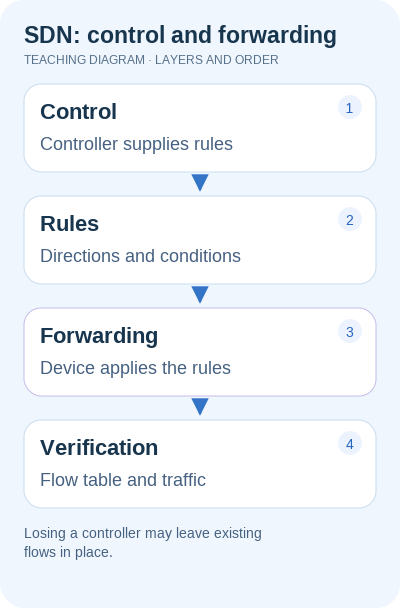
Software-Defined Networking describes approaches to programmable network control. The control plane determines rules; the data plane handles packets under those rules. A controller can program devices through a management interface. OpenFlow is one protocol used for that interaction, not a synonym for all SDN.
Losing a controller does not necessarily stop every packet. Existing flows, expiration, failure mode and local capabilities affect the outcome. Ask what rules remain, who can change them and where to observe their use. A user-traffic capture and a controller log answer different questions.
For the optional extension, use the official Mininet VM after learning to run a virtual machine. Mininet creates a small software network on Linux. It is a lab-management tool, not a read-only routing command; do not run sudo mn blindly on a work computer. Windows and macOS need a suitable Linux environment. The earlier route-reading exercise remains complete without this extension.
Follow the standard Mininet walkthrough first. At its prompt try help, nodes and net, then h1 ip addr and h1 ping -c 2 h2. The first commands show objects and links; the latter run commands from the exercise host. In another terminal inside the same VM, sudo ovs-ofctl dump-flows s1 reads Open vSwitch rules if the example created s1. Controller and version differences affect output. Explain an empty table by examining the actual lab rather than declaring a vulnerability.
Practice. Predict a path before checking it
This is fictional teaching data, not a configuration to install:
Destination       Next hop       Interface
127.0.0.0/8       local          loopback
10.60.20.0/24     tunnel peer    vpn0
0.0.0.0/0        home gateway   wifi0
Application: student may read own document only
Predict the path for 127.0.0.1, 10.60.20.8 and 192.0.2.8, then compare the principle with two real route records. Selecting vpn0 does not grant permission on another person’s document; routing and authorization remain separate decisions.
If you used Mininet, preserve nodes/net output, one h1-to-h2 check and a flow-table snapshot. Before any change, write an expected outcome and recovery method. Finish with exit and the walkthrough’s cleanup instructions. Do not transfer demonstration rules to a home router. Your outcome is an explanation of physical connection, logical segment, packet path and rule ownership using observed evidence.
Primary sources
- SDN terminology and architecture, RFC 7426
- Mininet walkthrough
- Open vSwitch ovs-ofctl
- Microsoft Get-NetRoute
- ip-route manual
Why a service cannot be reached
Change the conditions and observe this training model. It runs in your browser and does not change your computer.
Choose conditions above to see an explanation of the result.
Independent exercise · Russian
В учебном полигоне техникума новую группу виртуальных касс перенесли в отдельный сегмент. Панель управления сообщает об успешной публикации изменений, но дежурный заметил, что один виртуальный коммутатор ещё показывает старую версию таблицы.
Evidence
На учебном шлюзе маршрут 10.18.4.0/24 ведёт через интерфейс касс, 10.18.0.0/16 — через центральный интерфейс, а 0.0.0.0/0 — через внешний. В журнале контроллера в 12:00 опубликована версия 8. В 12:01 коммутатор А подтвердил версию 8, коммутатор Б сообщил о действующей версии 7.
Assignment
Предскажите выбор интерфейса шлюзом для 10.18.4.12 и 10.18.9.12. Затем напишите отдельный критерий приёмки для коммутатора Б. Объясните, какое измерение подтвердит передачу данных после применения новой версии.
Compare your reasoning
Для первого адреса подходит более узкая сеть /24, для второго — /16. На Б следует подтвердить установку версии 8 по его собственной таблице. Затем сравнить счётчики нужного правила до и после одного согласованного учебного обмена и сверить получение на назначении. Публикация контроллером и передача пакета проверяются разными наблюдениями.
Choose what you want to do next
First compare your work with the course exercises. Then try the free introductory module of your next topic and check its prerequisites.
Active Directory fundamentals: domain, LDAP, Kerberos and GPO
A host inventory and permission map
All modules free
Pentest from scratch: penetration testing methodology
An assessment plan with scope and stop conditions
All modules free
C2 traffic analysis and evidence state modelling
Evidence provenance worksheet
Try the free module
Sockets: building and testing a local protocol
Lab frame decoder
Try the free modulePersonal practice environment
Check an excerpt, find matching lines and compute the SHA-256 of the original text. Temporary data expires after 30 minutes or when you close the environment.
Sign in