
Your first Windows file: Explorer, downloads, and NTFS access
Why is control.log in the TXT list?
Show file name extensions in Explorer and read the complete file name. 38s · with narration and captions.
Video transcript
Irina has her own training computer. On day one she must save a note, find it tomorrow, and explain who can change it. We start there before discussing a whole system. Use your own Windows 11 or an isolated Windows VM that you can already sign into. A VM is a computer running inside another computer; installing a hypervisor is outside this lesson. On another person’s device, use an agreed environment. Reading on a Mac is possible, but completing this practice means doing it in Windows.
All eight modules are free. Windows tools are already installed; the first lesson requires no third-party antivirus, paid lab, or terminal. Menus depend on build and language. The main route uses Windows 11; Windows 10 exposes extensions directly on the View tab. Normal Windows 10 support ended on October 14, 2025. Check conditions for a particular edition or extended-support program separately and choose a supported environment for a new lab. Microsoft: file extensions and support notice.
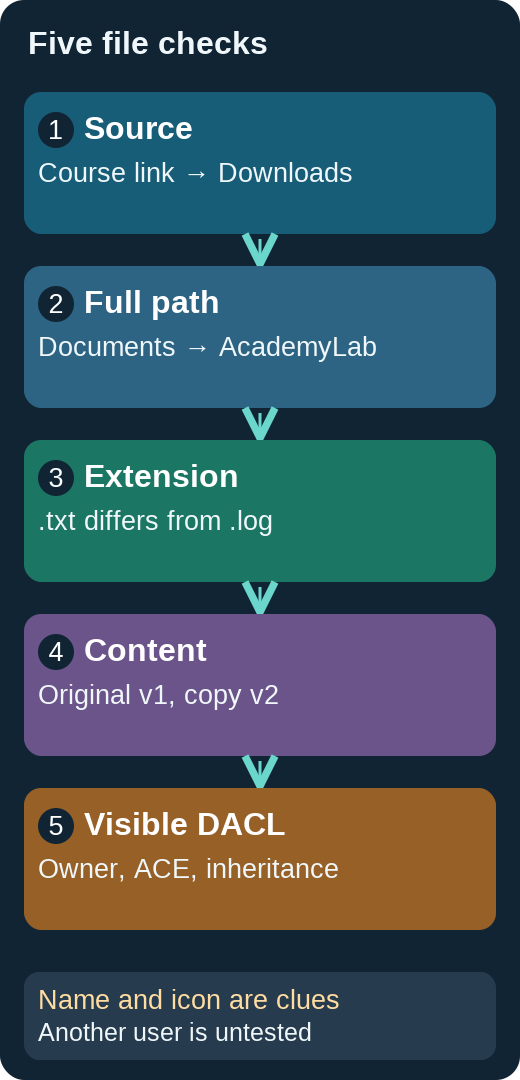
The diagram separates five properties of a file. Its name or icon alone cannot establish origin.
Lesson 1. Learn Explorer and the download location
Press Windows + E; the Windows key normally carries a window symbol. File Explorer opens. Locations are on the left, the address and search fields at the top, and folder contents in the middle. The address answers “where am I?”; search answers “what should I look for here?” Double-clicking a document opens its associated program. Use a single click for selection while learning, to avoid accidental launches.
Explorer mini-practice A: open Documents, click the address bar, and read the complete path. It may lead to OneDrive, another drive, or a redirected folder. Keep the actual path in personal notes; replace the username with learner in public work. Use Back and open Documents again. Mini-practice B: choose View → Show → File name extensions, then View → Details. Find Name, Type, and Size. An extension is the ending after the last dot. bill.pdf.exe ends in .exe; the earlier promise of PDF does not change that. Explorer gate: point to the current address and explain how it differs from search. Microsoft: File Explorer.
Now the browser. Its address bar identifies a page; its downloads view tracks saved files. Open it normally and press Ctrl + L to select the address. Browser mini-practice A: visit the Microsoft page above and identify support.microsoft.com. HTTPS protects a connection, but does not promise that every download is useful. Mini-practice B: right-click our training text file, choose Save link as…, select Downloads, and name it academy-download.txt. This is our harmless text, not a program. If the browser displays the text, return and use the link’s context menu. Ctrl + J normally opens Downloads; choose Show in folder if available. If your version does not list saved links, open Downloads in Explorer and record that limitation. Browser gate: distinguish the page, downloaded file, and its location, and identify this download’s source.
Lesson 2. Create a folder and save text
In Documents choose New → Folder; older menus expose New through the context menu of empty space. Name it AcademyLab and open it. Create Files, Reports, and Restore inside it. Avoid C:\Windows or someone else’s drive root. If AcademyLab already exists, inspect it and choose your own new AcademyLab-2, recording the difference for later lessons. Keep practice separate from personal documents.
Open Start, type Notepad, and launch it. The large area is editable text, File contains save actions, and tabs may hold several documents. Notepad mini-practice A: type Academy training note - version 1. Choose File → Save as…, browse to AcademyLab\Files, and enter note.txt. Select the text-document file type and save. If encoding is offered, select UTF-8. Close the tab and reopen note.txt from Explorer. The text returning from that path shows it was saved; an open editor alone does not.
Mini-practice B: select the file in Explorer, press Ctrl + C then Ctrl + V, and rename the copy with F2 to note-copy.txt. In Notepad change only the copy to Academy training note - version 2, press Ctrl + S, and reopen the original. It should still contain version 1. Ctrl + C copies, Ctrl + X prepares a move, and Ctrl + S saves the current document. Notepad gate: close the editor, locate both files, and demonstrate different contents. If tabs are restored automatically, verify the file at its actual path rather than relying on a restored tab.
Lesson 3. Read Properties and the DACL
Right-click note.txt → Properties. General shows type, location, and size. Read-only is not a replacement for NTFS permissions. Properties mini-practice A: compare Location with the folder address, record this file’s extension and size, and select Cancel. Mini-practice B: Properties → Security, select your entry or an understandable group, and read Allow and Deny. Advanced shows the owner and permission table, including Inherited from. Exit with Cancel without choosing Edit, Disable inheritance, or Add.
NTFS stores a DACL: entries allowing or denying operations to users and groups. One entry is an ACE; a group combines users for assigning rights. Read allows reading, Modify covers broader operations, and Full control also affects managing permissions. Inheritance receives rules from a parent. Ownership, permission to read, and permission to modify are separate properties. Visible entries do not demonstrate another account’s effective access, which depends on groups and the process token. SACL concerns auditing; DACL concerns access. A DACL alone does not automatically create an event. Microsoft: ACLs, DACLs, and SACLs.
If Security is missing, examine location and the drive’s filesystem through Properties in This PC. Do not format the drive. FAT/exFAT does not provide the same NTFS permission set; a network resource also has server and share conditions. Properties gate: separately identify location, owner, and one access entry, or explain why the information is unavailable.
Practice: the note was saved elsewhere
Start after the tool gates. Irina believes she downloaded a note into her lab folder, but the browser saved it in Downloads. Assemble the working set and explain the differences.
- Open Downloads, locate the saved
academy-download.txt, verify its extension, and open it in Notepad. ExpectAcademy download fixtureand training version 1. Its source is known from your own save action. - Copy it into
AcademyLab\Files. Return to Downloads: the original should remain, checking that the action was a copy. - Use Notepad → Save as… to create
control.login Files containingTraining negative control. Select All files. Verify.lograther than.log.txtin Explorer. This is negative input for a later.txtinventory, not an actual Windows event log. - Read Properties of
note.txtand the downloaded copy. Write a card in Notepad asReports\file-card.txt. The following is a form to fill with observations, not a completed result.
Object: Files\note.txt
Observed path: <actual local or redirected folder>
Extension: .txt; content: version 1
Owner / visible ACE / inherited from: <observed or unavailable>
Download: academy-download.txt; source: course link; copied, original kept
Negative input: control.log; confirmed final extension .log
Limit: no second-user test; no network-share access conclusion
If a file “disappears,” check the address, Downloads, and its extension. If downloaded text differs, compare source and time. An Unblock option in Properties need not be changed to read ordinary text. Access denied is not automatically solved by launching as administrator: record the object and consult the environment’s owner.
Submit the card and three own files with anonymized paths. Avoid publishing all Documents. Cleanup: delete only the training download using normal Delete if no longer needed; keep AcademyLab for later lessons. Recycle Bin recovers many locally deleted files but is not a backup. Deleting in a synchronized folder may propagate further. kkostin’s hands-on SMB/NTFS discussion, 2013 gives historical context for access boundaries; we do not repeat its server commands or old interfaces. Next you will identify whose context a program uses to access these files.
Account identity and access rights
Change the conditions and observe this training model. It runs in your browser and does not change your computer.
The example has one ownership rule. Real operating-system access also depends on groups, permissions and ACLs: lists of access rules. This illustrates a principle rather than reproducing Linux or NTFS.
Choose conditions above to see an explanation of the result.
Independent exercise · Russian

В декабре 2026 года сотрудник учебного склада сохранил сводку приёмки и увидел в Проводнике два похожих названия. Для передачи смене требуется текстовый файл из папки «Принято». Группа «Смена» должна иметь право прочитать документ.
Evidence
После включения показа расширений в Загрузках виден рейс.txt.rtf размером 384 байта. В D:\Учебная\Принято лежит рейс.txt размером 48 байт. Его свойства показывают тип «Текстовый документ». В разрешениях NTFS для группы «Смена» указано унаследованное разрешение на чтение.
Assignment
Составьте карточку передачи с полным путём, фактическим расширением, размером и указанным разрешением. Объясните выбор файла. Укажите, как в учебной среде подтвердить чтение под нужной ролью.
Compare your reasoning
Карточка должна указывать D:\Учебная\Принято\рейс.txt, расширение .txt и размер 48 байт. В имени из Загрузок последнее расширение .rtf. Унаследованную запись на чтение фиксируют в карточке. Проверка фактического доступа завершается, когда тестовая учётная запись смены открыла требуемый файл и прочитала его контрольную строку.
Find the file and explain the observation
Three ungraded tasks with open feedback. All lines below are training examples, not captured UI from your computer. Choose an action, then read the explanations.
The control has the wrong ending
Files: note.txt, note-copy.txt, control.log.txt
File name extensions are enabled.
Its final extension is currently .txt, so selection includes it. Fix only your harmless control and verify its name in Explorer.
The icon relates to its associated application and does not change its final extension. The negative input remains .txt.
That removes the positive training data. Fix only the own control, preserving note.txt and its copy.
Review every option
- Save the own control as control.log with All files
Its final extension is currently .txt, so selection includes it. Fix only your harmless control and verify its name in Explorer.
- Change the control icon to a log icon
The icon relates to its associated application and does not change its final extension. The negative input remains .txt.
- Delete every text file
That removes the positive training data. Fix only the own control, preserving note.txt and its copy.
The download is elsewhere
Browser: academy-download.txt saved into Downloads.
Explorer: Documents\AcademyLab\Files does not contain it yet.
Closing an application does not move saved files. Verify location in Explorer.
Ctrl + C and Ctrl + V create a separate copy. The original should remain in Downloads; read text at the known path.
The system folder is unrelated to the download. Work inside your own AcademyLab.
Review every option
- Close the browser and assume it moved
Closing an application does not move saved files. Verify location in Explorer.
- Copy Downloads into Files and inspect both folders
Ctrl + C and Ctrl + V create a separate copy. The original should remain in Downloads; read text at the known path.
- Rename the Windows folder
The system folder is unrelated to the download. Work inside your own AcademyLab.
Permissions visible; another user untested
note.txt: Owner=LAB-PC\learner; an inherited group ACE is visible.
No sign-in under another account was performed.
An ACE describes a rule; actual access by every account was not tested. The claim exceeds observation.
This changes access with possible consequences; it is unnecessary for reading and does not explain the original rule.
The card preserves visible evidence and an honest limit. The next module explains how process tokens and groups participate in access checks.
Review every option
- Claim every user already read the file
An ACE describes a rule; actual access by every account was not tested. The claim exceeds observation.
- Remove inheritance for a prettier card
This changes access with possible consequences; it is unnecessary for reading and does not explain the original rule.
- Record owner, ACE, and limit; next learn groups and tokens
The card preserves visible evidence and an honest limit. The next module explains how process tokens and groups participate in access checks.
Personal practice environment
Check an excerpt, find matching lines and compute the SHA-256 of the original text. Temporary data expires after 30 minutes or when you close the environment.
Sign in