
PowerShell from zero: a bounded inventory and verifiable CSV
Irina can open her note and read permissions. Now she needs a table of three training texts: name, size, and modification time. Manual collection is possible, but choosing the wrong folder is easy. PowerShell names the scope precisely and preserves a repeatable query. The shell works with objects, each file having separate properties. We use existing Windows commands rather than building an analyzer or installing a library.
Continue with AcademyLab\Files and Reports. Files should contain note.txt, note-copy.txt, academy-download.txt, and control.log. If you skipped lesson one, return to it; a long command is premature when you cannot locate its output. Use ordinary Windows PowerShell 5.1, included in Windows. PowerShell 7 is a separate product and is unnecessary. Running another PowerShell on a Mac does not validate Windows ACLs, services, or event logs.
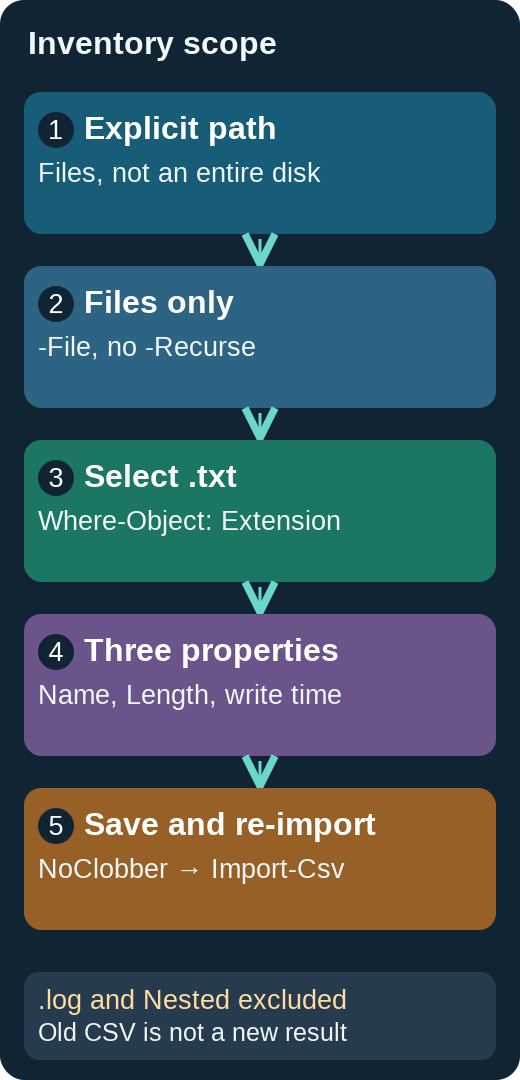
Each stage narrows the request. Formatting the screen and saving data have different jobs.
Lesson 1. Recognize the window and understand the first line
Open Start → Windows PowerShell → ordinary Open. Enter commands after PS ...>, without copying the prompt. Enter executes; Up recalls a previous line without executing it. Ctrl + C interrupts a running command without undoing completed operations. Paste one line at a time and read it before Enter. Avoid a window labeled Administrator.
Mini-practice A: execute these lines. Get-Location reads the current folder. $PSVersionTable.PSVersion reports the shell version: $PSVersionTable is a built-in variable and the dot selects a property. Get-Help reads help for the named command; -Examples requests examples. If complete local help is absent, use the official document below without changing the system through Update-Help.
Get-Location
$PSVersionTable.PSVersion
Get-Help Get-ChildItem -Examples
Compare the current folder with Explorer. Different locations are normal. Mini-practice B: create a path variable. = stores a value and $lab names it. [Environment]::GetFolderPath('MyDocuments') asks the system for the actual Documents location, including redirection. It calls an existing function, not a network service. Join-Path combines a parent and child name. If you chose AcademyLab-2, change that name.
$lab = Join-Path ([Environment]::GetFolderPath('MyDocuments')) 'AcademyLab'
$files = Join-Path $lab 'Files'
$reports = Join-Path $lab 'Reports'
$files
Test-Path -LiteralPath $files
Test-Path -LiteralPath (Join-Path $lab 'deliberately-missing')
Test-Path checks existence. -LiteralPath treats the path literally without interpreting characters such as [ as patterns. Expect True for your folder and False for the deliberately absent one; verify its absence in Explorer first. True does not prove write permission. Shell gate: identify the version, show the calculated path, explain both results, and distinguish reading from report creation.
Lesson 2. Understand objects and selection before export
Get-ChildItem -LiteralPath $files -File reads immediate files. -File excludes folders; without -Recurse, nested files are outside scope. The pipe | sends objects to the next command. Where-Object retains matching objects, braces hold a condition, and $_ is the current object. .Extension reads the extension and -eq compares equality. This is a standard selection method, not a determination of content format or safety.
Select-Object Name,Length,LastWriteTime selects name, size in bytes, and modification time. Time alone does not identify the person who changed a file; clocks and copying affect interpretation. Sort-Object Name orders names for easier comparison. Screen display represents objects. Format-Table prepares human display, so do not put it before Export-Csv, where it would replace file data with formatting objects. Microsoft: PowerShell pipelines.
The ready-made Get-Acl also reads permissions. Practice before applying it: A, read the ACL of note.txt; B, read the Files folder ACL and compare ownership with Advanced Properties from lesson one. Format-List Owner,Access displays those properties as a list, appropriate for reading on screen. These parameters do not modify the DACL. We do not use -Audit, which requests different information and can require additional rights.
Get-Acl -LiteralPath (Join-Path $files 'note.txt') | Format-List Owner,Access
Get-Acl -LiteralPath $files | Format-List Owner,Access
ACL-reading gate: identify the object, connect Owner with ownership and Access with visible ACEs, and state that another user’s effective access has not been tested. If GUI and command differ, first establish they refer to the same path and object. Microsoft: Get-Acl.
Lesson 3. A CSV file does not establish successful collection
Export-Csv writes a table with headers. -NoTypeInformation omits a type-information line, -Encoding UTF8 selects encoding, and -NoClobber prevents replacing an existing file. Windows PowerShell 5.1 normally writes UTF-8 with a BOM; PowerShell 7 has different defaults. We read CSV with the ready-made Import-Csv, instead of guessing delimiters or columns from a screenshot. It turns rows into objects using the headers as property names. Microsoft: Export-Csv.
Read the whole block before the case. It reads Files, then writes one new file in Reports. It neither changes permissions nor runs downloads nor collects all personal documents. If output exists, choose inventory-2.csv in $report; do not add -Force to suppress the failure.
Practice: three texts and two controls
- Check the set in Explorer. If the control is
control.log.txt, fix your own copy so the final extension becomes.log. Create Files\Nested and savenested-note.txtthere withNested training filein Notepad. This is the second scope control. - Repeat assignments to
$lab,$files, and$reportsif the window was closed. Enter the case block using straight quotation marks. A line break after|continues the pipeline.
$rows = Get-ChildItem -LiteralPath $files -File |
  Where-Object { $_.Extension -eq '.txt' } |
  Sort-Object Name |
  Select-Object Name,Length,LastWriteTime
$rows
$report = Join-Path $reports 'inventory.csv'
$rows | Export-Csv -LiteralPath $report -NoTypeInformation -Encoding UTF8 -NoClobber
Import-Csv -LiteralPath $report- Expect three initial rows:
academy-download.txt,note-copy.txt, andnote.txt. The count differs if you added other immediate.txtfiles; explain each extra row. Neithercontrol.lognornested-note.txtshould appear. The latter is excluded by nonrecursive scope rather than extension. - Open CSV in Notepad without saving changes. Compare headers and names with
Import-Csv. If export refused an overwrite, reading an old CSV does not validate a new run. Choose another name and repeat the understood block. - Edit one line only in
note-copy.txt, save, and collect a newinventory-2.csv. Explain why a row’s size or time may change. Your own changes do not justify claiming an attacker modified the file.
“Path not found” calls for checking $files and the folder name. Access denied calls for reading scope permissions and stopping an unauthorized step. If .log appears, check the final name: the rule correctly includes .log.txt. Do not change execution policy. Individual lines here need no .ps1 launch, and policy itself is not a complete security boundary. Microsoft: execution policies.
Submit both CSVs, command text, and Reports\inventory-method.txt: source, time, filter, three properties, both excluded controls, and one limitation. Cleanup: keep the first CSV as a baseline; extra reports may be deleted normally after checking. Keep Nested until the final scope check or remove only that own folder and file. Close the shell. You produced an explainable inventory rather than a whole-device security verdict; next you will examine running processes and services.
What your computer stores
Change the conditions and observe this training model. It runs in your browser and does not change your computer.
A filename is not the whole story. Try revealing its extension.
Choose conditions above to see an explanation of the result.
Independent exercise · Russian
В филиале учебного центра оператор готовит для бухгалтерии список текстовых сводок верхнего уровня. Раньше в отчёт случайно включили прошлую смену из подпапки. Новый отчёт сохраняют отдельно, а результат проверяют по именам и размерам.
Evidence
В D:\Учебная\Смена находятся утро.txt (12 байт), вечер.txt (18 байт), схема.png (44 байта) и папка Архив. Внутри Архива — вчера.txt (25 байт). Отчёт должен содержать колонки Name и Length, суммарный размер учитывается в байтах.
Assignment
Запишите параметры Get-ChildItem для точного пути и нужного типа файлов. Опишите выбор колонок, сохранение CSV в соседнюю папку и проверку отчёта после повторного чтения через Import-Csv.
Compare your reasoning
Используйте -LiteralPath с путём папки, -File и -Filter *.txt. Оставьте обход на одном уровне. Выберите Name и Length и сохраните таблицу через Export-Csv. При повторном чтении с тем же разделителем ожидаются две строки с именами утро.txt и вечер.txt. Числовая сумма Length равна 30. Имена схема.png и вчера.txt служат контрольными исключениями.
Personal practice environment
Check an excerpt, find matching lines and compute the SHA-256 of the original text. Temporary data expires after 30 minutes or when you close the environment.
Sign in