
Windows capstone: working baseline, retest, and next action
Irina no longer collects isolated green indicators. She can explain a saved file, a window’s identity, a service observation, and an actually restored version. The capstone describes your own training station so another person can repeat permitted checks and understand limits. A record helps transfer a station or compare it after change. It does not replace a complete audit or promise absent unknown threats.
Use the same Windows, your Files, Reports, Restore, Recovery, and seven modules’ results. If you only read on a Mac, your honest outcome is a worked example and an unverified-Windows list; an actual station card requires your Windows. Another laptop’s screenshot or invented EVTX cannot fill the gap. Moving artifacts to another VM also requires a new source annotation.
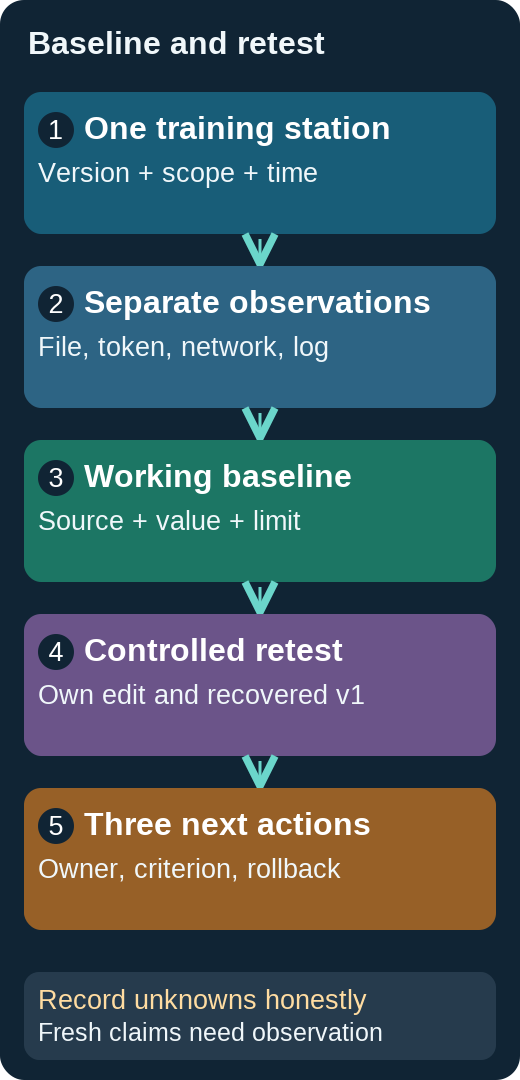
The report joins observation, limit, and action. Change is verified through comparison.
Lesson 1. Read versions and built-in encryption limits
A comparable card needs OS version, edition, and shell version. Open Windows + I → System → About. Device specifications and Windows specifications are separate. Avoid copying the entire screen for publication because device/product identifiers are unnecessary. About mini-practice A: read edition, Windows version, and OS build. Mini-practice B: find system type/architecture and compare with familiar $PSVersionTable.PSVersion. Build, architecture, and PowerShell version are different fields. Gate: identify each source without including identifiers. Microsoft: device information.
Windows provides Device Encryption and BitLocker as built-in storage controls; interfaces and enablement depend on edition, hardware, and management. These OS mechanisms are separate from specialized security products. Protection of locked/offline storage does not replace file permissions or prevent every permitted running process from accessing content.
Learn reading before enabling. Encryption mini-practice A: Windows + I → Privacy & security → Device encryption if present; read state without toggling it. On another supported edition, find Manage BitLocker in Start and read its per-drive table. A missing interface means “not verified,” not “disabled.” Mini-practice B: read the official document, relate edition/conditions to your screen, and note whether an authorized recovery-key storage location is known without opening or copying the key. Gate: distinguish drive state, interface availability, and recovery readiness.
Enabling encryption is a separate change requiring a verified recovery method; we do not perform it here. Never put a key, password, or PIN in the card. An unknown recovery location calls for consulting the owner rather than disabling protection. Microsoft: Device Encryption, BitLocker edition conditions.
Lesson 2. Combine observations with consistent provenance
Start Reports\workstation-card.txt in Notepad. State the purpose “repeatable record of my training station,” owner learner, replacement LAB-PC, start/end, and time zone. Preserve acquisition method for every fact. “Firewall enabled” is weaker than “Security showed the active Public profile enabled at 14:10.” “Backup exists” is weaker than “version 1 restored elsewhere and matched SHA-256; storage shares the source disk.”
Combination mini-practice A: choose two own cards and establish whether they concern the same machine and day. Otherwise mark an older source rather than presenting a simultaneous picture. Mini-practice B: read one row as an outsider and check whether path, filter, time, and command permit repetition. Add a missing parameter. Baseline gate: every row gives source, value, limit, and a next action when needed.
Own-workstation card form:
Scope: own Windows/VM; one device; read state + own-file exercises
Edition / version / build / architecture / shell: <observed values>
Account: <type>; ordinary token: <observed or not verified>
File: Files\note.txt; extension/owner/visible ACE: <redacted>
Inventory: immediate .txt only; .log and nested .txt excluded
Process and service: <own Notepad observation and EventLog snapshot>
Network: <interface/profile; separate DNS/TCP/browser results>
Logs: <log/provider/range/count/export/reopened comparison>
Protection / update / encryption: <visible status + limits>
Restore: <version/location/hash comparison/storage independence>
Unknowns: <at least two bounded limits, not invented status>
Fill it with observations rather than copying an example as an audit. Name the unknown precisely: “Security inaccessible” is clearer than “logs broken.” Exclude original EVTX, complete SIDs, addresses, personal paths, and keys from public copies. Keep source evidence in the lab. If Get Help changed networking, state the actual action and resulting condition; reading an older card is not a retest.
Lesson 3. Choose actions from evidence
For each issue write observation → possible meaning → limit → next test. A pending Windows Update restart calls for scheduling and reading status after sign-in rather than disabling updates. Unverified restoration calls for returning one fixture elsewhere rather than buying another application. DNS success with TCP failure calls for examining that network stage rather than changing every setting.
For a change specify owner, prior state, action, acceptance criterion, and rollback. The reader should know which screen or narrow query to repeat. Priority depends on the station’s purpose and data. Unknown encryption on a laptop holding important portable data deserves investigation; an empty VM has different context. Do not assign every unknown identical severity.
This example is synthetic, not your device’s result:
Training example only:
updates: restart pending; observed today
backup: app installed; selected version and restore test unknown
firewall: active profile enabled
Security log: access denied
encryption: interface unavailable; state unknown
Neither firewall status nor an installed application resolves the other unknowns. Select three checks and expected evidence: fresh update status after an agreed restart, recovered-file hash, and selected drive state from an authorized interface or owner. Denied Security access does not mean absent events.
Practice: controlled change and a new card
- Copy your first
inventory.csvtoReports\baseline-inventory.csvin Explorer, retaining the original. Read it usingImport-Csv -LiteralPathwith the actual path. Expect module three’s method, not the whole disk. If absent, collect a new baseline and identify its start time. - Open only Files\note-copy.txt, append
Capstone: own controlled change, save, close, and reopen. Leave note.txt unchanged. Record time and your exact action. - Repeat module three’s learned pipeline into
Reports\capstone-inventory.csvwith-NoClobber. Compare names, sizes, and times through Notepad/Import-Csv. Your copy’s row should change, but time without the action record would not identify the author. - Negative control: control.log and Nested\nested-note.txt, if retained, remain outside the nonrecursive inventory. Explain count differences caused by your additions. Do not add recursion to manufacture a result.
- Restore your restore-demo.txt version 1 to a fresh separate location as learned in module seven and compare SHA-256 again. Do not replace working version 2. Record today’s retest rather than only the older backup date.
- Repeat accessible Settings/Task Manager/Services/Security/Update and bounded log observations within a close interval. Their screens and fields were taught earlier; reopen normally. Do not collect all Security or a whole disk for report volume.
- Add three next actions, each with owner, expected evidence, and subsequent verification. Mark required rights or hardware as prerequisites.
- Produce Reports\portfolio-summary.txt: six to ten anonymized observations, two limits, one controlled change, and one actually verified restoration. List evidence using relative training paths.
If an existing name blocked CSV creation, reading the old file does not count; use a new name. If the changed row does not differ, check the selected copy and saving. For a mismatched restored hash check version and encoding before system changes. Preserve unavailable fields as limits rather than guesses.
Cleanup: clear the Viewer training filter, close your windows, and normally delete only unnecessary temporary copies. Retain original baseline, final report, and confirmed version 1. For temporary File History/Get Help changes, label completed or still-required restoration without disabling another active backup.
Next, Windows and Active Directory extends identity to domains; SOC extends event selection to rules and hypothesis tests; digital forensics extends artifact preservation and analysis; infrastructure pentesting requires a separate authorized target and deeper prerequisites. Your entry artifact is an understandable own-station record rather than a list of memorized tool names.
What your computer stores
Change the conditions and observe this training model. It runs in your browser and does not change your computer.
A filename is not the whole story. Try revealing its extension.
Choose conditions above to see an explanation of the result.
Independent exercise · Russian
В январе 2027 года на рабочем месте учебной кассы принимают восстановление после замены накопителя. В карточку попали сведения с двух станций. Смена должна определить, какие утверждения относятся к восстанавливаемому узлу КАССА-07, и закрыть только проверенные пункты.
Evidence
На КАССА-07 в 14:05 зафиксированы редакция Windows 11 Pro и требуемая учётная роль. В 14:10 там восстановили отдельную копию шаблона и получили совпадение SHA-256 с эталоном. Фото со статусом защиты BitLocker «Включено» подписано КАССА-08. Исходный файл на КАССА-07 пока не перечитывали.
Assignment
Сведите результаты в акт по КАССА-07. Для каждого незакрытого пункта укажите объект, место проверки и признак успеха. Разведите в акте состояние шифрования тома и сохранность рабочего файла.
Compare your reasoning
Редакция, роль и совпадение восстановленной копии подтверждены для КАССА-07. Для шифрования нужны собственные показания этой станции по нужному тому, включая состояние шифрования и статус защиты. Для сохранности оригинала повторно прочитайте рабочий файл и сравните с его исходным эталоном. Снимок с КАССА-08 относится к другому узлу. В итоговой карточке каждое измерение должно иметь источник и время.
Choose what you want to do next
First compare your work with the course exercises. Then try the free introductory module of your next topic and check its prerequisites.
Explore every path and focused course
Personal practice environment
Check an excerpt, find matching lines and compute the SHA-256 of the original text. Temporary data expires after 30 minutes or when you close the environment.
Sign in